

KEEP CLIENTS, SERVICES AND INVOICES TOGETHER
Clients & Billing
ARN Connect keeps each client's sites, domains and hosting accounts on one client card and bills them with a product list, recurring services and daily draft invoices, plus proforma invoices, quotations and payment reminders in Turkish, English or Arabic.
Clients
Keep each client's sites, domains and hosting together.
Client cards hold contact details, a phone number for WhatsApp, email, address, tax details and the message language. Assign sites, hosting accounts and domains to a client.
- Filter sites and updates by client and prepare client reports.
- The client page shows Services, Billing details, Invoices and Quotations.
- Payment reminders can be switched off per client.
Weekly note. Turn it on per client with a weekday on the client card. On that day, in your time zone, ARN Connect prepares a short summary of the past seven days for each such client with at least one site: availability and short outages, the updates installed and checked, the updates waiting, the latest backup and the points being worked on, in the client's words. The notes wait under Clients → Weekly notes to review, with a counter next to Clients in the menu.
Review and send opens the share dialog in the client's language, where you edit the text and send it by email, WhatsApp or your mail program; Dismiss drops a note. Nothing is sent on its own. See Sharing with Clients
Products
Define what you sell once.
Create products for hosting, domains and extras in Settings → Billing → Products. Each product has a currency, a billing cycle and a VAT rate.
Domain products. One product per extension and currency, such as .com, .net, .sa, .com.sa or .ae. The longest matching extension wins.
Extras. Services such as a monthly mail service.
Currencies. TRY, USD, EUR, SAR and AED.
A product that was used on an invoice is archived instead of deleted.

Recurring Services
Attach each client's services to the dates that drive them.
Set recurring services on the client page, on a hosting account's Billing card or on a domain's Billing card with Bill this domain. Each service has a product, a quantity, an optional own price and dates.
- A hosting service follows the WHM start date.
- A domain service follows the registry expiry date.
- A date changed by hand is kept.
Renewal reminders for services work like domain reminders. See Domains
Automatic Draft Invoices
Let the invoices prepare themselves, and send them yourself.
Every day, services that renew within 7 days are collected into one draft invoice per client, currency and VAT rate. The number of days is adjustable.
- A service period is never invoiced twice.
- Drafts can be edited, and sending is always manual.
- The Overview shows auto-generated drafts; Billing has Generate now, an Auto-generated filter and Coming up for the next 30 days.
- Paying an invoice moves each service on it forward one cycle. A domain waits until the registry shows the renewal.
- The period of a cancelled invoice is invoiced again only with Regenerate.
Proforma Invoices
Track every invoice from draft to paid.
Invoices are numbered ARN-YYYY-NNNN, sequential per year. Create them from a hosting account, from a client or blank.
| Status | Meaning |
|---|---|
| Draft | Editable, not sent |
| Sent | Sent to the client |
| Paid | Paid; cannot be edited or deleted |
| Cancelled | Cancelled; cannot be edited or deleted |
Download the PDF, email it with the PDF attached, share a WhatsApp text or mark it as sent, paid or cancelled. Overdue invoices raise alerts and Billing notifications.
These are proforma documents, not official e-Fatura or e-Arşiv invoices. Nothing is sent to a tax authority.

Invoice Template
Match the invoice to your company, in the client's language.
The template has a live preview in Settings → Billing.
- Languages: Turkish, English or Arabic, with a right-to-left layout and optional Arabic-Indic digits for Arabic.
- Company and tax details, title, accent color, logo, number format, due days, VAT, notes, terms and footer.
- Bank accounts with an IBAN check that catches typing errors before they reach a client; choose which accounts appear.
PDFs are written by the panel itself; no external program is needed.
Quotations
Send an offer and turn it into an invoice in one step.
Quotations use the invoice layout and languages, with the title TEKLİF, QUOTATION or عرض سعر. They are numbered TKL-YYYY-NNNN and have a validity date, 15 days by default.
- Lines come from Products or are written by hand, each with a billing cycle or one-time.
- Status moves from draft to sent to accepted or rejected. A sent quotation expires after its validity date, with a notification a few days before.
- Download the PDF, email it, share a WhatsApp text or Duplicate it.
- Convert to invoice creates the draft invoice and can turn product lines into recurring services linked to a hosting account or domain.
A Pending quotations widget on the Overview keeps open offers visible, and every step is in the quotation's history.

Payment Reminders
Remind clients politely without writing each email.
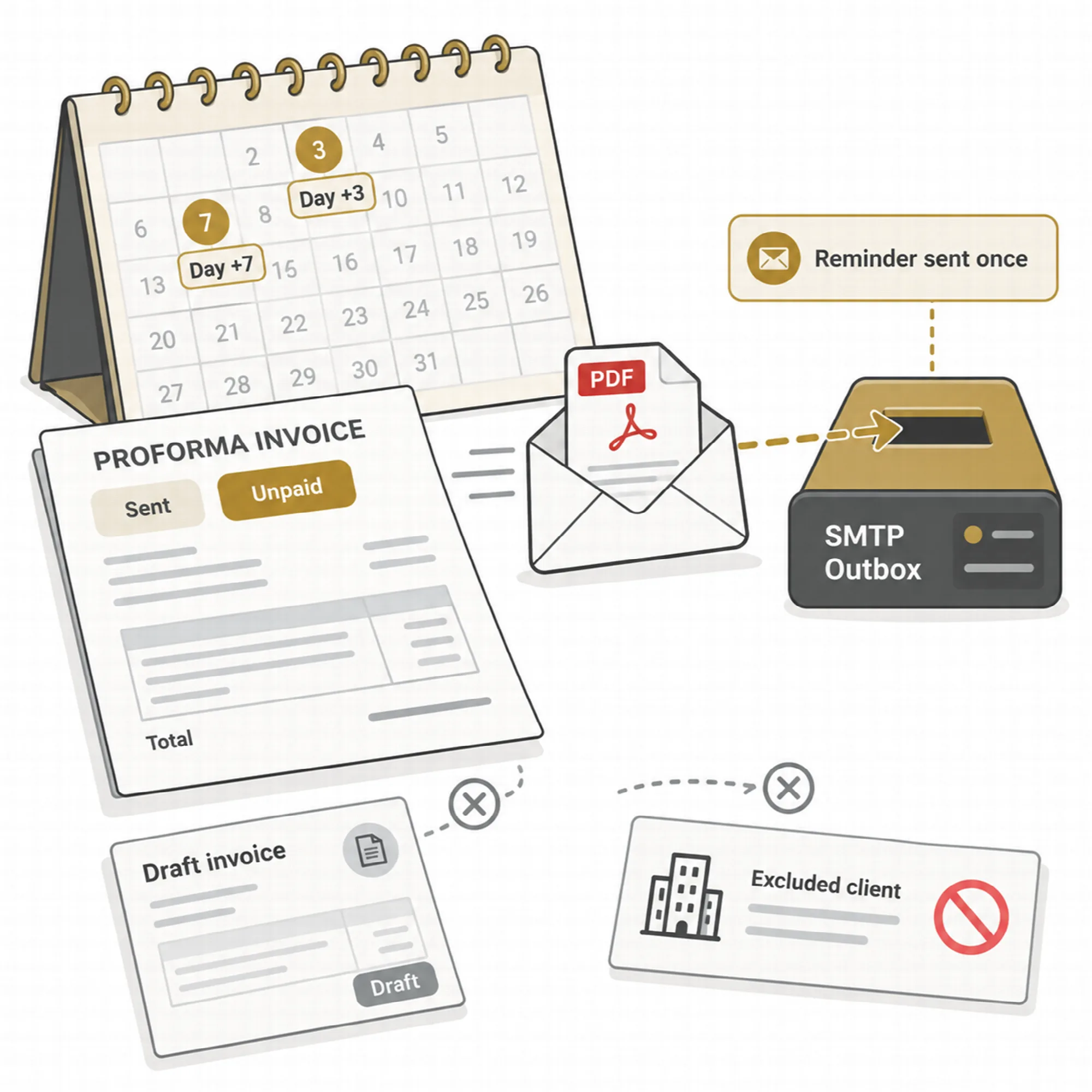
Sent invoices still unpaid 3 and 7 days after the due date get a polite email in the invoice's language, with the PDF and the bank accounts. The days and the on/off switch are in Settings → Billing → Payment reminders.
- Drafts never get reminders, and each reminder is sent only once.
- Old invoices do not get a burst of emails when reminders are turned on.
- A client can be excluded on its Edit form.
- Send reminder on an overdue invoice sends one at once.
Payment reminders need an SMTP mail server. See email delivery
A Practical Billing Month
- Create client cards and assign each client's sites, domains and hosting accounts.
- Create products for your hosting plans, domain extensions and extras.
- Add recurring services from hosting accounts and domains.
- Review the auto-generated drafts on the Overview and edit them if needed.
- Send the invoices and mark them as paid when payment arrives.
- Let payment reminders follow up on overdue invoices.
Questions About Clients & Billing
Are invoices sent automatically?
No. Drafts are created automatically, but sending is always manual. Only payment reminders for sent, overdue invoices are emailed automatically when turned on.
Are these official tax invoices?
No. They are proforma documents. Official e-Fatura or e-Arşiv invoices must be issued with your accounting system.
Which languages can invoices use?
Invoices and quotations can be in Turkish, English or Arabic. Arabic uses a right-to-left layout.
Is WHMCS needed?
No. Clients, products, services, invoices and quotations are managed in ARN Connect, with dates taken from WHM and domain registries.
Continue Your ARN Connect Workflow
Reviewed against ARN Connect 0.12.3 · Last updated 1 November 2026