

BRANDING, GOVERNANCE AND SELF-HOSTED CONTROL
Administration
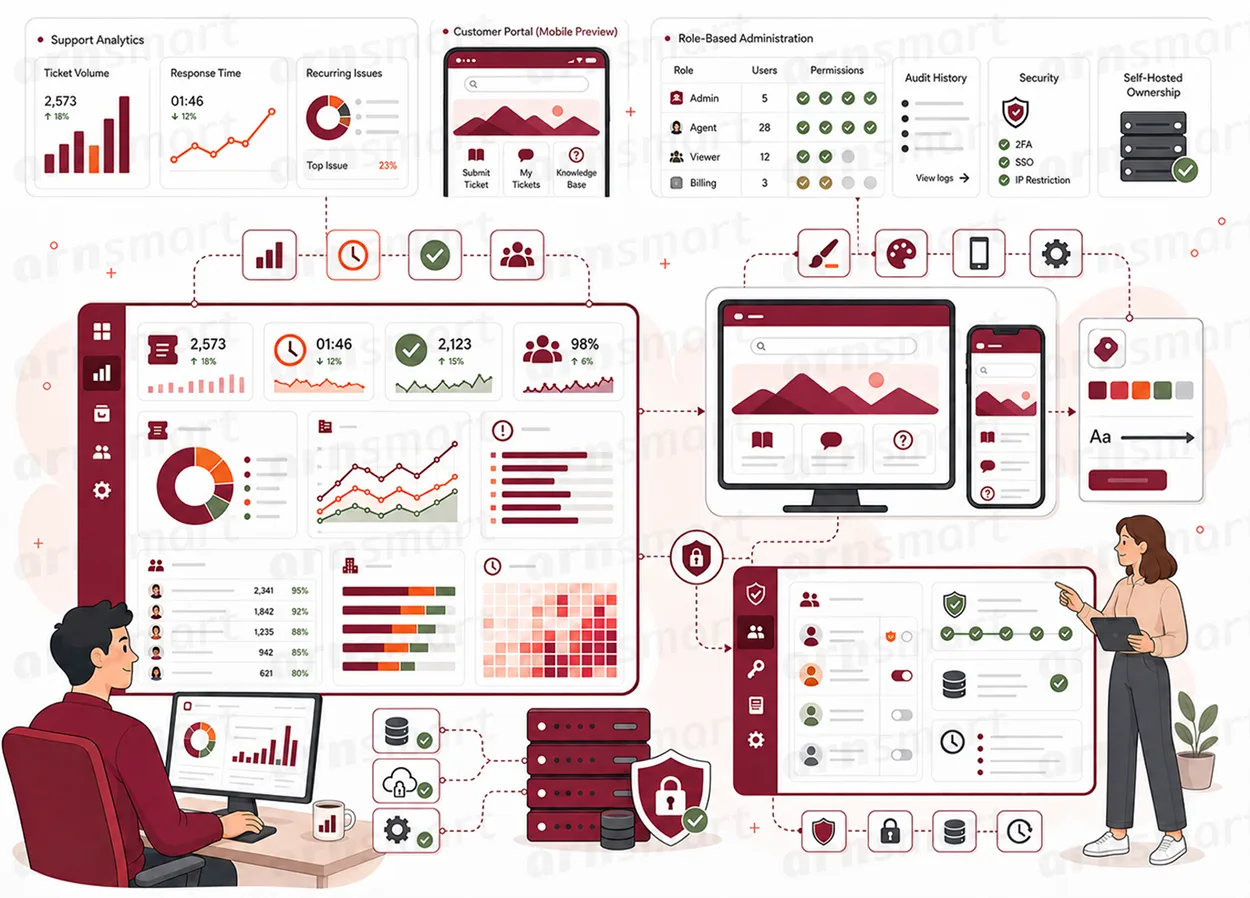
Ticketix administration covers portal branding with your name, logos, color, footer and hero content, English, Turkish and Arabic interfaces, ticket forms with custom fields, agent and customer management with role-based access, and a self-hosted deployment with a scheduled task, license activation, manual updates and diagnostic tools.
Branding
Make the portal look like your organization, not like a vendor.
General Settings set the system name, logos, primary color, footer text and support email. Removing ARN branding leaves a clean footer, so the portal presents only your identity.
System name and company details. The name shown in page titles, the sidebar and emails, plus company name and mail domain.
Portal and admin logos. Separate logos for the customer portal and the agent area, uploaded or linked by URL.
Primary color. One color applied across buttons, links and highlights.
Footer and white label. Your own footer text; "Remove ARN branding" drops the default "Powered by" line.
Support email. The address customers see for support.
Portal Content
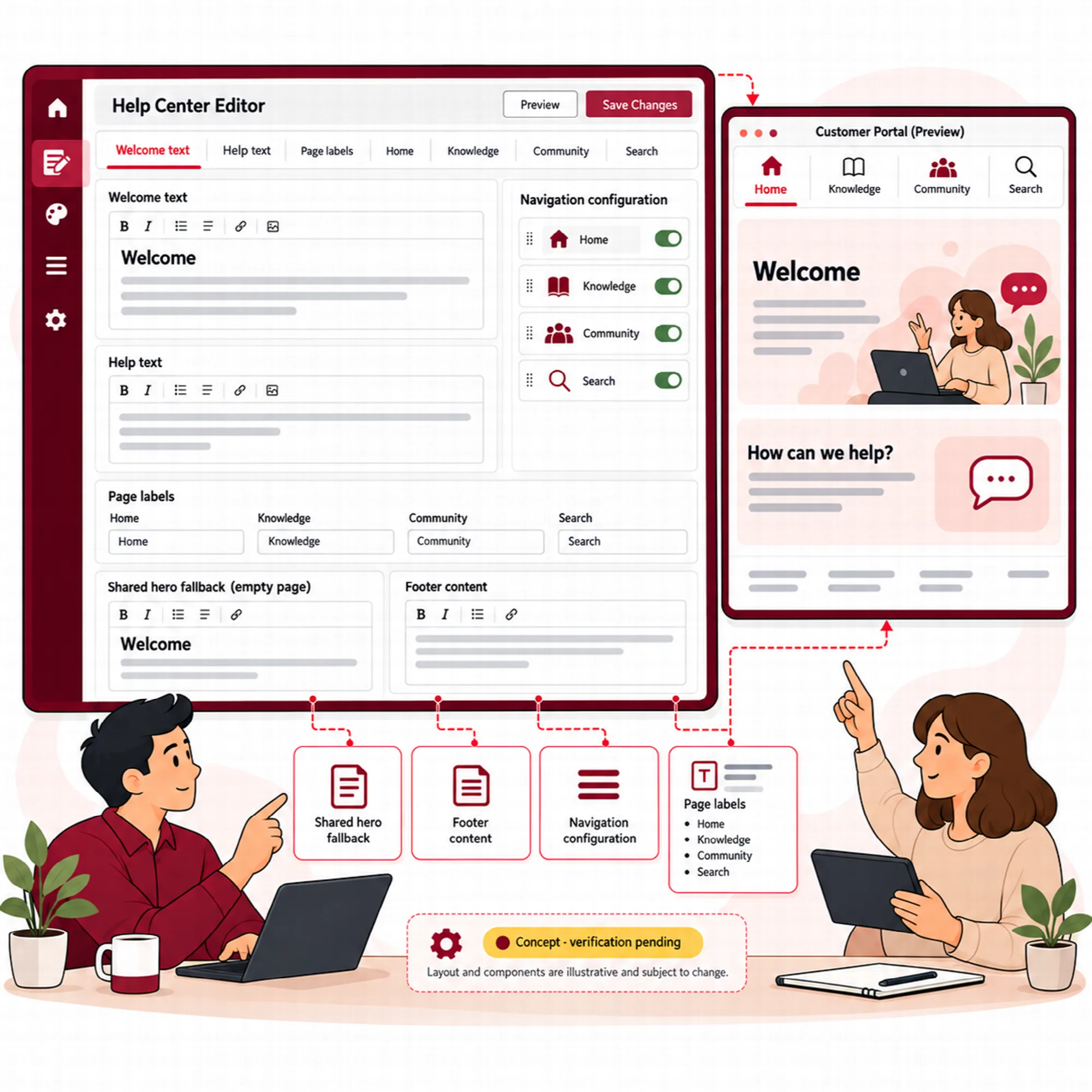
Write the words and links customers see on each portal page.
Each portal page carries its own hero, and an empty page hero falls back to the main hero. The homepage cards and the agent sidebar are edited in the same settings area.
| Element | Where it appears |
|---|---|
| Main hero | The portal homepage and the fallback for every other page. |
| Knowledge hero | The knowledge base landing page. |
| Community hero | The community landing page. |
| Search hero | The search results page. |
| Hero fields | Background image, title, subtitle, button text and button URL. |
| Homepage cards and sidebar links | Label, URL, icon from the built-in icon library, order, description and visibility. |
| Footer | The bottom of every portal page. |
The resulting pages are described in Support Homepage.
Mobile & Responsive Experience
Serve customers and agents on any screen, in their language.
The portal and the agent area use a responsive layout, so menus and tables adapt to small screens. Three interface languages are built in, with right-to-left layout for Arabic.
Responsive layout. Ticket submission, replies, articles and community pages work on a phone.
English, Turkish and Arabic. Users switch the language from the header; Arabic turns the layout right-to-left.
Language settings. Choose the default language and which languages the portal offers.
Translation editor. Override any interface text per language without editing files.
Accessible navigation. A skip-to-content link and keyboard-closable dialogs.
Ticketix runs in the browser; it does not install as an app on the device.
Administrative Workspace
Run the whole platform from one menu.
The agent area opens with a dashboard and a sidebar that the administrator can rearrange. Agents see a shorter menu than administrators.
| Menu item | What it opens |
|---|---|
| Dashboard | Recent tickets, recent replies, mailbox status and links to saved reports and AI. |
| Tickets | The ticket list, views, bulk actions and the New Ticket screen. |
| Support Users | Customer accounts, invitations and customer context. |
| Forms | Custom fields and form templates. |
| Knowledge and Community | Article and community administration. |
| Reporting | Analytics, saved reports and role and department intelligence. |
| Mail queue, background jobs, delivery suppressions and mailboxes. | |
| Settings | General, mail, team, automation, SLA, products, navigation, language, templates and canned replies. |
| Export, Tools, Updates, My Profile | Data export, diagnostics, installed version and personal settings. |
Agents see Dashboard, Tickets, Knowledge, Community, Reporting, Export, Canned Replies and My Profile. In Ticketix 2.0.1, Mail, Tools and the email templates open only for administrators. Mail configuration and diagnostics are described in Mailbox Processing & Diagnostics.
Forms & Custom Fields
Ask for the details each kind of request needs.
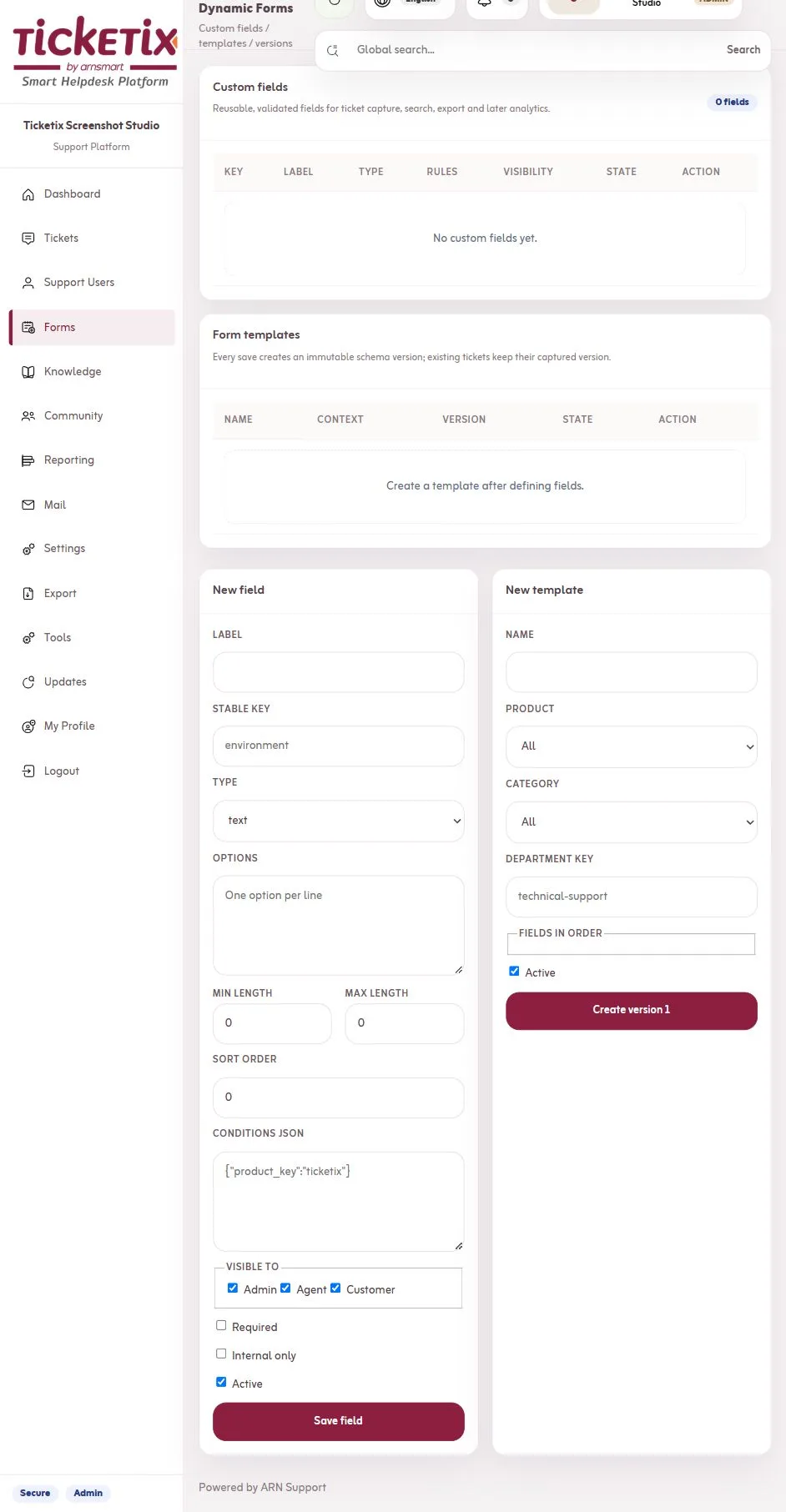
Custom fields add structured questions to ticket forms, and form templates decide which fields appear for a product, category or department. Answers are stored on the ticket.
Field types. Text, text area, number, dropdown, radio, checkbox, date and file.
Rules. Required, minimum and maximum length, options and conditions in JSON that show a field only when another answer matches.
Visibility. Fields visible to customers or internal-only fields that only agents fill in.
Form templates. Versioned templates with an ordered field list, chosen by product, category or department key.
Captured data on the ticket. Agents see and edit the answers on the ticket screen; customers see their submitted details on the portal ticket page.
Guest and portal forms both use the templates; see Guest Tickets & Tracking.
Users, Roles & Security
Decide who can do what, and check every request.
Ticketix separates staff and customers. Staff are Administrators or Agents, and customers sign in only to the portal.
Administrators. Full access to tickets, settings, AI, SLA, automation, forms, mailboxes, the Mail Center, email templates, Tools and the license. Only administrators delete or merge tickets.
Agents. Work on tickets assigned to them, shared with them or sent to them for review, and on knowledge and community. Agents close tickets but cannot delete them, and they add, edit and delete the shared canned replies from Canned Replies in their menu.
Team members. Create agents, set role and status, reset passwords and keep a signature per agent.
Customer management. Filters, products per customer, tags, context fields, internal customer notes, recent activity, duplicate detection with merge, and invitations limited to chosen products that expire after 72 hours by default.
Request protection. Every form carries a CSRF token, sign-in and public forms are rate limited, and passwords are stored hashed.
Audit records. Status changes, rule changes, SLA overrides and other sensitive actions are written to an audit record in the database.
The organization operating Ticketix remains responsible for access permissions, customer-data policies, retention and mailbox security.

Self-Hosted Operations
Keep the platform, its data and its schedule on your own server.
Ticketix is installed on infrastructure your organization controls, with a MySQL or SQLite database and file storage on the same server. One scheduled task runs mail, SLA, automation, report and maintenance work.
| Area | What it covers |
|---|---|
| Requirements | PHP 8.3, 8.4 or 8.5 with PDO MySQL or SQLite, mbstring, OpenSSL, cURL, ZIP, fileinfo and Sodium; HTTPS; Apache rules included, Nginx rules set by the host. |
| Setup | A browser-based setup writes the configuration, including the public address used in email links; subfolder installations are supported. |
| Scheduled task | php scripts/cron.php fetches and sends mail, runs SLA monitoring, delayed and inactivity rules, scheduled reports, knowledge publishing, AI jobs and auto-closing. |
| License | Activation with the ARNA code issued for the product and domain; a temporary license service outage does not lock the platform for up to 24 hours. |
| Updates | Manual: extract the official update package over the installation; the first request runs the one-time database upgrade. The Updates screen shows the installed version and the steps. |
| Tools | Administrators only: health and writable-folder checks, SMTP and IMAP tests, search index rebuild, queue processing, maintenance and cleanup, log viewer and ticket deletion with its files. |
| Health endpoint | health.php reports database, schema and storage status to administrators or to a monitor that sends the health secret. |
| Backup and export | Back up config.php, the storage folder and the database; administrators can export a full support package. |
Ticketix has no in-app update check; updates are applied by hand.

A Practical Administration Workflow
- Set the system name, logos, primary color and footer, and decide whether to remove ARN branding.
- Write the main hero and the knowledge, community and search heroes, then arrange the homepage cards.
- Add products, a form template with the fields each product needs and the first agents.
- Configure the mailbox and confirm that the scheduled task runs on the host.
- Open Tools after the first day and review queue status and logs.
Questions About Administration
Can the portal hide that it runs on Ticketix?
Yes. Set your own system name, logos and footer text and turn on "Remove ARN branding".
What does Ticketix need from the server?
PHP 8.3 or newer with the listed extensions, a MySQL or SQLite database, HTTPS and a scheduled task. Email needs a mailbox with IMAP and SMTP access.
Where is customer data stored?
In the database and the storage folder on the server where Ticketix runs. Text leaves the server only for your mail server and, when you turn AI on, for the AI provider you connect.
Can administrators limit what an agent can do?
Yes. Agents work only on tickets assigned or shared with them, see a shorter menu and cannot change settings, AI, SLA, automation, forms or the license. In Ticketix 2.0.1, the Mail Center, email templates, Tools and ticket deletion are also reserved for administrators.
Continue Your Ticketix Workflow
Reviewed against Ticketix 2.0.1 source code · Last updated 29 October 2026