

SITE-OWNED SHORT LINKS WITH EDITABLE DESTINATIONS
Link Management
Linkix creates short links on your own WordPress domain with automatic or custom aliases, lets you change a destination without changing the public link, and manages every link from one dashboard and from the post editor. Pro adds custom permalinks for posts and pages and canonical references; Multisite support is included in both editions.
Short Links
Give every long address a clean alternative on your own domain.
Linkix creates short links that live on your WordPress site instead of on an external shortening service. A long product URL with tracking parameters becomes a short address such as /s/spring-sale/ that is easy to read, say aloud and print.
Because the link belongs to your domain, it stays available as long as your site does. There is no third-party account to renew and no outside service deciding where your visitors go.
Your domain. Short links use your own site address, so visitors see a name they already trust.
No external shortener. Links are created and resolved inside WordPress; nothing is sent to an outside network.
Active or disabled. Each short link has a status. A disabled short link stops redirecting, and its address returns a "not found" page until you activate it again.
One address per purpose. Create a separate short link for each campaign, channel or printed item so each one can be measured on its own.
Short links are available in Linkix Free and Pro. Linkix manages links within WordPress; it is not a hosted link-shortening network.

Link Aliases
Choose the slug yourself or let Linkix generate one.
Every short link needs an alias, the part after the short link prefix. Linkix generates a random alias when you leave the field empty, or you can type a custom alias that describes the campaign, product or event. If the alias is already in use, Linkix adds a number to keep each address unique.
| Alias type | When it fits |
|---|---|
| Automatic | Links that will be clicked rather than typed, such as buttons in newsletters or social posts |
| Custom | Links that people read, remember or type, such as printed material, spoken promotions and QR cards |
A custom alias is part of the public address, so choose it before the link is shared. The destination behind the alias can change later; the alias itself is what people will keep using.

Editable Destinations
Change where a link points without changing the link.
The destination of a Linkix link can be edited at any time, and the public short link stays the same. Every copy of the link that is already in circulation follows the new destination on the next click.
This matters most for links you cannot easily replace:
- Printed flyers, packaging and signage.
- QR codes, because each QR code points to the short link rather than to the final page.
- Social profile links and older posts.
- Email campaigns that have already been sent.
Short links for posts and pages. A short link created from the post editor belongs to that post. While the post is published, the short link follows the post's current address, so a changed slug does not break it.
When a landing page moves, a product sells out or a campaign ends, edit the destination once. Short links always answer with a temporary (302) redirect, so browsers do not keep an old destination; see Redirect Types.

Link Dashboard
Manage every link from one screen inside WordPress.
All Linkix links are managed from the Linkix menu in the WordPress admin area. The Dashboard shows totals such as links, redirects and QR codes, the latest short links and quick actions for the next step. The Short Links screen lists every short link with its slug, destination, hits and status, and a search box finds a link by slug or destination.
One place for every link. Campaign links, profile links and printed-material links sit in the same list, so nothing is forgotten in a spreadsheet.
Linkix URL Panel in the post editor. Create a short link for the post you are editing, copy or open it, generate a new one and see its QR code without leaving the editor. The panel's Smart URL Advisor suggests a readable path and rates the readability of the current address and how well it matches the title.
WordPress access. The Linkix screens are open to administrators and use your existing WordPress login; there is no separate account to maintain.
Connected actions. QR codes and click data belong to the short link, so related work starts from the same screen.
Module control. Settings → General lets you switch off the Linkix parts you do not use, such as Redirects or Bio Pages; their screens then leave the Linkix menu.

Short Link Prefix
Decide which path your short links share.
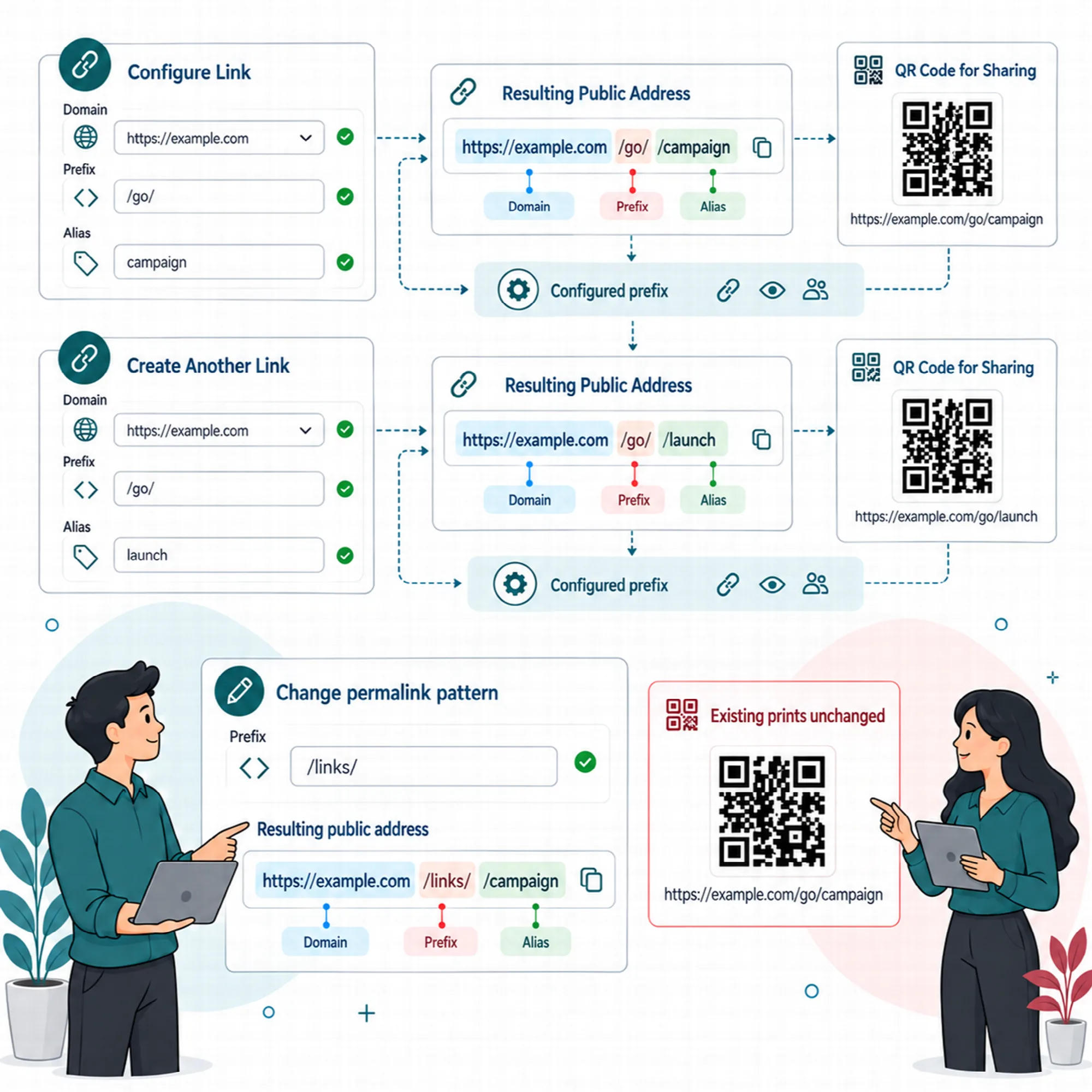
Every short link uses one prefix between your domain and the alias. The default prefix is s, so a link looks like example.com/s/spring-sale/. Change it in Settings → General to a word that fits your site, such as go.
Set the prefix before links are distributed. Changing it later changes every public short link address, and links already printed with the old prefix stop working. After changing it, save the settings (in Pro, save the WordPress permalinks once) so the rewrite rules refresh.
The short link prefix is available in Linkix Free and Pro.
Custom Permalinks Pro
Give a post or page the address you choose.
Linkix Pro lets you replace the address of a post or page with a custom path, for example /summer-sale/ or /knowledge/sample-post/. Set the path in the Linkix URL Panel of the post editor, or map an object to a path on the Permalinks screen with an optional canonical URL.
Conflict check. A custom path that is already used by another object is refused, so two pages do not compete for the same address.
Works with menus and lists. Post lists and menus link to the custom address, and one-segment paths open their post with the /%postname%/ permalink structure.
Reset at any time. Resetting returns the post to its WordPress address, and that address no longer redirects to the old custom path.
Only published posts answer. From Linkix Pro 2.0.1, the custom path of a draft, a trashed post or a deleted post returns "not found" instead of the front page. A trashed post keeps its path for when it is restored; a permanently deleted post releases it, so another post can use it.
Custom permalinks require Linkix Pro. Linkix Free keeps the WordPress permalink of each post.

Canonical References Pro
Point search engines to one main address.
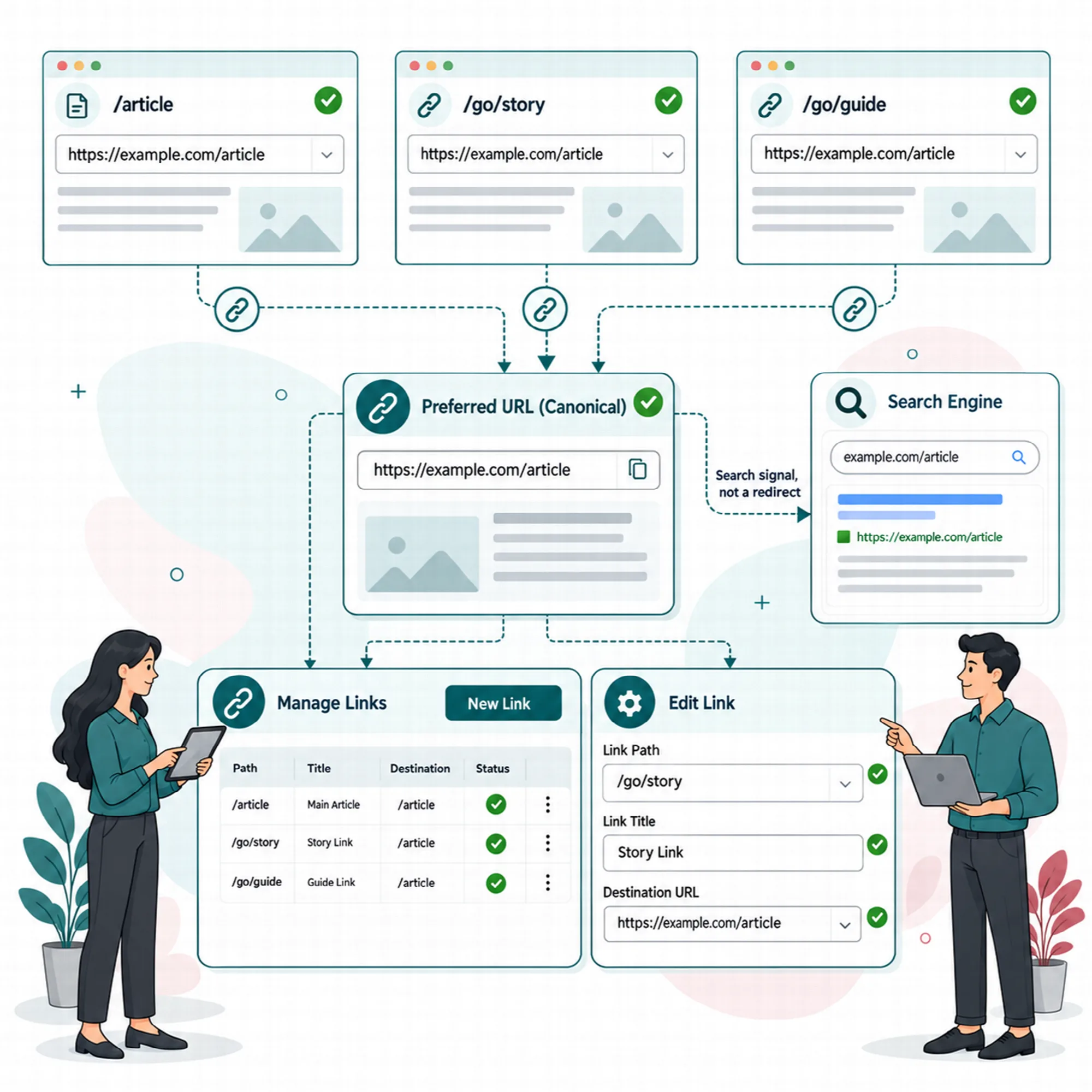
A canonical reference tells search engines which URL is the primary version of a page when several addresses lead to the same content. Linkix Pro adds a canonical tag to single posts and pages that points to the primary address, which is the custom permalink when one is set.
Short links and redirect sources are never canonical. They route traffic but do not become the address you ask search engines to index.
Tracking parameters removed. Marketing parameters such as utm_source, gclid or fbclid are left out of the canonical address; functional parameters such as page, lang or sort can be kept. Unknown parameters are kept or removed according to your policy.
Old addresses redirected. Requests for a post's legacy address can be redirected to the primary address.
Short link parameters. The short link parameter policy decides whether a visitor's query parameters are passed through to the destination or ignored; the destination's host never changes.
The Canonical screen shows the current policy and a live parameter example; the rules are set in Settings → Routing & canonical. Canonical references require Linkix Pro. How search engines use the signal is decided by the search engine, not by the plugin.
Multisite Support
Run Linkix across a WordPress network with settings per site.
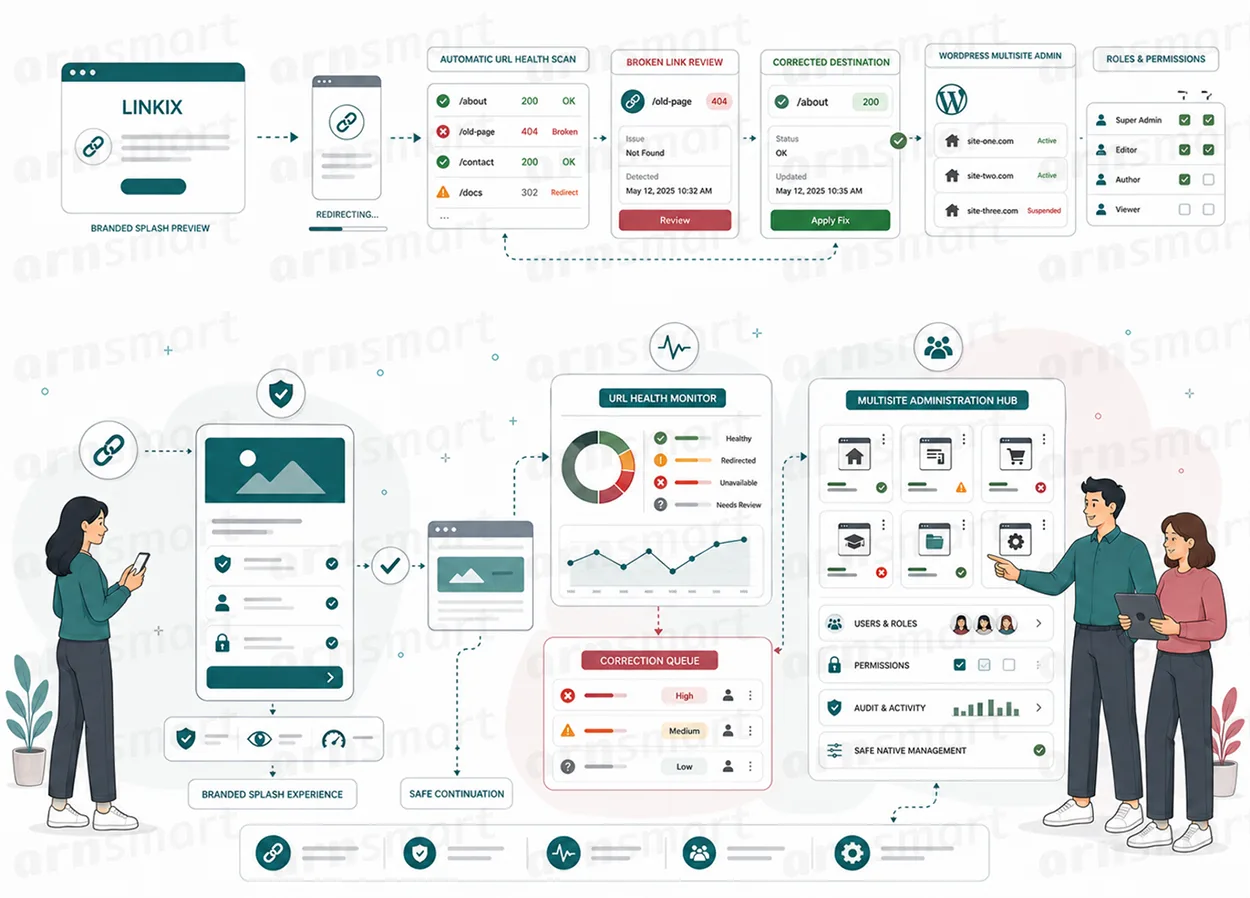
Linkix runs on WordPress Multisite, the mode in which one WordPress installation serves several sites. Each site in the network keeps its own links, redirects and Linkix settings, so one site's link setup does not change another's.
This suits agencies that manage client sites from one network and organizations that run separate sites for regions, brands or departments. Network activation prepares the Linkix tables on every site in small batches, and new sites get them when they are created.
Multisite support is included in Linkix Free and Pro. In Pro, one network licence covers the whole network; only network administrators manage it.
A Practical Link Management Workflow
- Pick one page you already promote through several channels.
- Set the short link prefix once, before any link is shared.
- Create a short link with a custom alias that people can read and remember.
- Share the short link and its QR code instead of the long address.
- When the page moves or the offer changes, edit the destination once.
- Review the dashboard regularly and disable links you no longer need.
Questions About Link Management
Do I need an external shortening service?
No. Linkix creates and resolves short links on your own WordPress domain. Nothing is sent to an outside shortening network.
What happens to links that are already shared when I change the destination?
They keep working. The public short link does not change, so every existing copy follows the new destination on the next click.
Can I choose my own alias?
Yes. Enter a custom alias when you create the link, or leave it empty and Linkix generates one. The prefix in front of the alias is set once for the site.
Can I change the address of a post itself?
Yes, with Linkix Pro. Custom permalinks give a post or page the path you choose, and the canonical tag points to that address.
Does every site in a Multisite network share the same settings?
No. Linkix supports WordPress Multisite with settings per site, so each site keeps its own configuration.
Continue Your Linkix Workflow
Reviewed against Linkix Pro 2.0.1 and Free 1.1.1 · Last updated 29 October 2026