

ROUTING RULES AND DESTINATION HEALTH
Redirects
Linkix sends visitors from an old or chosen path on your WordPress site to a new destination with redirect rules, and reviews the addresses of your posts and pages with URL Health. Linkix Pro adds device, scheduled and rotating redirects, Smart App Links that open native apps, and a Broken Link Check for redirect targets.
Redirect Types
Tell browsers and search engines whether a move is permanent or temporary.
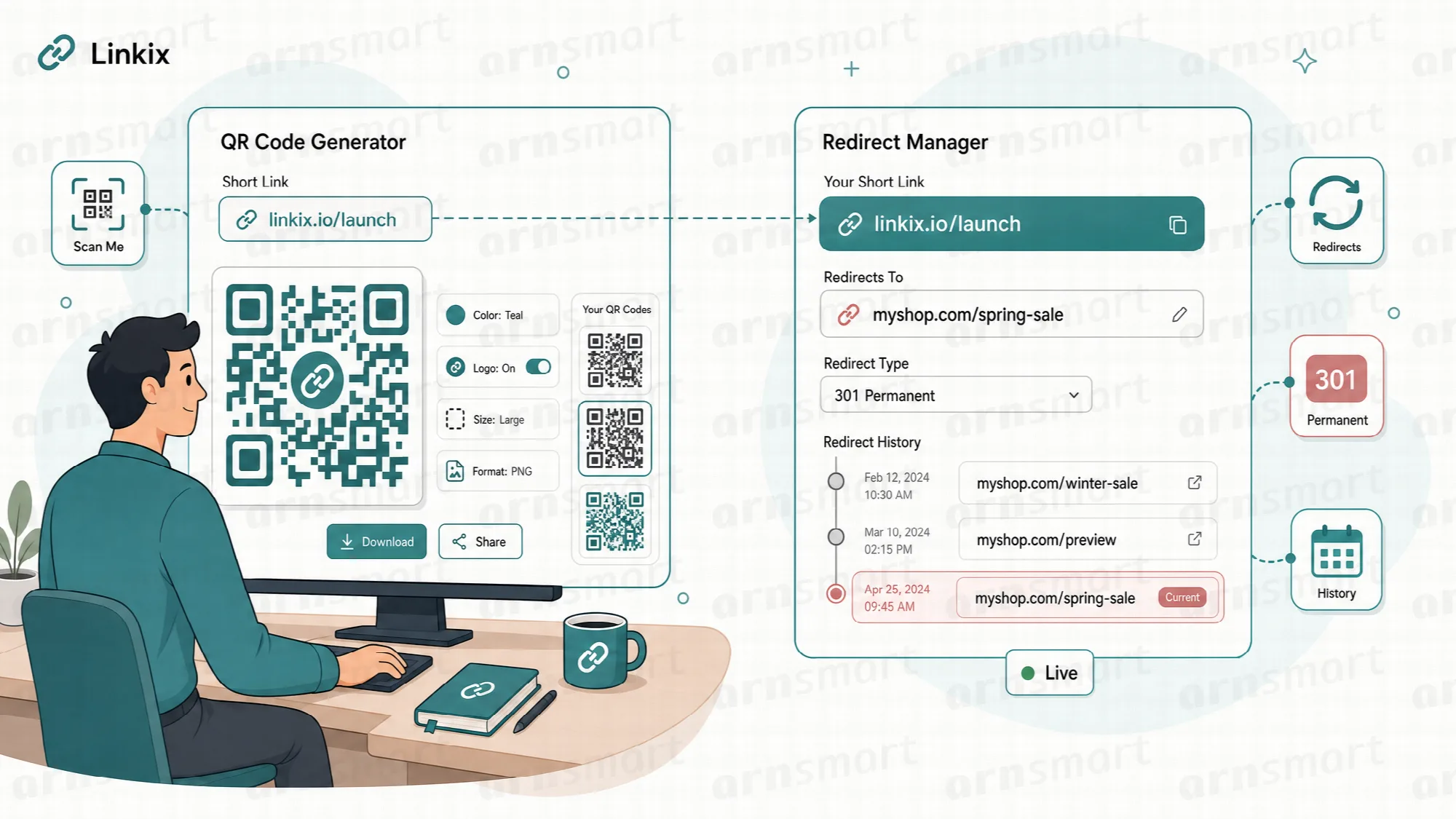
A redirect rule on the Redirects screen connects a source path on your site, such as /old-offer/, to a target URL. A 301 says the content has moved permanently; a 302 says the move is temporary and the old address remains the one to keep using.
| Type | Meaning | Typical use |
|---|---|---|
| 301 | Permanent redirect | A page that has moved for good, such as the old address of a deleted or renamed page |
| 302 | Temporary redirect | Campaign paths, rotating offers and any destination you expect to change |
Redirect rules also work when WordPress has no page at the source path, so the old address of a deleted page can still lead somewhere useful. Every redirect hit is counted on the rule and in Analytics. Requests for /favicon.ico and /robots.txt are left to WordPress and are not checked against redirect rules (Linkix Pro 2.0.1 and Free 1.1.1).
Short links are always temporary. Short links answer with a 302, so browsers do not remember an old destination after you edit it.
Edition note. Linkix Pro and Linkix Free 1.1.1 and later apply the 301 or 302 type you choose for each rule and accept targets on any website. Linkix Free 1.1.0 and earlier answer every redirect rule with a permanent 301 and only to addresses on your own site. With Linkix Pro 2.0.1 and Free 1.1.1, a rule keeps its 301 or 302 type when the site moves between the two editions.
Browsers and search engines may cache a 301 redirect, so 302 is the safer choice for destinations that will move again.
Destination Safety Checks
Stop a link from being saved with a destination that will not work.
Linkix checks every destination before it is saved and again before a visitor is sent there. A destination that is not a valid web address, or that does not use http or https, is rejected instead of being saved as a dead link.
Malformed addresses. A target that cannot be read as a valid URL is refused with a message on the screen.
Web addresses only. Only http and https destinations are accepted, so a short link on your domain does not forward visitors to other kinds of addresses.
Checked on save and on use. The editor sees the problem when saving. If a stored destination is no longer valid, a redirect rule does not redirect and a short link answers "not found" instead of sending the visitor elsewhere.
Bio page clicks stay on saved links. A click on a bio page goes only to one of the buttons or social links saved on that page; any other address in the link is ignored.
Destination safety checks are part of Linkix Free and Pro. Pro also checks that a scheduled rule has a valid fallback URL and that a rotation has at least one valid address.

Device Redirects Pro
Send phones, iPhones, Android devices and desktops to the destination that fits them.
Linkix Pro can route a redirect rule by device. One source path can send iPhone visitors to an App Store page, Android visitors to Google Play, other phones to a mobile page and desktop visitors to the default target URL.
- Keep one public path and one QR code for every channel.
- Set a Mobile, iOS and Android URL; the default target URL serves desktops.
- An empty device field falls back to the next fitting address: iOS and Android to Mobile, Mobile to the default target.
Device routing can be combined with a schedule. Device detection relies on the information the visitor's browser sends, so results depend on that information being available. Device redirects require Linkix Pro.

Scheduled Redirects Pro
Let a redirect take effect when the campaign starts.
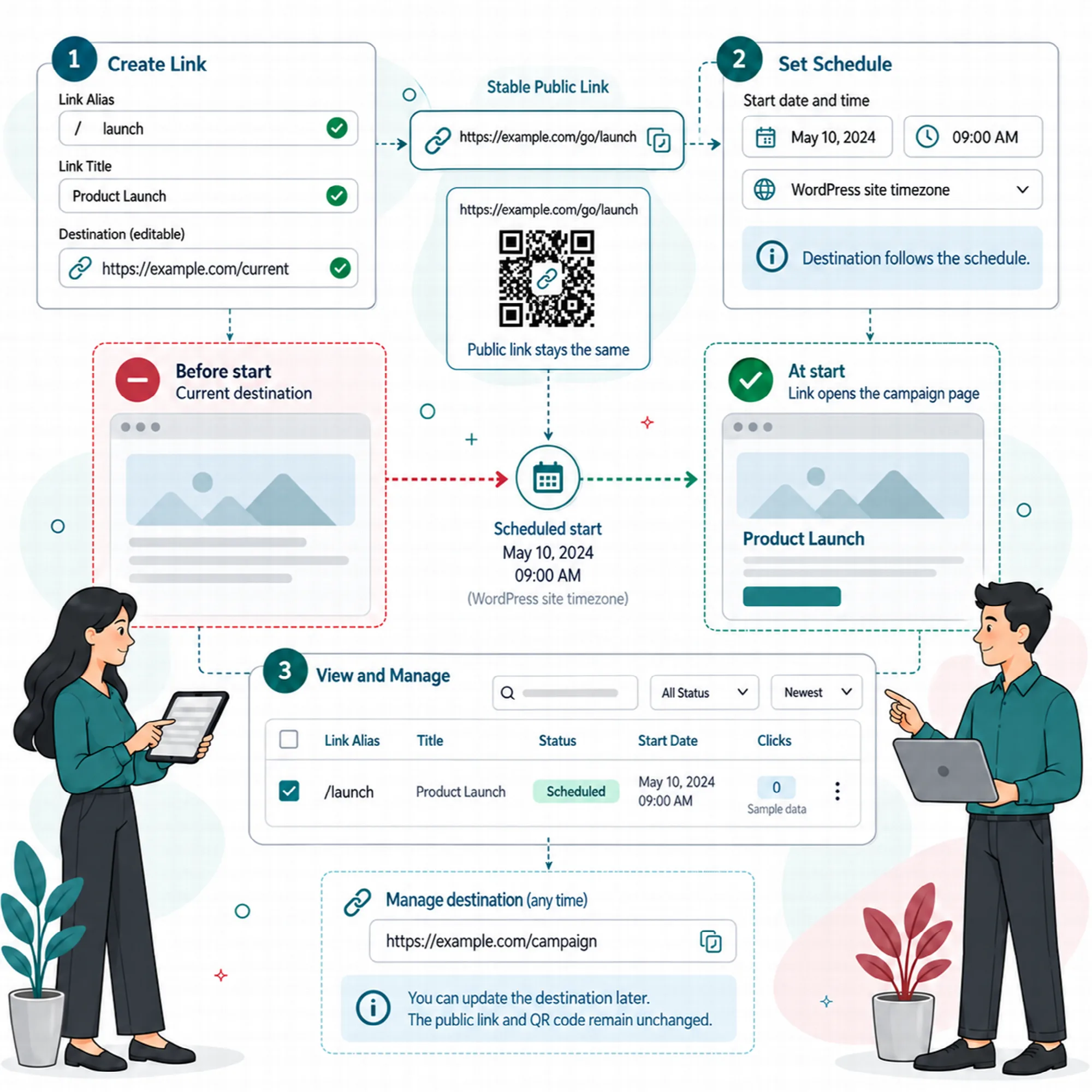
Linkix Pro lets you give a redirect rule a start date, an end date or both, and a fallback URL. Inside the time window visitors go to the target; before it starts and after it ends they go to the fallback URL.
Scheduling is useful for printed material prepared before a launch, embargoed announcements, and seasonal offers that return every year with a different landing page. The short path and QR code can be distributed early; the destination follows the schedule.
A schedule can be combined with device routing or with rotation. Scheduled redirects require Linkix Pro.
Destination Rotation Pro
Share one link that leads to several destinations.
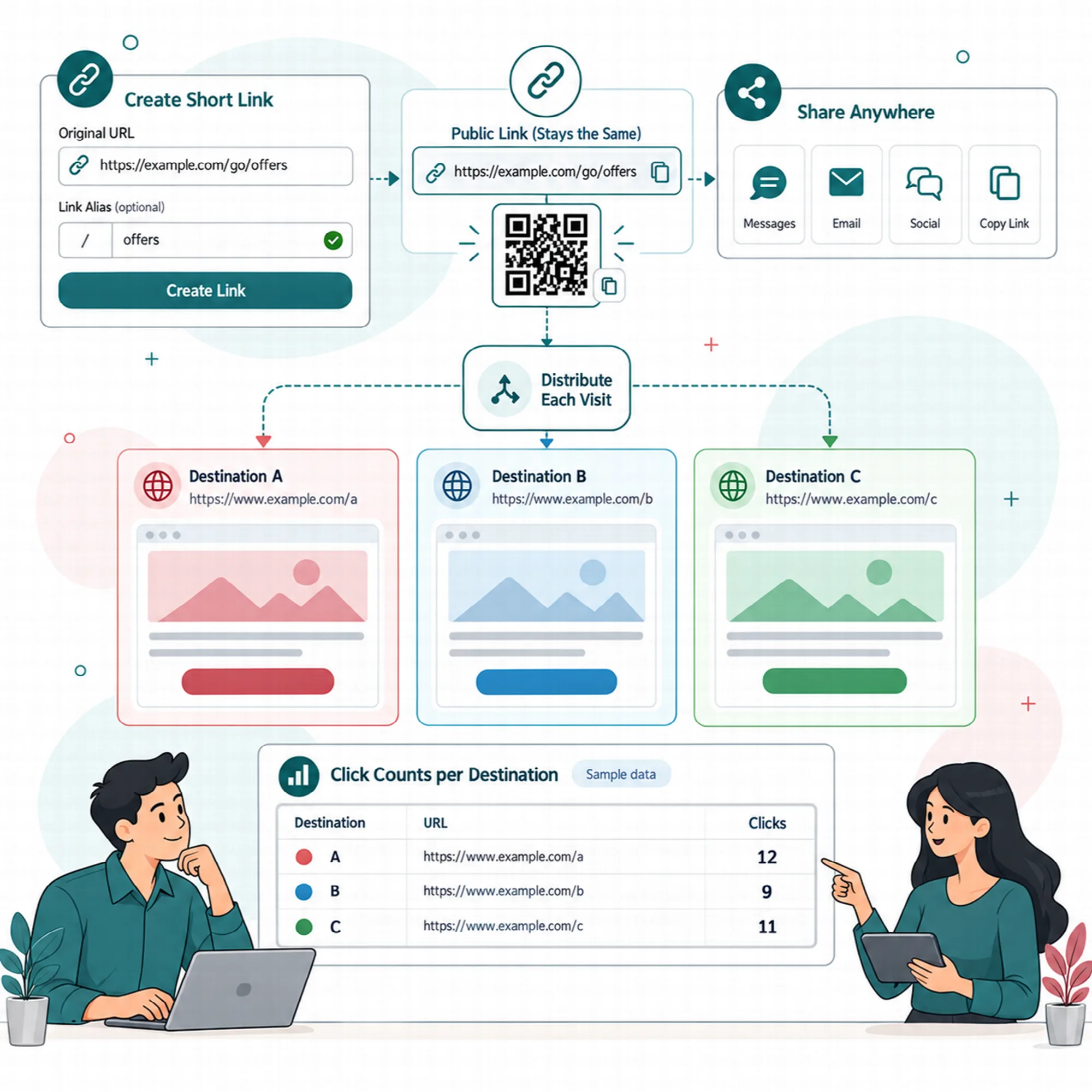
Linkix Pro can rotate between several destinations behind a single redirect rule. Add one URL per line and choose how visitors are spread across them.
| Rotation mode | What happens |
|---|---|
| Round Robin | Each visit goes to the next URL in the list, in order |
| Random | Each visit goes to a URL picked at random from the list |
Several landing pages. Compare how different pages perform from the same promotion, as in a simple A/B split.
Several offers. Spread visitors across stores, partner pages or affiliate destinations.
One public address. Keep the printed link and QR code unchanged while the rotation changes behind it.
Rotation can be combined with a schedule but not with device routing. Rotation requires Linkix Pro.
App-Link Presets Pro
Open the right native app from a single link.
Linkix Pro includes Smart App Links: links that try to open an app on the visitor's phone and fall back to the web version when the app is not available. Choose a preset, enter only the minimum details, such as a username or phone number, and Linkix builds the app and web targets.
| Presets | What you enter |
|---|---|
| Instagram, TikTok, X, Snapchat, Telegram | A username or handle |
| Facebook, LinkedIn, YouTube | A page slug, handle or the full URL |
| WhatsApp, Phone | A phone number in international format, with an optional WhatsApp message |
| Messenger, Spotify | The full Messenger or Spotify URL |
| Google Maps | A place name, an address or a Google Maps URL |
| An email address and an optional subject | |
| Custom | Your own web, iOS, Android, desktop and fallback URLs |
Each Smart App Link gets its own address under /app/ by default, a QR code, a click count and a [linkix_smart_app] shortcode that shows the link with its app icon in Brand, White, Black or a custom color.
Smart App Links require Linkix Pro. Whether the app opens depends on the app being installed and on the visitor's device.
Destination Health
Find broken destinations and risky addresses before visitors do.
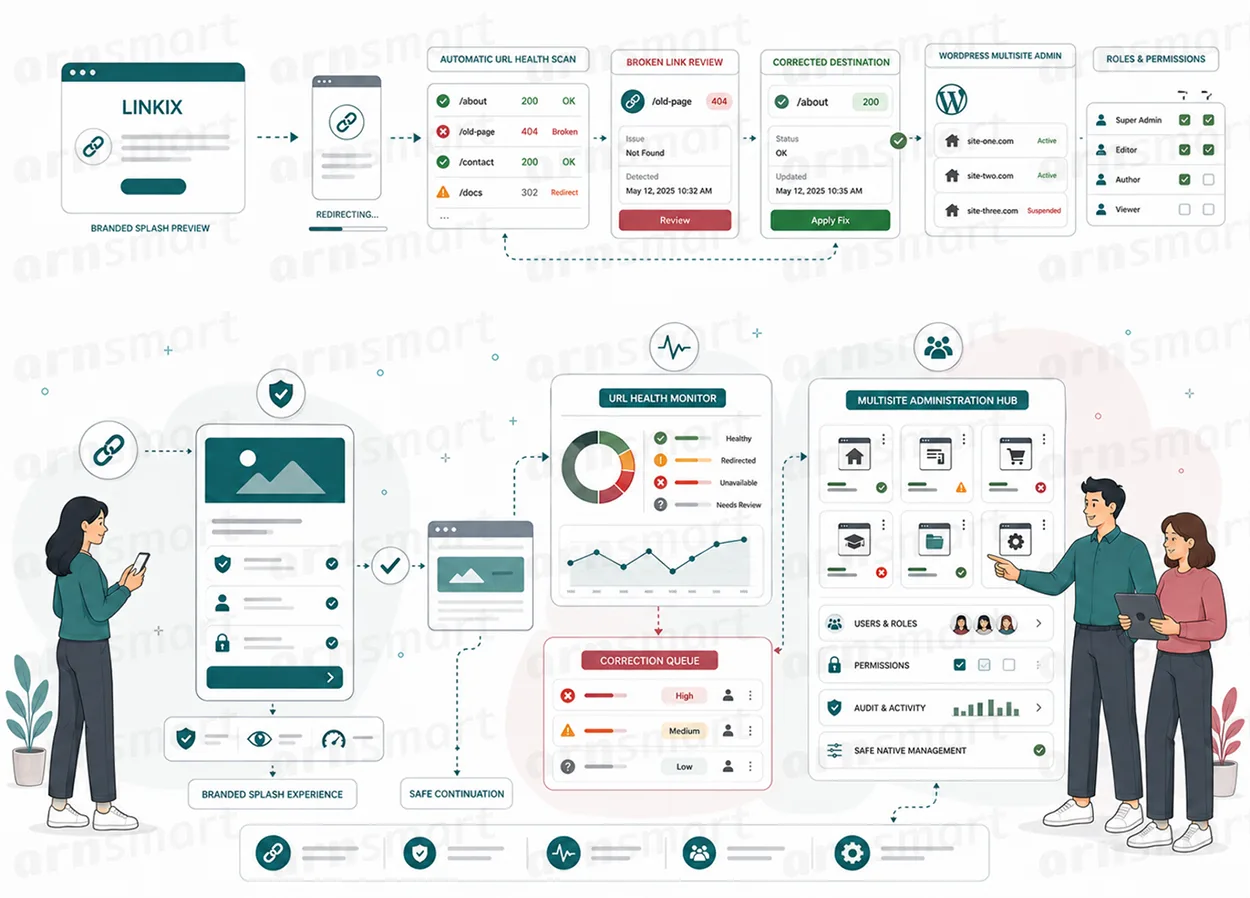
Linkix includes two checks that run in the background in short steps (WP-Cron), so large sites are not scanned in one long admin request. The screen shows progress while a scan runs.
URL Health. Reviews the addresses of up to 500 posts and pages for routing conflicts, duplicate candidates, readability, length and how well the address matches the title, and marks each one with a risk level. URL Health is part of Linkix Free and Pro.
Broken Link Check (Pro). Requests every target of the 200 most recent redirect rules, including device, fallback and rotation addresses, with a 5-second timeout, and lists each one as Healthy, Redirecting, Broken or Issue with a suggested action.
Fix without replacing. Because destinations are editable, a flagged target is corrected by changing the destination; the public address and QR code stay in use.
Health checks depend on the destination server responding to requests from your site. A destination that blocks automated requests may appear as problematic even when it loads in a browser. If WP-Cron is disabled, a server cron job must call it for scans to continue.
A Practical Redirect Workflow
- Create a redirect rule for the path you want to move, and choose 302 while the destination is still likely to change.
- Check that the target is accepted when you save the rule.
- In Pro, add device URLs or a Smart App Link if phone visitors need a different target.
- In Pro, schedule the destination for launch day, or set up rotation between several pages.
- Share the path and its QR code, then watch hits in Analytics.
- Run URL Health, and in Pro the Broken Link Check, and correct flagged targets.
Questions About Redirects
Should I use a 301 or a 302 redirect for a campaign link?
Use 302 for links whose destination may change, such as campaigns and rotating offers. Use 301 only when the destination is final, because browsers and search engines may cache a permanent redirect. Short links always use 302.
Does Linkix check whether a destination is still working?
Yes, in Linkix Pro. The Broken Link Check requests redirect targets and marks broken ones. Both editions include URL Health, which reviews the addresses of your posts and pages.
Can one link send phone and desktop visitors to different pages?
Yes, with Linkix Pro. Device redirects send iOS, Android, other mobile and desktop visitors to different targets, and Smart App Links try to open a native app on phones.
What happens if I enter an address that is not valid?
Linkix refuses to save it and shows a message. Only valid http and https destinations are accepted.
Can I redirect the address of a page I deleted?
Yes. Redirect rules also work for paths where WordPress no longer has a page.
Continue Your Linkix Workflow
Reviewed against Linkix Pro 2.0.1 and Free 1.1.1 · Last updated 29 October 2026