

MAKE SIGN-INS AND ACCOUNT ACCESS DELIBERATE
Account & Access Security
SiteWatch Account & Access Security combines login failure limits, Authenticator or Browser Verification sign-in policies, session and account review and pending-account approval for supported WordPress login paths.
Login Protection
Limit repeated failures with account and source context.
Configure account-based and observed-source failure budgets. Known username/email aliases share the supported account counter, while source-level failures remain a separate signal.
Restrictions use bounded expiry windows. A successful login clears the account's failure counter without erasing source-level failure history.
Review shared networks and proxy configuration before enforcement. Source budgets can affect more than one legitimate visitor, and recovery access matters when the policy becomes too restrictive.
Two-Factor
Choose the verification method the site can support.
The sign-in policy offers Authenticator, Browser Verification or Both. Both combines the authenticator requirement with an email challenge for an untrusted browser.
Turn the policy on or off and choose the method in Access Security → Two-Factor Authentication. Turning it off keeps enrolled authenticators and the last selected method, so the policy can be switched back on without a new enrollment.
Sites with the earlier setup. On sites that still use the earlier role and personal authenticator policies, the form from SiteWatch 2.0.1 opens with sign-in verification on, the roles of enrolled accounts selected and Authenticator (or Both, when an earlier browser rule exists) as the method, so saving it unchanged keeps asking those accounts for their code. When accounts in the selected roles have not enrolled yet, the form says how many.
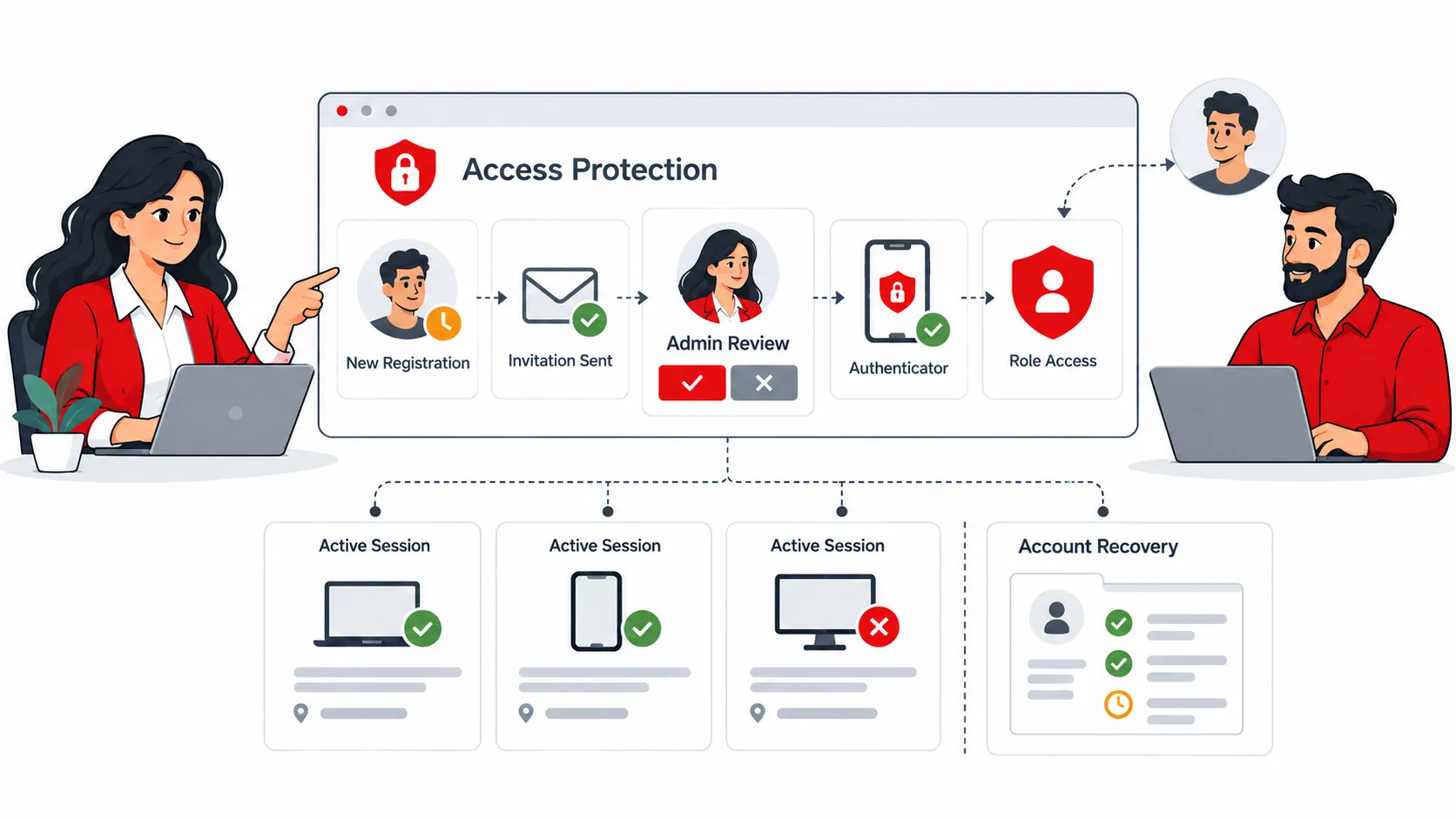
Authenticator setup uses a locally generated QR code or manual key, the current password and a fresh code. Save the one-use recovery material when it is displayed.
Configured role requirements, enrolled-user safeguards and supported core authentication paths define the operating scope. Custom SSO and membership flows need their own integration review.

Roles & Trusted Browsers
Keep a role label separate from verification and approval authority.
Review password/session policy and documented browser verification. A trusted-browser state is part of the selected sign-in method, not a general permission to bypass every sensitive action.
A WordPress administrator role alone does not designate the account as a SiteWatch security approver. That authority is configured separately.
When the selected policy changes, inspect the effect on existing users and legitimate browser paths. Keep email transport and recovery behaviour usable before enforcing the browser challenge.
Temporary administrator access. An existing enrolled site member who is not a super administrator can receive reviewed administrator access for up to four hours. The expiry is stored before the role changes and Authenticator verification is required; when the time ends, the sessions are revoked and the previous role returns. Expiry relies on incoming requests or a working WordPress Cron.
Sessions & Accounts
Review active access and important account changes.
Inspect available sessions and terminate access deliberately where required. Recorded account and role events help review unexpected changes within the retained history.
Session review describes the supported collected evidence. It does not reconstruct every action that happened before collection or outside the instrumented workflow.
Temporary delegated package permission is managed in Plugin Review → Accounts & Permissions, with its own expiry and revocation scope.
Account Approval
Keep pending accounts on the review path.
Supported public registration can require mailbox verification and separate administrator review. Closed-account policies can hold newly created accounts for an authorized approval decision.
Pending accounts do not gain the protected supported access merely by receiving an administrator role. Approval cannot be self-granted through the pending account.
Mailbox verification demonstrates access to the address; it does not prove personal identity. Review third-party registration and membership integrations separately.
A Practical Access Setup
Review ordinary and emergency login paths, configure the selected method, enroll the necessary accounts and test an untrusted browser. Check pending-account access and a legitimate recovery route before expanding the policy.
Questions About Access Security
Does Both send an email challenge on every trusted-browser login?
The browser challenge applies according to the documented trust policy; Both adds it for an untrusted browser alongside authenticator verification.
Does the WordPress administrator role automatically make someone an approver?
No. SiteWatch security approval authority is explicitly designated.
Can a pending account approve itself by receiving an administrator role?
No. Pending accounts do not gain the protected supported access merely by receiving an administrator role, and approval cannot be self-granted through the pending account.
Does mailbox verification prove who registered the account?
No. Mailbox verification demonstrates access to the address, not personal identity. Closed-account policies can still hold the account for a separate administrator review.
Do users have to enroll again if sign-in verification is switched off for a while?
No. Turning the site policy off keeps enrolled authenticators and the last selected method, so verification resumes when the policy is turned back on.
Continue the Review
Reviewed against SiteWatch 2.0.1 · Last updated 29 October 2026