

KEEP THE SUMMARY CONNECTED TO THE EVIDENCE AND DELIVERY CONTEXT
Reports & Automation
Reports & Automation covers Visioix saved reports and history, weekly or monthly Growth email reports with optional AI executive summaries, contact notifications sent through WordPress Mail or SMTP, and the connectors, webhooks and automation rules that deliver intent and contact responses from a WordPress site to configured destinations.
Reports & History
Return to the result that was actually recorded.
Use available saved report evidence and history to review earlier findings. Keep the recorded source, date and scope with the report instead of assuming a later query recreates the same snapshot.
Supported export and custom-report tools serve their own configured purpose. Review what the selected export includes before sharing it with another team.
A stored finding remains an observation from its period, not a continuously current statement about the website.
Pro Custom Reports. Warnings & Reports > Custom Reports builds a Visitor Intelligence, Website Intelligence or combined executive report for a chosen period, segment, metrics and sections, with a live preview that can include forecast warnings, A/B test results and Action Plan tasks. Each source stays independently calculated. Reports export as CSV or PDF, can be saved as immutable snapshots in Report History and can get a share link that is shown once and can be revoked.

Scheduled Email
Give the team a periodic review point.
Current Growth reports can be scheduled weekly or monthly by email. Optional AI executive summaries use the report's saved evidence and configured provider workflow.
Pro Report schedules. A schedule keeps the current Custom Reports selections, creates an immutable PDF snapshot and emails it weekly or monthly to the chosen recipient. If the optional AI summary cannot finish within one hour, the numeric report is delivered; uncertain dispatches are not resent automatically. Schedules can be paused and resumed, a delivery log lists recent results, and a schedule pauses when its author loses report permission.
Review recipients, scheduling and mail delivery conditions before relying on the digest. A provider or transport acceptance is distinct from receipt in the intended mailbox.
Growth Slack/WhatsApp report delivery is not part of this current email workflow.
Report Context
Explain what the numbers and interpretation cover.
Retain source references, dates, available observations and missing-data context. Separate measured results from the explanation or action proposed around them.
A manager can start with the summary and return to the underlying evidence for a decision. Do not remove caveats merely to make the report seem more decisive.
Keep before/after changes observational unless the configured experiment and evidence support the narrower claim being made.
Contact Delivery
Send the right notification for the captured interaction.
Configure supported contact notifications through WordPress Mail, an existing SMTP plugin mode or the documented internal SMTP setup.
Use connection tests and actual recipient review to confirm the route. Notification rules can depend on whether contact information was supplied.
Contact notifications belong to the response workflow. They are separate from Growth report schedules and from external Call/Email/WhatsApp button clicks.
Daily email limit. Settings > Limits & Proxy caps notification emails per day (default 200). Once the limit is reached, responses are still saved but no more notification emails are sent until the next day; integrations and automations are not affected.

Integrations
Connect a documented workflow to a configured destination.
Use the built-in connectors, supported incoming/outgoing webhooks and automation rules with explicit destinations and field mapping. Review delivery logs and test the selected integration rather than assuming every external tool is interchangeable.
Enable only the integration you need, protect its credentials and inspect failed deliveries. A connector configuration is not permission to send every stored response to every destination.
Keep supported intent/contact automation distinct from the current Growth report transport.
Pro Connectors. Integrations offers Webhook, REST API, Zapier, Make, Slack, Discord and CRM / Custom API connections to an HTTPS endpoint, with step-by-step setup notes for each service, encrypted credentials and a delivery log. An incoming REST API (arn-visioix/v1, /webhook and /responses) accepts requests that carry a valid X-Visioix-Key header.
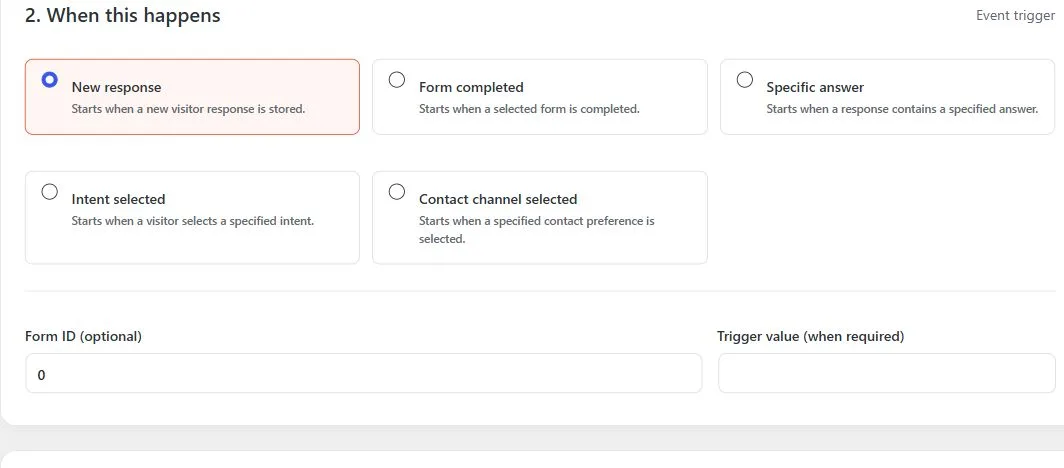
Pro Automation rules. A rule starts on a new response, a completed form, a specific answer, a selected intent or a selected contact channel, checks conditions such as form, intent, contact channel, answer value, email or page URL, and then sends an email, an internal notification, a CRM sync or a webhook, adds a tag, or creates a follow-up or task. With Visioix Pro 2.0.1 the connectors and the automation triggers, conditions and actions are built in only: other plugins can no longer add their own.
Background processing. Integration and automation queues run every 5, 10, 15 or 30 minutes (default 15), set in Settings > Data & Cache > Background Processing. Shorter intervals deliver sooner but increase server load.

A Practical Report Setup
Select the evidence to report, confirm the recipient and schedule, then review a saved result and an actual delivery. Test a connector independently when adding an external workflow.
Questions About Reports
How often can Growth reports be scheduled?
Current Growth reports can be scheduled weekly or monthly by email. Optional AI executive summaries use the report's saved evidence and the configured provider workflow.
Can I send the scheduled Growth report through WhatsApp?
The described current Growth delivery uses email. A WhatsApp contact button is a separate capability.
Which mail routes are available for contact notifications?
Contact notifications can use WordPress Mail, an existing SMTP plugin mode or the documented internal SMTP setup. Connection tests and actual recipient review confirm the route.
Does a delivery-status success prove receipt?
A recorded transport outcome is useful evidence. Confirm the actual recipient mailbox and relevant spam handling separately.
Continue the Review
Reviewed against Visioix Pro 2.0.1 and Free 2.1.0 · Last updated 29 October 2026