

SEE HOW PEOPLE INTERACT WITH THE QUESTIONS YOU ASK
Visitor & Conversion Analytics
Visitor & Conversion Analytics is the Visioix workspace where a WordPress site team reviews intent responses, panel views and opens, contact clicks, funnel drop-off and supported lead assessments. It also holds the consent, CSV export and cleanup settings that govern the collected responses.
Interaction Metrics
Follow the steps between seeing a prompt and responding.
Inspect supported views, panel opens, responses, dismissals and contact activity. Rates help compare those steps when their definitions and available sample are understood.
A panel open is different from a submitted response. A contact click is different from a completed external conversation. Keep those boundaries visible when explaining results to the team.
Compare relevant periods and configurations instead of treating a single total as a complete view of visitor behaviour.

Intent Distribution
Understand which choices visitors make.
Review the distribution of submitted intent choices and the supported page, device, visitor-type and time context.
An intent answer can provide useful direction for content or service navigation. It remains a response from the measured interaction, not a complete account of every visitor's motivation.
Check the question wording and sample alongside the result. A changed set of choices can affect the comparison even when the page's audience has not changed.
Funnel Analysis
Find where the configured interaction loses momentum.
Use supported panel-to-submission and form-step evidence to review drop-off. Compare the relevant stages and available device/page context rather than assuming every lost step has the same cause.
A long field, an unclear choice or an unsuitable trigger may be worth investigating. Use the finding to choose a specific review or test, then inspect the affected interaction.
Funnel evidence describes the collected path. It does not establish the reason a visitor left without additional context.
Lead Intelligence
Prioritize review with the inputs visible.
Supported lead and intent assessments can organize responses for follow-up. Review the answers and configured scoring context before deciding which contact deserves priority.
A high score is an assessment based on available signals, not a confirmed purchase commitment. Keep explicit visitor information separate from inferred interest.
Use the supported prioritization to guide a human review and retain the original response when interpreting an AI-assisted explanation.
Visitor Intelligence. Both editions add a Visitor Intelligence screen that turns visitor analytics into findings about intent, contact behaviour, triggers, pages, time periods and funnels, and keeps earlier analyses as history. Built-in rule-based insights work when AI is off; optional AI analyses run through a background AI Queue, and Cost & Usage shows token use and estimated cost. Pro adds lead and contact scoring.

Data Handling
Keep collection, export and retention aligned with the workflow.
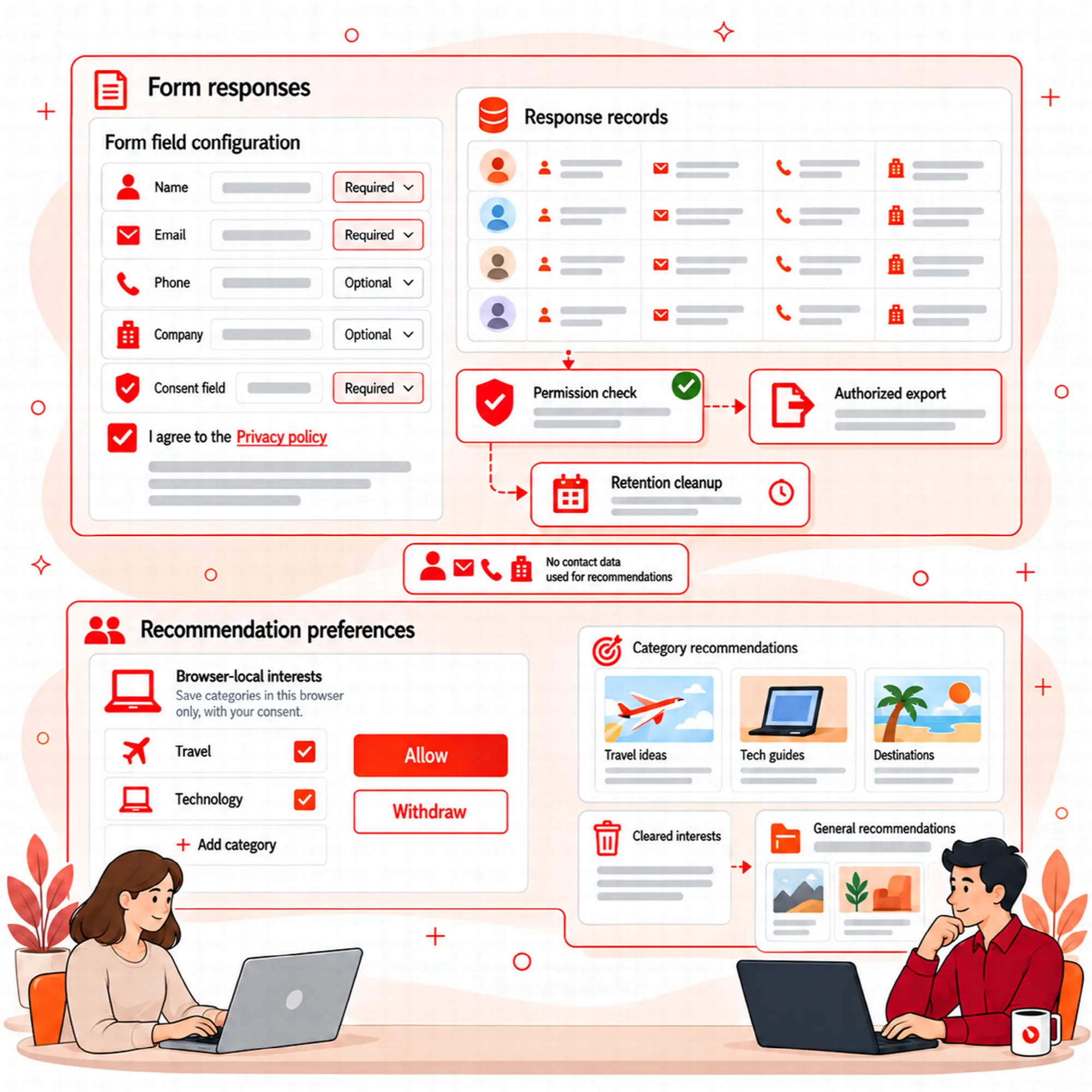
Review consent, configured response fields, CSV exports and manual/automatic cleanup choices. Retain the information needed for the stated purpose without assuming every collected record should remain indefinitely.
Anonymous internal-link exposure/click observations belong to the permission-controlled Growth workflow. Optional recommendation interests remain local to the browser. Neither scope makes stored contact responses anonymous.
Check exports with the intended recipient and review the cleanup period before removing records needed for a current analysis.
Access. Visitor Responses hold personal data, so only administrators can list, open, edit or delete them; responses cannot be added by hand and come only from the visitor form.
Daily limits. Settings > Limits & Proxy caps notification emails and AI analyses of responses per day (default 200 each). Responses are always saved; once the AI limit is reached, later responses show the AI status "Skipped" until the next day.
Retention and removal. Detailed visitor events and daily counters are kept for two years and removed in small batches by the daily cleanup. Settings > Data & Cache also resets the visitor display cache manually or automatically. Deactivation removes scheduled tasks; on uninstall, settings, analytics and responses are removed only when "Delete all plugin data when the plugin is deleted" is on, and on Multisite each site follows its own setting.
A Practical Interaction Review
Compare a configured period, inspect the largest drop between stages and review a few eligible responses. Choose one change to investigate, then return to the same definitions and context when examining later observations.
Questions About Visitor Analytics
Does a contact click count as a completed lead or sale?
It records the supported contact interaction. External conversation completion and sales attribution require their own evidence.
Can a score prove that someone intends to buy?
No. Scores organize available signals and should support a reviewed decision rather than replace it.
Can collected responses be exported or deleted?
Yes. Data Handling covers CSV exports and manual or automatic cleanup choices alongside consent and the configured response fields. Review the cleanup period before removing records needed for a current analysis.
Are internal-link observations stored with contact responses?
No. Anonymous internal-link exposure/click observations belong to the permission-controlled Growth workflow, and recommendation interests remain local to the browser. Neither scope makes stored contact responses anonymous.
Who can see visitor responses?
Only administrators. Authors, Contributors and Editors do not see Visitor Responses in the WordPress admin, and responses are created only by the visitor form.
Continue the Review
Reviewed against Visioix Pro 2.0.0 and Free 2.1.0 · Last updated 29 October 2026