

Automatic Reply & Filters
ANSWER ON TIME, EVEN WHEN NOBODY IS AT THE DESK
Mailix sends automatic replies for a date range or on a weekly schedule in any time zone, can let the company's AI answer from approved company information when two-step verification is on, protects against reply loops and spam, and manages server-side mail filters in cPanel.
Date Range or Weekly Schedule
Reply during a holiday or every evening and weekend.
Settings → Automatic reply shows at the top whether replies are going out right now and when that changes.
| Mode | Use it for |
|---|---|
| Date range | A holiday or any single period, with a start and end date and time, or no end date |
| Weekly schedule | Set hours every week, such as weekdays 18:00–09:00 and all weekend |
Templates. After hours, Weekends only or Custom. Each day can be Don't reply, All day or up to six hour ranges, and a range can run past midnight.
Time zone. The weekly schedule follows the chosen time zone, so a team abroad answers on local hours.
Validity. The weekly schedule runs only between its start and end dates, or with No end date.
The date range uses cPanel's own automatic reply. The weekly schedule needs cPanel Webmail: Mailix adds one scheduled task to the hosting account that checks new mail every five minutes, so replies leave within a few minutes. The task never uses or stores the mailbox password.

View the interface example

Protection Against Loops and Spam
Never answer machines, lists or forged senders.
Automatic replies can pile up or bounce between two auto-responders. Mailix prevents that:
- No replies to bulk mail, mailing lists, no-reply addresses, automatic messages or spam.
- Reply to the same sender at most once every 4 days, unless this option is turned off.
- With the weekly schedule and AI replies, also no replies to senders that look forged, based on the server's SPF, DKIM and DMARC results.
- With the weekly schedule and AI replies, at most 50 different people a day per mailbox, and no replies to mail delivered before the schedule was turned on.
Recently sent replies lists the last five replies of the weekly schedule, with recipient, subject and time.
View the interface example

AI Replies From Company Information
Let the AI answer questions it can answer from facts you provide.
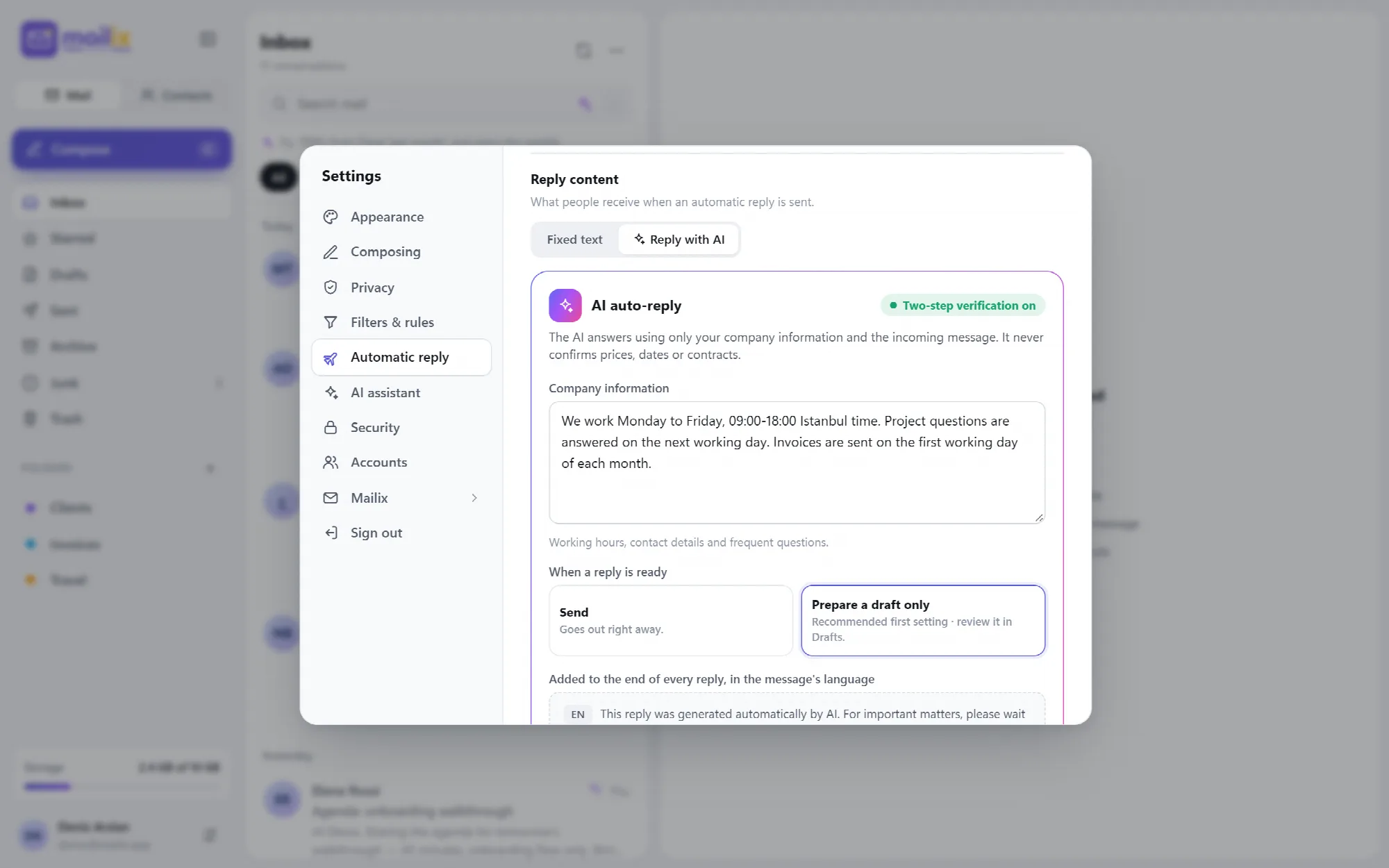
With Reply with AI, the company's AI account writes each automatic reply from the incoming message and the Company information you enter: working hours, contact details and frequent questions.
Strict rules. The AI uses only the company information, never confirms prices, dates, appointments, orders or contracts, writes a short plain-text reply in the sender's language and adds no links or contacts that are not in the company information. A reply that is too long, or that contains a link or domain missing from the company information, is not used.
Draft first. When a reply is ready, Mailix can Send it or Prepare a draft only. Draft only, the recommended first setting, puts the reply into Drafts for review.
Clear notice. Every AI reply ends with a note in the message's language (English, Turkish or Arabic) saying that AI wrote it.
Fixed text as fallback. The fixed text is still required. It is sent when the AI cannot answer, for example when the monthly AI limit is reached.
AI replies need the company's AI account, cPanel Webmail and two-step verification on the mailbox. See Security · See AI Assistant

View the interface example
Server Filters
Sort mail on the server, before any device sees it.
Filters & rules run on the mail server through cPanel, so they work on every device and while Mailix is closed.
| Part | Choices |
|---|---|
| Match | All conditions or any condition |
| Field | From, To, Subject, Body or Any header |
| Comparison | contains, does not contain, is, begins with, ends with |
| Action | Move to folder, Copy to folder, Forward to or Delete |
Each rule can be switched on and off with Enabled, edited or deleted. Rules created on cPanel's own screen are shown too. Filters need the cPanel mail service on the server.

View the interface example

A Practical After-Hours Setup
- In Settings → Automatic reply, choose Weekly schedule and the After hours template.
- Check the time zone and the validity dates.
- Write the fixed subject and message.
- To answer with AI, turn on two-step verification, write the company information and start with Prepare a draft only.
- Save and review the first replies under Recently sent replies and in Drafts.
Questions About Automatic Reply & Filters
Will Mailix reply to newsletters or no-reply senders?
No. Bulk mail, mailing lists, automatic messages, spam and no-reply addresses never get an automatic reply.
Can the AI promise a price or an appointment?
No. The AI is told never to confirm prices, dates, appointments, orders or contracts, and it uses only the company information you write.
Does the weekly schedule need Mailix to stay open?
No. A scheduled task on the hosting account answers mail every few minutes, whether or not anyone has Mailix open.
Do filters work in my phone's mail app?
Yes. Filters run on the mail server, so mail is already sorted when any app or device reads it.
Continue Your Mailix Workflow
Reviewed against Mailix 1.2.3 · Last updated 29 October 2026