

A THEME THAT LETS BUILDERS AND PLUGINS DRAW
Elementor & Plugins
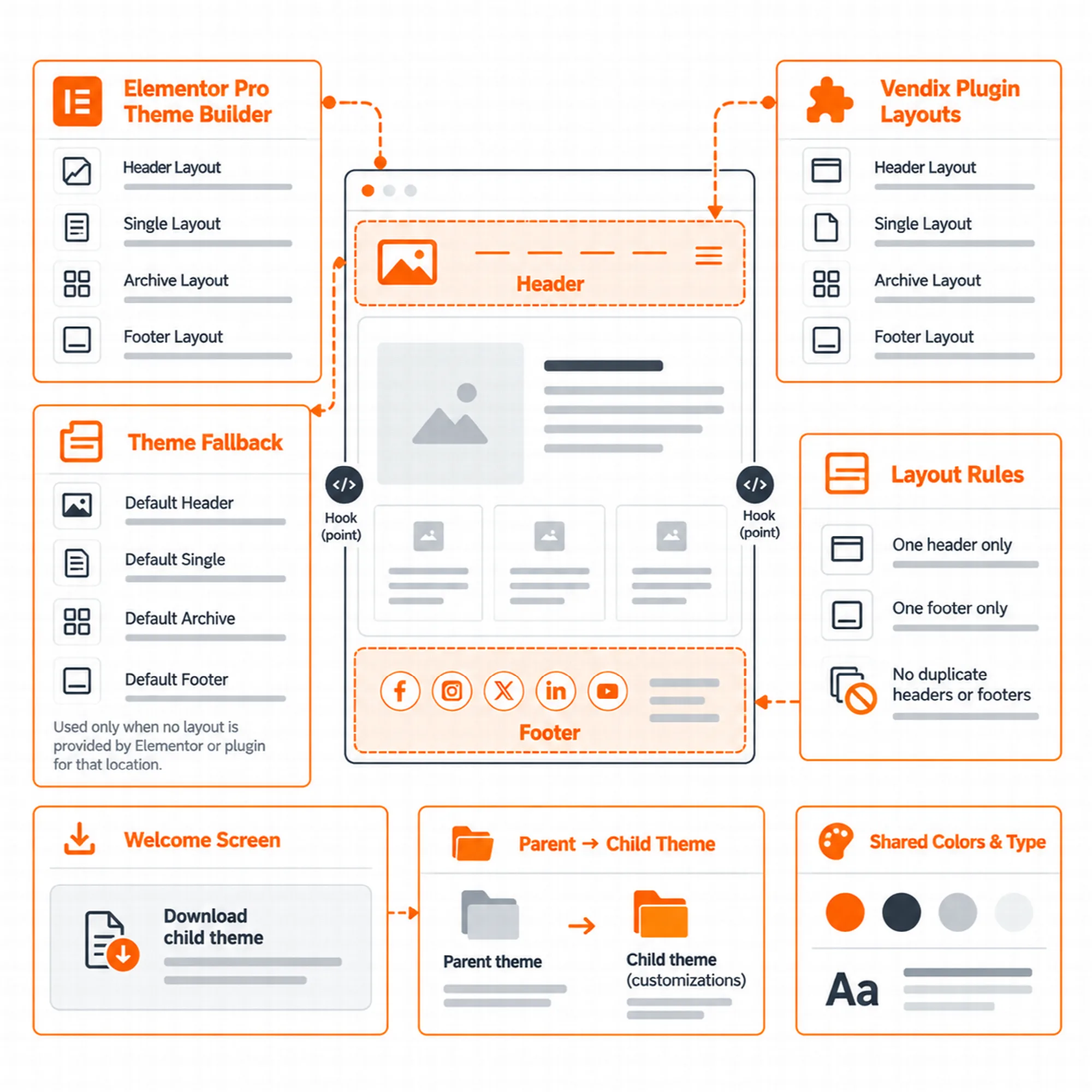
Vendix Theme supports the header, footer, single and archive locations of Elementor's Theme Builder and opens the same locations to plugins. The Vendix plugin uses them for its Header & Footer layouts, templates, banner zones and news parts, and developers get documented hooks, filters and CSS variables.
Elementor Theme Builder
Let Elementor draw the parts it owns.
Pages are designed in Elementor, and the Page Layout options of each page are also in the Elementor page settings panel. With Elementor Pro, the Theme Builder's header, footer, single and archive templates print in the theme's places; the theme draws its own simple header, footer and page title only where no layout replaces them.
Colors and fonts are set in Elementor → Site Settings unless a plugin's design system provides them.
The Vendix Plugin
Connect the theme with Vendix Free or Vendix Pro.
Vendix Theme is made for the Vendix plugin, and Vendix uses the same places as any plugin. The Header & Footer Builder, the design system colors and the guided setup connect in Vendix Free and Pro; Vendix Pro adds element typography, Vendix Templates, banner zones, Newspaper parts, Post Features and store links in the header. Each connection, edition by edition, is on Vendix Plugin.
When a Vendix template fills the single or archive place, the theme prints only its header and footer around it, and a shop template leaves out the theme's shop sidebar.
Colors and Type from a Plugin
Use one design system for the theme and the widgets.
The vendix_theme/palette filter takes the design system colors (primary, secondary, accent, heading, text, muted, border, light and dark background) for the block editor palette, and the site reads the --vendix-color-* CSS variables. Type comes from --vendix-type-* CSS variables for body, H1–H6 and the menu: font, size per device, weight, line height, letter spacing and text transform, each only when it has a value.
Without these values the theme keeps its own palette and type, and it reads a plugin's settings only while that plugin's design system runs.

Hooks for Developers
Add parts without editing theme files.
- Locations: the
vendix_theme/locationfilter getsheader,footer,singleandarchive; a plugin prints its layout and returns true.current_theme_supports( 'vendix-templates' )tells that the theme works this way. - Header and footer actions:
vendix_theme/header_before,header_after_branding,header_actions,header_afterandvendix_theme/footer_before. - Post actions:
vendix_theme/single_before_content,single_after_content,post_metaandcard_metaon every site type, andvendix_theme/news_*on news sites. - Filters:
vendix_theme/site_type,defaults,header_minimal,footer_minimal,page_options_post_id,palette,setup_urlandsetup_complete. - CSS hooks: the
vt-sticky-header,vt-menu-openandvt-header-slotclasses and the--vt-sticky-header-heightand--vt-back-to-top-offsetvariables.
The theme's readme FAQ and code notes describe each hook.
Welcome Page & Child Theme
Start with a guided setup, customize with a child theme.
Appearance → Vendix opens a welcome page. "Start setup" opens the guided setup of a compatible plugin, such as ARN Smart Site Utilities for Elementor, and the page lists the recommended plugins with links to WordPress's own install and activate screens; nothing is installed until you click. A notice on the Dashboard and the Appearance screens leads to the page until you close it, skip the setup or finish it, and activating the theme opens no page by itself.
A child theme starter is available for changes that should survive theme updates. Turkish and Arabic translations of all theme texts are included.
A Practical Integration Check
- Activate the theme and open Appearance → Vendix.
- Run the guided setup of the Vendix plugin, or set colors in Elementor Site Settings.
- Publish a Vendix or Elementor header and footer and check that the theme header gives way.
- Open a post, an archive and a store page to see which templates print.
Questions About Elementor & Plugins
Does Vendix Theme work with Elementor Pro's Theme Builder?
Yes. Its header, footer, single and archive templates print in the theme's places.
Can another plugin replace the theme header?
Yes. Hook vendix_theme/location, print the layout for the given location and return true.
Does the welcome page install plugins by itself?
No. It links to WordPress's own install and activate screens; nothing is installed until you click.
Continue Exploring
Reviewed against Vendix Theme 1.3.3 · Last updated 1 November 2026