

ONE PLUGIN AND ONE THEME, BUILT TOGETHER
Vendix Plugin
Vendix Theme is made for the Vendix plugin. It opens its own places for Vendix's store and news parts, banner zones, headers, footers and templates, and it follows Vendix's colors and type. Vendix is developed and tested with Vendix Theme, so the full fit is there, and the theme also works without the plugin.
Made for Each Other
Give Vendix a theme that keeps places ready for it.
ARN Smart makes Vendix Theme for the Vendix plugin. The theme keeps places for Vendix in the header, the footer, around the text of posts, on product cards and on news pages, and Vendix fills them. Vendix's store and news features are developed and tested with Vendix Theme.
Vendix runs on other WordPress themes too. It is developed and tested with Vendix Theme, and the full fit is there.
The theme also works without the plugin, with or without Elementor. It draws its own header, footer, page title, store pages and news parts, and on Elementor sites Elementor Site Settings stay the design source.

Store
Let the theme's store styles and Vendix's store modules share the page.
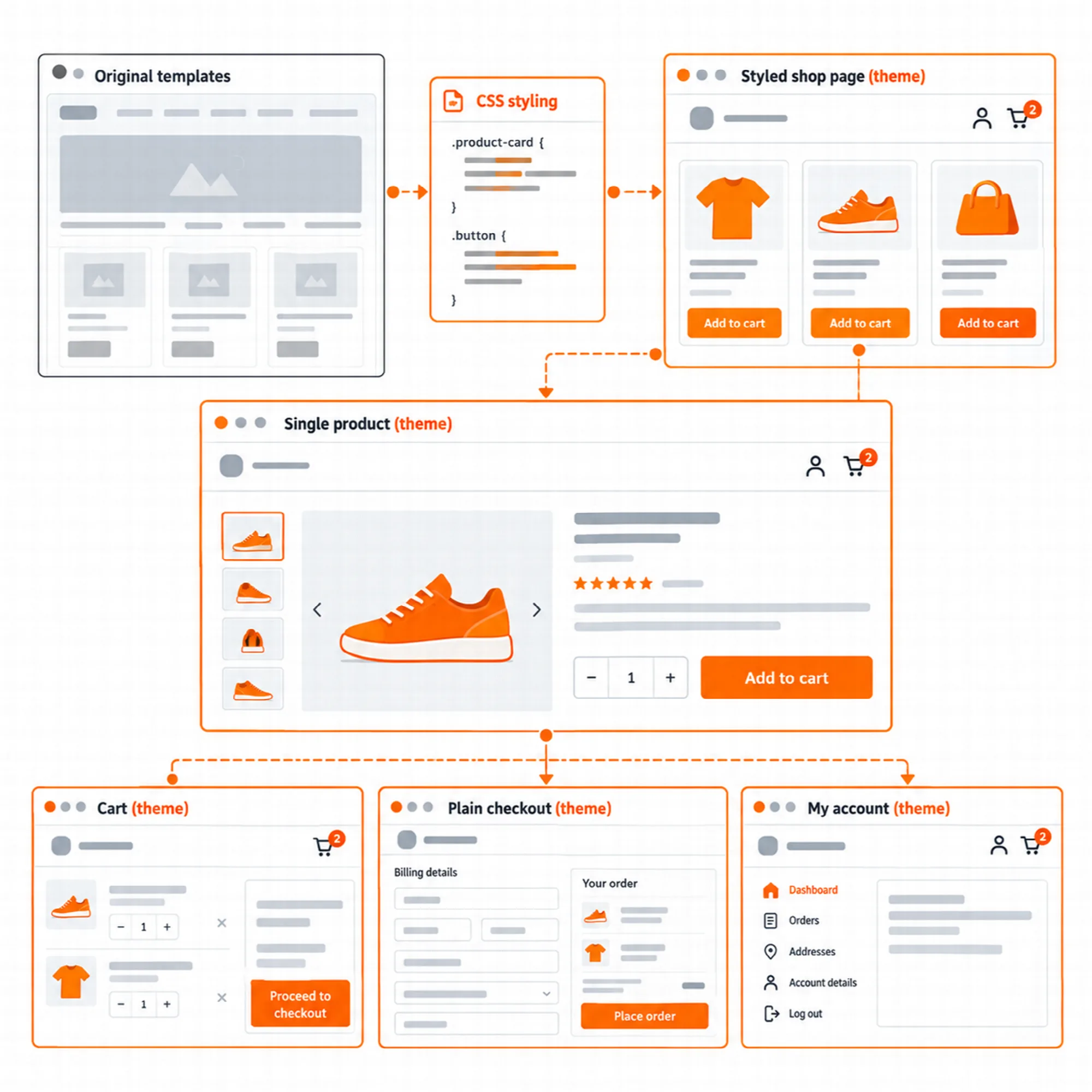
The theme brings the store frame: header search, account and cart icons, a plain checkout, a shop sidebar or filter panel, product cards with a hover image and a sale badge, and styled cart, checkout and account pages. Vendix Pro's store modules fit into it:
- Header lists: wishlist and compare links with their counts join the theme header's store icons. A switch on the Store Features tab, on by default, turns them off.
- Card buttons: quick view, wishlist and compare buttons sit in the theme's card action area over the product image.
- Store templates: Vendix product, shop, cart, checkout and account templates print in the theme's single and archive places, and a shop template leaves out the theme's shop sidebar.
- Products widget: the ARN Products widget takes the theme's number of columns on phones.
- Plain checkout: banners and the Floating Contact button set by broad rules stay out of the theme's plain checkout; those set for the checkout page still show.
News
Bring the news parts into the theme's own header, post meta and related news.
With the News / Magazine site type, the theme brings a top bar with the date, published and updated times, a standfirst, related news and a reading progress bar. Vendix Pro's Newspaper widgets show a news ticker, view counts and most-read lists on any theme; with Vendix Theme the module also fills the theme's own news places, and each part stays off until it is chosen in Smart Features → Newspaper Widgets:
- Breaking news band: in the theme's top bar or under the theme header.
- View counts: in the theme's post meta and on its post cards.
- Related news order: the theme's related news can put the most read posts first.
- Templates around the text: the saved Elementor templates of the template layer go to the theme's places above and below the post text.
Vendix Pro's Post Features add share buttons, a review box and a sponsored label in the places the theme opens around posts, on every site type. For front pages, the Newspaper module has ten widgets; Vendix Free includes News Blocks, News Ticker and Section Header.

Banners & Ad Areas
Place banner zones in the theme without a widget.
On News / Magazine sites the theme has five widget areas with reserved ad sizes: beside the logo, before and after the post text, between posts and before the footer.
Vendix Pro's Banners module places zones by itself on any theme: before or after the post content, after a chosen paragraph, in post lists and over the page as pop-ups, slide-ins and bars. With Vendix Theme it also uses the theme's own places without any widget: above the header, beside the logo, under the header and above the footer, and before and after the post text on news sites. Display rules, devices and schedules decide when a zone shows. Under a transparent header, zones above and under the header stay out.

Header & Footer
Print Vendix headers and footers in the theme's own places.
The Vendix Header & Footer Builder, in Vendix Free and Pro, prints its layouts in the theme's header and footer places, and the theme leaves out its own header and footer there. When Vendix draws both, the theme also loads none of their styles and scripts. With Vendix Pro, the presets of the theme's site type come first and are marked as suggested.
On the plain checkout, a layout set by a broad rule gives way to the theme's plain header and footer; a layout set for the checkout page shows as it is. The wishlist and compare links and the breaking news band belong to the theme's own header; a Vendix header has its own wishlist and compare icons. With the Vendix Breadcrumbs widget on a page, the theme leaves out its own trail.

Colors & Type
Set colors and fonts once, in Vendix.
- Colors (Free and Pro): while the Design System is on, its nine colors, primary, secondary, accent, heading, text, muted, border, light and dark background, replace the block editor palette (Vendix Theme 1.3.2 or later). On the site, the theme uses six of them: primary, heading, text, muted, border and light background.
- Type (Pro): Element Typography sets the font, size per device, weight, line height, letter spacing and text transform of the body, H1–H6 and the menu as
--vendix-type-*CSS variables. The theme's body text, headings, menu and news post text follow them. - Accent (Free and Pro): with the Design System off, the accent color of Vendix widgets follows the theme's accent color; in Vendix Pro, so do store features, banners and Header & Footer.
Without the plugin, the theme keeps its own palette and type.

Guided Setup
Start a Vendix site from the theme's welcome page.
Appearance → Vendix opens the theme's welcome page. "Start setup" opens the Vendix guided setup, in Vendix Free and Pro, and the theme's notice goes away when the setup is finished. With Vendix Theme active, the setup:
- suggests the theme's site type, Business, Store or News, as the starting choice;
- sets the theme's site type in a step of its own;
- puts the menu it creates in the theme's main menu place.
"Undo setup" brings back the earlier site type and menu places.

Free, Pro and the Theme
One theme package, two plugin editions.
Vendix Theme is one package with no separate paid edition; its WordPress.org name is "Vendix". Vendix Free is named ARN Smart Site Utilities for Elementor on WordPress.org.
| With Vendix Theme | Vendix Free | Vendix Pro |
|---|---|---|
| Design System colors in the block editor palette and on the site | Yes | Yes |
| Header & Footer layouts in the theme's places | Yes | Yes |
| Guided setup from the welcome page, with the theme's site type | Yes | Yes |
| Breadcrumbs widget in place of the theme's trail | Yes | Yes |
| Banner zones in the theme's places, without a widget | — | Yes |
Element Typography (--vendix-type-*) |
— | Yes |
| Header & Footer presets of the theme's site type first | — | Yes |
| Vendix Templates in the single and archive places | — | Yes |
| Breaking news band in the theme header, view counts in its post meta and cards, most-read order of its related news | — | Yes |
| Post Features around posts | — | Yes |
| Wishlist and compare links in the header, card buttons over the image | — | Yes |
With Another Theme
Keep Vendix working and know what the theme adds.
Vendix runs on other WordPress themes too. It is developed and tested with Vendix Theme, and the full fit is there. The parts that use the theme's own places come with Vendix Theme:
| Area | With other themes | With Vendix Theme |
|---|---|---|
| News | Newspaper widgets with a news ticker, view counts and most-read lists; news schema, Google News sitemap, templates around the post text | Also the breaking news band in the theme header, view counts in its post meta and cards, and most-read order of its related news |
| Store | Store Features, store templates and widgets; card buttons in a row under the add to cart button | Also wishlist and compare links in the header, card buttons over the image and the theme's phone columns in the Products widget |
| Header & Footer | Layouts with their own HTML and CSS | Layouts in the theme's own places, presets of its site type first |
| Vendix Templates | The template replaces the content area | The template fills the theme's single and archive places |
| Banners | Automatic places before and after the post content, after a paragraph, in post lists and over the page; shortcode, widget and custom slots | Also zones above, beside and under the theme header, above its footer and in its news places |
| Guided setup | Business, news or store site | Also the theme's site type and main menu |
A Practical Setup
- Activate Vendix Theme and the Vendix plugin, Free or Pro.
- Open Appearance → Vendix and click "Start setup".
- Choose the site type in the setup; the theme takes the same type.
- Turn on the store or news parts the site needs and check a product page and a post on a phone.
Questions About Vendix Theme and the Vendix Plugin
Does Vendix Theme need the Vendix plugin?
No. It works on its own, with or without Elementor. With Vendix installed, it opens its places to the plugin's store, news, banner, header and design features.
Do I need Vendix Theme to use Vendix?
No. Vendix runs on other WordPress themes too. It is developed and tested with Vendix Theme, and the parts that use the theme's own places, such as the breaking news band and the wishlist and compare links in the header, come with it.
Is there a paid edition of Vendix Theme?
No. Vendix Theme is one package. Vendix Free and Vendix Pro are the editions of the plugin.
Continue Exploring
Reviewed against Vendix Theme 1.3.3, Vendix Pro 2.0.1 and Vendix Free 2.0.1 · Last updated 1 November 2026