
Build Once. Manage Centrally. Keep Every Page Consistent.
A WIDE COLLECTION OF PURPOSE-BUILT WIDGETS FOR MODERN ELEMENTOR WEBSITES
Vendix brings together a wide collection of flexible Elementor widgets designed for real production work—not just visual demos. Build engaging pages, structured content, interactive experiences, pricing sections, navigation systems, contact areas, and dynamic layouts without assembling multiple add-on packs.
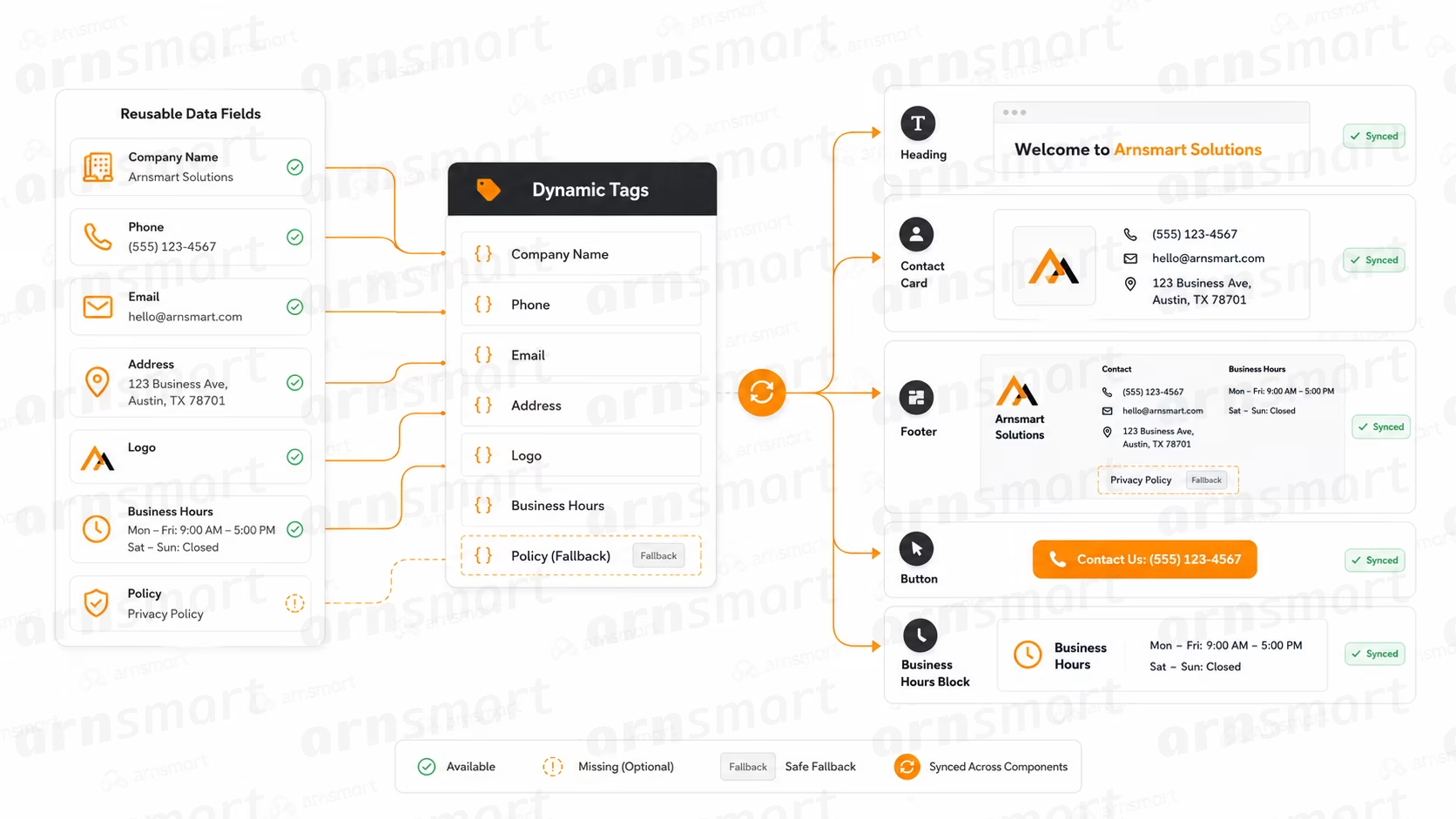
DYNAMIC TAGS
Connect centralized company values to Elementor fields, allowing names, contact details, locations, policies, and business information to update automatically across every supported component without repeated page-by-page editing.
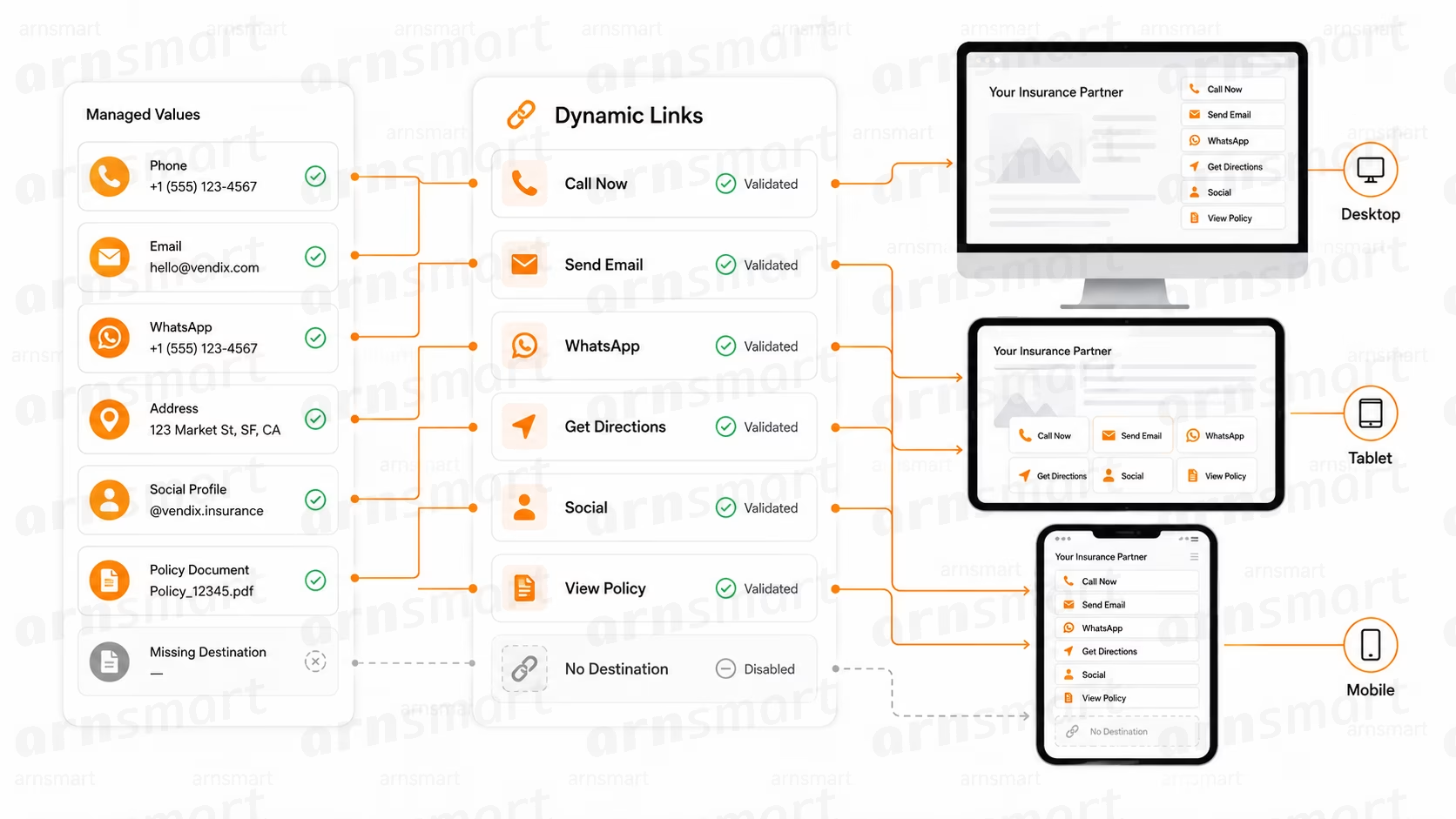
DYNAMIC LINKS
Turn managed contact and business values into reliable actions for calls, email, WhatsApp, directions, social profiles, and documents, with consistent destinations across every supported component and responsive website experience.
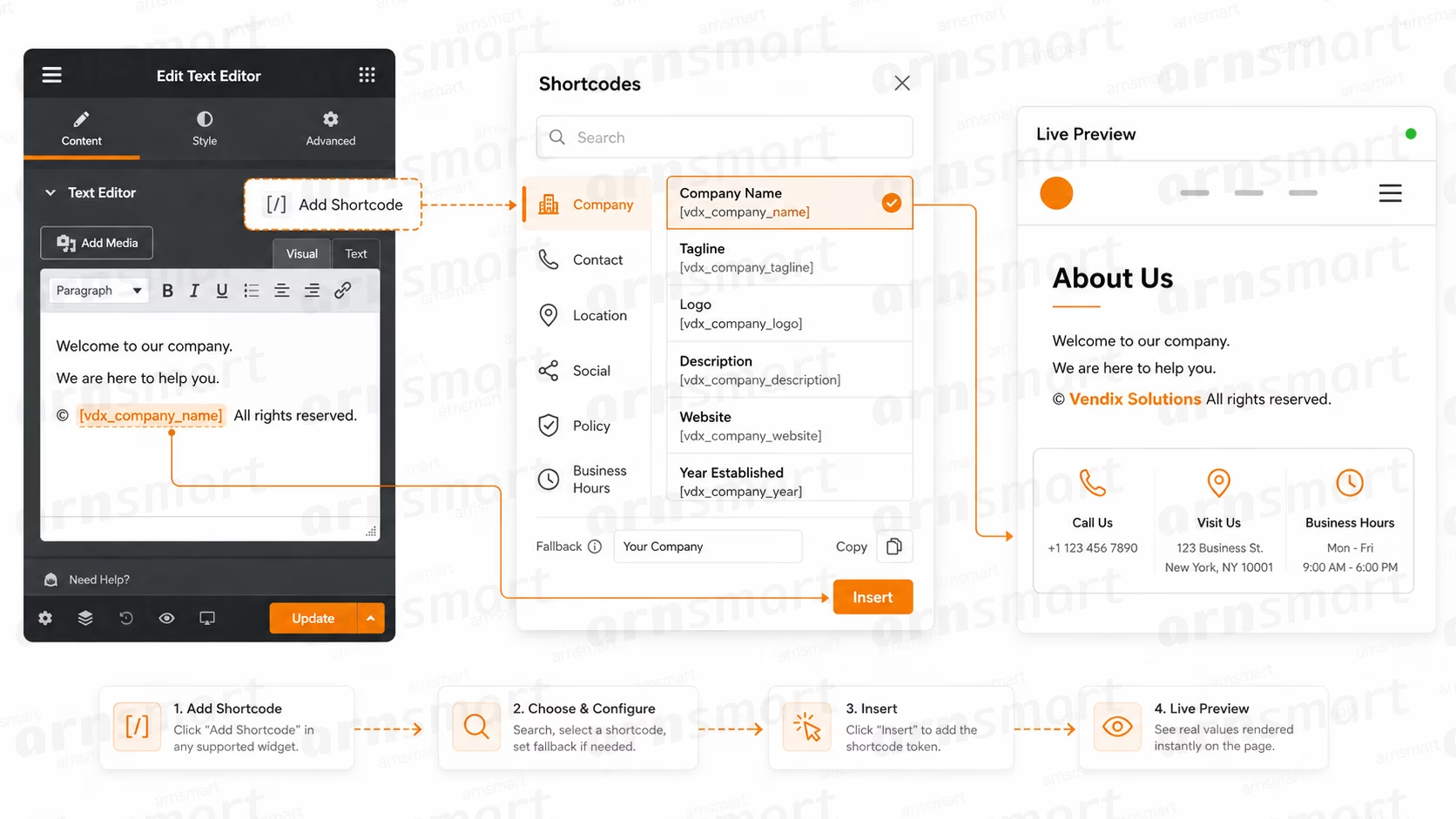
SHORTCODES
Insert centralized company information directly inside content through a searchable shortcode library, complete with categories, configurable fallbacks, quick copying, simple insertion, and immediate live previews across supported editors.
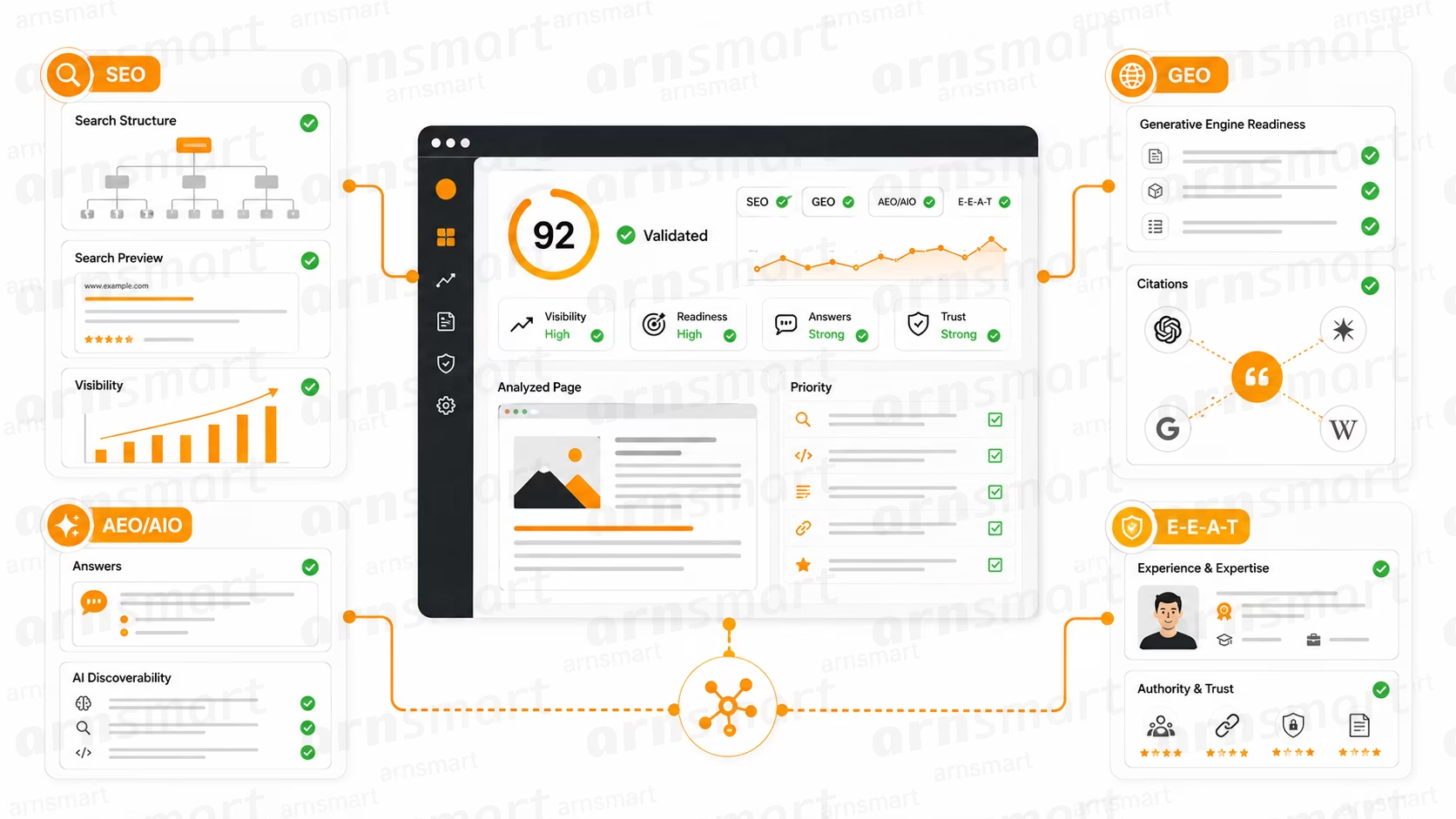
SEO, GEO, AEO/AIO AND E-E-A-T Settings
Strengthen website visibility and trust through coordinated SEO, GEO, AEO/AIO, and E-E-A-T controls covering structured data, answer readiness, citations, expertise, authority, and technical search foundations across WordPress content.
Content and Structure
Builds responsive feature and information lists with icons, images, descriptions, links, and structured visual organization.
Creates versatile feature, service, benefit, and process cards with customizable icons, imagery, actions, and responsive styling.
Creates focused call-to-action sections combining persuasive headings, supporting descriptions, imagery, and configurable primary or secondary buttons.
Builds accessible, responsive question accordions with flexible styling, organized answers, and optional FAQPage structured data support.
Builds layered headings with upper text, highlighted phrases, descriptions, decorations, responsive presets, and optional action buttons.
Automatically generates navigation from selected headings while tracking and highlighting the visitor’s currently active page section.
Automatically generates contextual breadcrumb navigation for pages, archives, searches, taxonomies, and supported WordPress content views.
Combines an icon or image with lightweight heading content, supporting text, flexible alignment, and responsive styling.
Provides rich text editing with searchable company-data shortcodes for inserting centralized information directly within content.
Displays centralized company fields as sortable rows with labels, links, icons, and responsive layout options.
Shows an information, success, warning or error message with an icon, a title, text and an optional link or button.
Folds long text or a saved template to a set height and opens it with a Read more button.
List BlockOpen the full page
Loading content…
Feature BlockOpen the full page
Loading content…
Loading content…
Loading content…
Advanced HeadingOpen the full page
Loading content…
Table of ContentsOpen the full page
Loading content…
BreadcrumbsOpen the full page
Loading content…
Smart Text EditorOpen the full page
Loading content…
NoticeOpen the full page
Loading content…
Icon HeadingOpen the full page
Loading content…
Company InformationOpen the full page
Loading content…
UnfoldOpen the full page
Loading content…
Media and Visual Presentation
Builds responsive hero sections with layered content, adaptable images, multiple buttons, navigation controls, and smooth transitions.
Presents client, partner, certification, and technology logos through responsive grids or smoothly moving carousel layouts.
Displays multiple images within responsive sliders with adjustable navigation, spacing, sizing, transitions, and presentation controls.
Delivers dedicated desktop, tablet, and mobile images with independent sizing, positioning, linking, and precise display behavior.
Extends imagery toward the viewport edge while preserving alignment, spacing, and readability within adjacent content columns.
Adds responsive decorative section separators using customizable preset shapes or uploaded transparent image assets and positioning.
Creates accessible image comparisons with responsive dragging, orientation, labeling, positioning, and complete keyboard interaction controls.
Places interactive information points over images to explain product features, locations, components, plans, or visual details.
Builds responsive split-image and mosaic compositions with controllable sizing, spacing, image placement, and entrance effects.
Presents mixed image and video stories through responsive cards, flexible widths, overlays, navigation, and collapsible sections.
Arranges images and videos in a gallery with a category filter and a lightbox.
Shows images, videos, Elementor templates or containers of the page as slides.
Plays a Lottie or dotLottie animation when visible, on load, on hover, on click or with the scroll progress.
Before / AfterOpen the full page
Loading content…
Hero SliderOpen the full page
Loading content…
Logo CarouselOpen the full page
Loading content…
Image SliderOpen the full page
Loading content…
Responsive ImageOpen the full page
Loading content…
Edge ImageOpen the full page
Loading content…
Shape DividerOpen the full page
Loading content…
Hotspot ImageOpen the full page
Loading content…
Split ImageOpen the full page
Loading content…
Media GridOpen the full page
Loading content…
Media CarouselOpen the full page
Loading content…
Media ShowcaseOpen the full page
Loading content…
LottieOpen the full page
Loading content…
Navigation and Interaction
Organizes content and saved Elementor templates into responsive tabs with intuitive navigation and mobile accordion behavior.
Creates continuously moving announcement, text, icon, image, or logo rows with precise motion and timing controls.
Displays announcements, updates, posts, or manual content inside continuous ticker layouts with configurable movement and presentation.
Provides a persistent contact menu with configurable channels, visibility, device rules, working hours, and automatic availability.
Opens accessible popup experiences with configurable triggers, content layouts, closing behavior, overlays, and focus management.
Transforms selected external Elementor containers into responsive tabs without rebuilding or duplicating their existing content.
Converts selected external Elementor containers into navigable slides with responsive arrows, pagination, positioning, and movement controls.
Builds configurable buttons with precise hover, icon, typography, spacing, linking, and motion state controls.
Opens full-screen experiences using pages, templates, shortcodes, widgets, videos, HTML, or other configured content sources.
Builds responsive icon-based navigation menus with optional headings, configurable links, visual states, and active-item highlighting.
Shows a WordPress menu or a list of custom links as a header menu or a single-level inner page menu.
Places a WordPress search form in a header template or anywhere on a page.
Places round account, wishlist, compare and cart buttons in a header.
Shows the site logo from the Vendix company logo, the WordPress custom logo or an uploaded image, linked to the home page.
Content TickerOpen the full page
Loading content…
Floating ContactOpen the full page
Loading content…
Modal / PopupOpen the full page
Loading content…
ButtonOpen the full page
Loading content…
Icon MenuOpen the full page
Loading content…
Navigation MenuOpen the full page
Loading content…
Header SearchOpen the full page
Loading content…
Header ToolsOpen the full page
Loading content…
Site LogoOpen the full page
Loading content…
Advanced TabsOpen the full page
Loading content…
MarqueeOpen the full page
Loading content…
Section TabsOpen the full page
Loading content…
Section SliderOpen the full page
Loading content…
Full Modal — Content IncludeOpen the full page
Loading content…
Business and Conversion
Showcases statistics, milestones, percentages, dates, and business achievements using flexible formats and smoothly animated numerical values.
Presents customer experiences, reviews, and recommendations through responsive cards, flexible grids, or interactive carousel layouts.
Presents employee and leadership profiles through responsive cards, category filters, detailed information, and carousel layouts.
Builds structured pricing offers with monthly or yearly values, feature lists, actions, badges, and presentation presets.
Displays people, departments, offices, or branches through organized cards with contact details, directions, and actionable links.
Explains workflows, project phases, company history, or milestones through responsive process and timeline presentations.
Compares multiple plans against shared features using organized pricing cards or a detailed responsive comparison matrix.
Presents independent pricing plans where every card controls its own features, price, badge, styling, and action.
Creates product, service, catalogue, line-sheet, and compact price-list presentations using efficient, adaptable responsive layouts.
Presents addresses, phones, email, WhatsApp, maps, and social channels from custom or centralized company information.
CounterOpen the full page
Loading content…
TestimonialsOpen the full page
Loading content…
Team MembersOpen the full page
Loading content…
Pricing TableOpen the full page
Loading content…
Contact CardsOpen the full page
Loading content…
Process / TimelineOpen the full page
Loading content…
Plan ComparisonOpen the full page
Loading content…
Pricing CardsOpen the full page
Loading content…
Price BoxOpen the full page
Loading content…
Get in TouchOpen the full page
Loading content…
Content, Data and Utilities
Builds responsive comparison tables with customizable columns, organized values, clear distinctions, and optional sticky feature columns.
ARN Post / Content Grid
Displays posts or custom content through responsive grids with filtering, source controls, and secure AJAX pagination.
Visualizes percentages, scores, targets, and completion values using customizable linear or circular progress presentations.
Displays weekly operating schedules with customizable labels, open and closed states, and automatic current-day highlighting.
Creates linked information cards with icons, images, headings, descriptions, visual states, and optional calls to action.
Displays responsive countdown timers for launches, events, campaigns, or deadlines with configurable completion actions and styling.
Creates accessible image-led cards with responsive content reveals, hover interactions, keyboard control, and mobile-friendly behavior.
Renders selected Elementor templates inside pages, sections, reusable layouts, and other compatible Vendix compositions dynamically.
Shows the current time of several cities or time zones as digital or analog clocks.
Comparison TableOpen the full page
Loading content…
Progress BarOpen the full page
Loading content…
Business HoursOpen the full page
Loading content…
Info BoxOpen the full page
Loading content…
CountdownOpen the full page
Loading content…
Interactive Image CardOpen the full page
Loading content…
World ClockOpen the full page
Loading content…
TemplateOpen the full page
Loading content…
Hero Designs
Turns a full-screen slider into named steps, each shown in the navigation and above its title.
Fills the screen with three to six panels side by side; the open panel grows and shows its text and button.
Builds each slide around one cut-out product image, with a short label, a two-part title, a text and up to two buttons.
Shows one large word per slide, sized to fill the width, with an optional cut-out object woven through it.
Pairs a full-screen slider with a colored bar holding the slide counter, a progress line, arrows and a play / pause button.
Presents collection slides with a top strip of collection and social links, an accent line over a bold title and slide numbers.
Places the slide content in the middle of a full-screen slider, with a logo area at the top and corner links that open side panels.
Combines a giant title, a cut-out image and a short text with background layers that follow the mouse at different depths.
Lays out each slide like a magazine cover, with two corner labels, a giant title, a short text, an author line and a progress counter.
Hero — StoryOpen the full page
Loading content…
Hero — PanelsOpen the full page
Loading content…
Hero — SplitOpen the full page
Loading content…
Hero — TypographyOpen the full page
Loading content…
Hero — SidebarOpen the full page
Loading content…
Hero — FashionOpen the full page
Loading content…
Hero — CenteredOpen the full page
Loading content…
Hero — ParallaxOpen the full page
Loading content…
Hero — EditorialOpen the full page
Loading content…
News Publishing
Puts a title bar above a section of a news or magazine page.
Runs headlines in a band beside a "Breaking News" label, from your posts or a page the editors write.
Shows how long a post takes to read and buttons to share it on Facebook, X, WhatsApp, Telegram, LinkedIn or by email.
Shows the site's social profiles with follower counts for a sidebar.
Lists the writers of the site, each with a photo, their latest article and a link to their author page.
Section HeaderOpen the full page
Loading content…
News TickerOpen the full page
Loading content…
Reading Time & Share BarOpen the full page
Loading content…
Social CounterOpen the full page
Loading content…
AuthorsOpen the full page
Loading content…