

BUILD THE NAVIGATION AND INFORMATION AREAS YOUR WEBSITE NEEDS
Header & Footer Builder
The Vendix Header & Footer Builder creates headers and footers for WordPress sites from rows, columns and elements, with its own HTML and CSS; with Vendix Theme, layouts print in the theme's own header and footer places. Layouts start from 24 header and 17 footer presets or a blank layout, support mega menus and menu badges, and use display rules that decide where each one appears.
Header Layout
Arrange the header around the site's actual content.
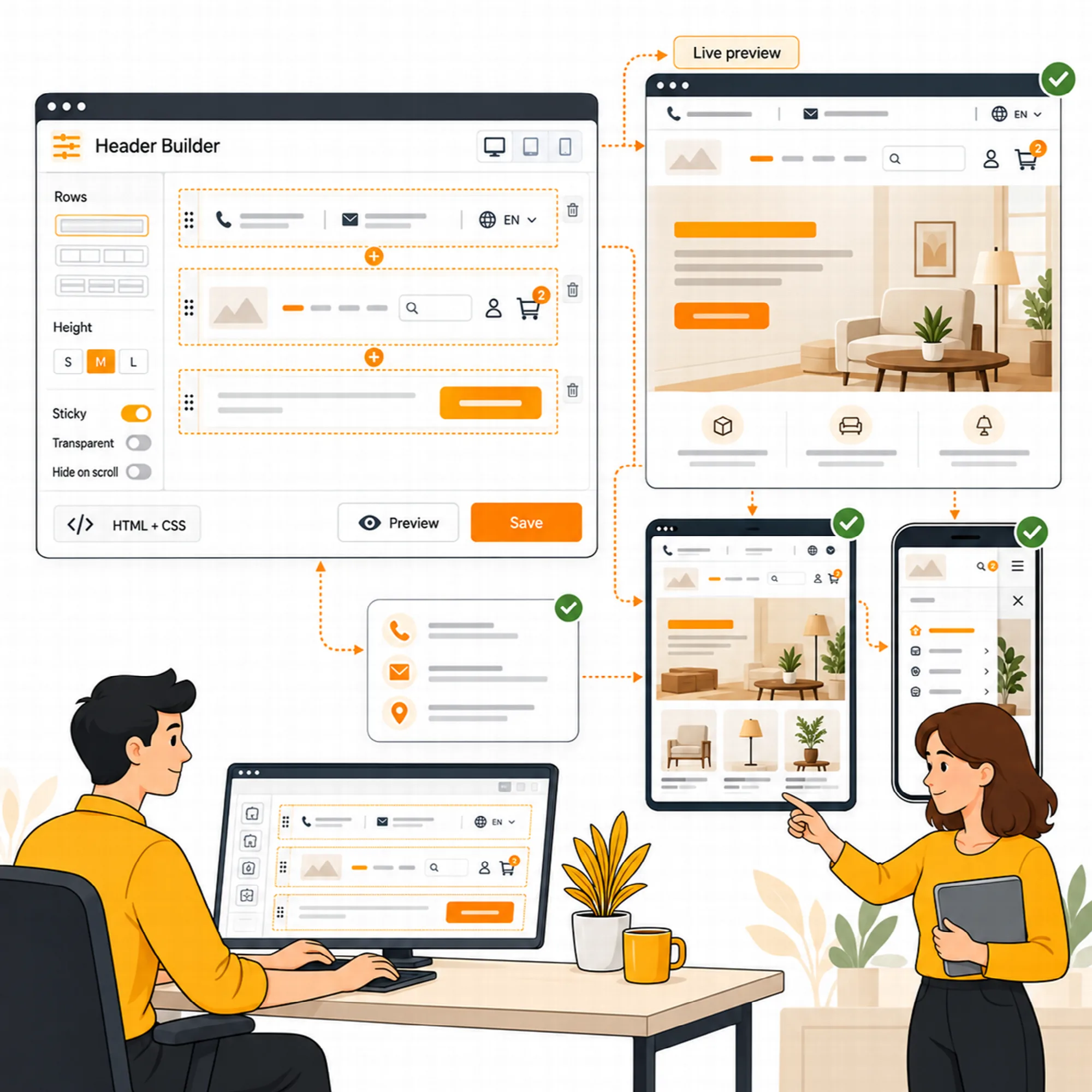
Open the builder under Vendix Templates → Header & Footer; it moved there from the ARN Vendix menu in Vendix 1.15.0, and its address stayed the same. Build up to six rows with up to six columns each, and move, duplicate or remove the elements inside them. Choose row heights, backgrounds and width behavior rather than relying only on the header options supplied by the theme. A logo block can also run beside all rows, with an optional slanted edge.
Preview the layout on a selected page and device view before publishing it. Draft and published states keep work in progress separate from the header visitors receive.
The builder produces its own HTML and CSS and runs on other WordPress themes too, classic and block themes. It is developed and tested with Vendix Theme, and the full fit is there: layouts print in the theme's own header and footer places; see Vendix Theme. It does not require an Elementor header template to render that independent layout.
Vendix Free includes the core builder with 19 element types, sticky and transparent headers, display rules and the language switch. The presets, the nine newer elements, mega menus and menu badges, layout conversion and screenshot drafts on this page are part of Vendix Pro.
Presets
New
Start from a finished layout instead of an empty row.
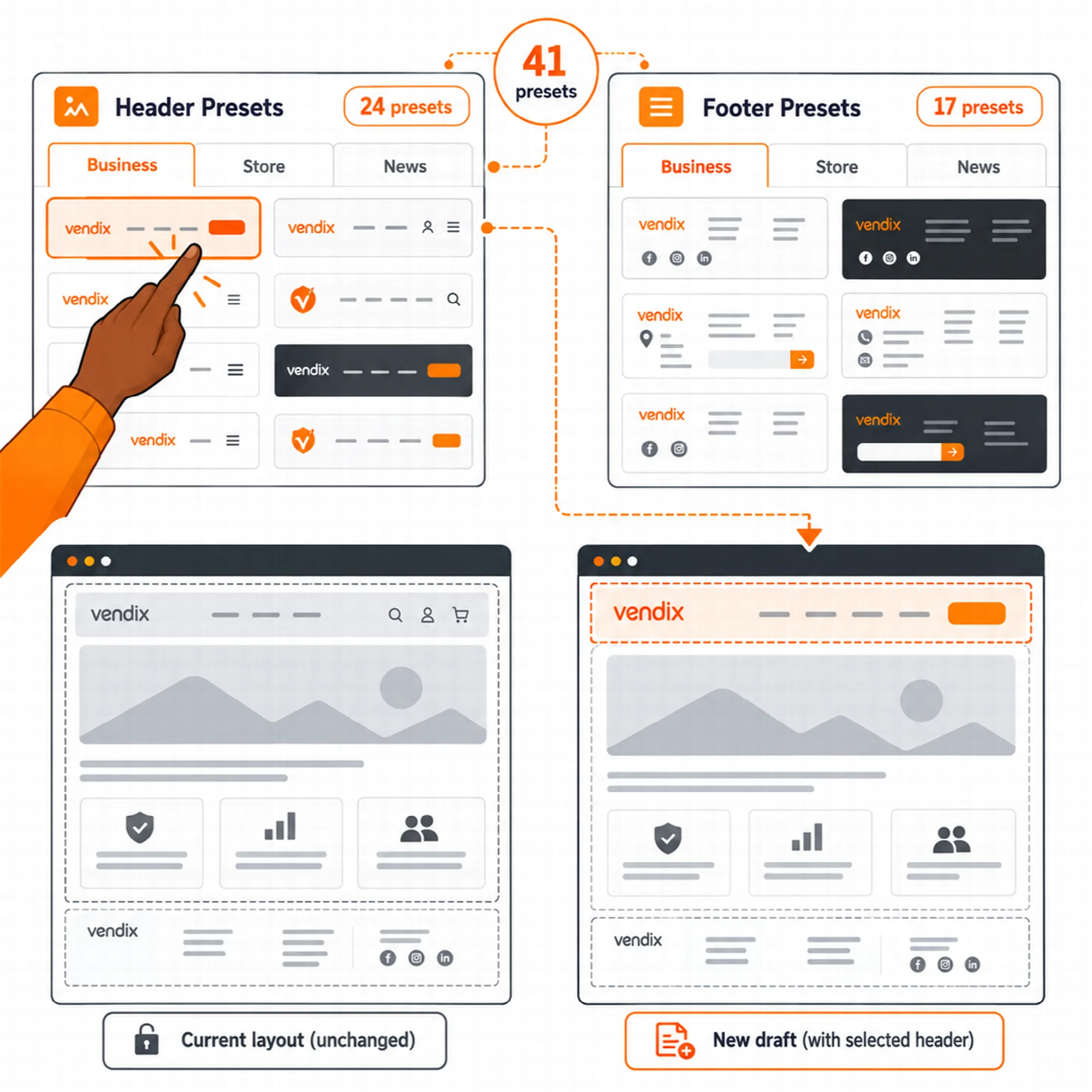
Choose Start from a preset in Vendix Templates → Header & Footer or in the builder to open one of 24 header or 17 footer presets as a new draft. The layout you are editing stays as it is, so a preset never overwrites published work.
| Group | Headers | Footers |
|---|---|---|
| Business | 13 | 9 |
| Store | 6 | 4 |
| News & magazine | 5 | 4 |
Presets show the site logo and menu, use short generic texts and take their colors from the Vendix design system. Their links point to the site's own pages and categories when they exist, and to "#" otherwise. With Vendix Theme active, the group that matches its site type comes first.
Review the texts, links and contact elements of a preset before publishing it.
Header Elements
Put navigation, contact and account actions in the right place.
Choose from 28 element types. The core set covers a logo, menu, search, buttons, text, contact items, social links, a language switch, location, account, cart and wishlist icons, a menu button, link lists, copyright, images, HTML, spacing and dividers. Vendix Pro adds nine more:
- Newsletter. Sends the address to your email service's form address or uses a form plugin's shortcode; Vendix stores no address.
- App store badges. App Store and Google Play buttons for your app links.
- Call to action band. A heading, short text and button, often the top row of a footer.
- Numbered large menu. Large links numbered 01, 02 and so on.
- Event card. A date box with the event name, time and place; by default it hides after the date.
- Country or city picker. A list of links that opens from a button.
- Compare icon. Links to the Store Features comparison page and shows its item count.
- Banner zone. Shows a zone from Vendix → Banners while that module is on.
- Elementor template. Places a published Elementor template inside a row.
Keep the main navigation discoverable and avoid giving secondary actions the same visual weight as the primary one. The cart icon needs WooCommerce, and wishlist and compare counts appear while those store features are on. The language switch lists the WPML or Polylang languages when one of them is active.
Mega Menus & Badges
New
Open large menus as one organized panel.
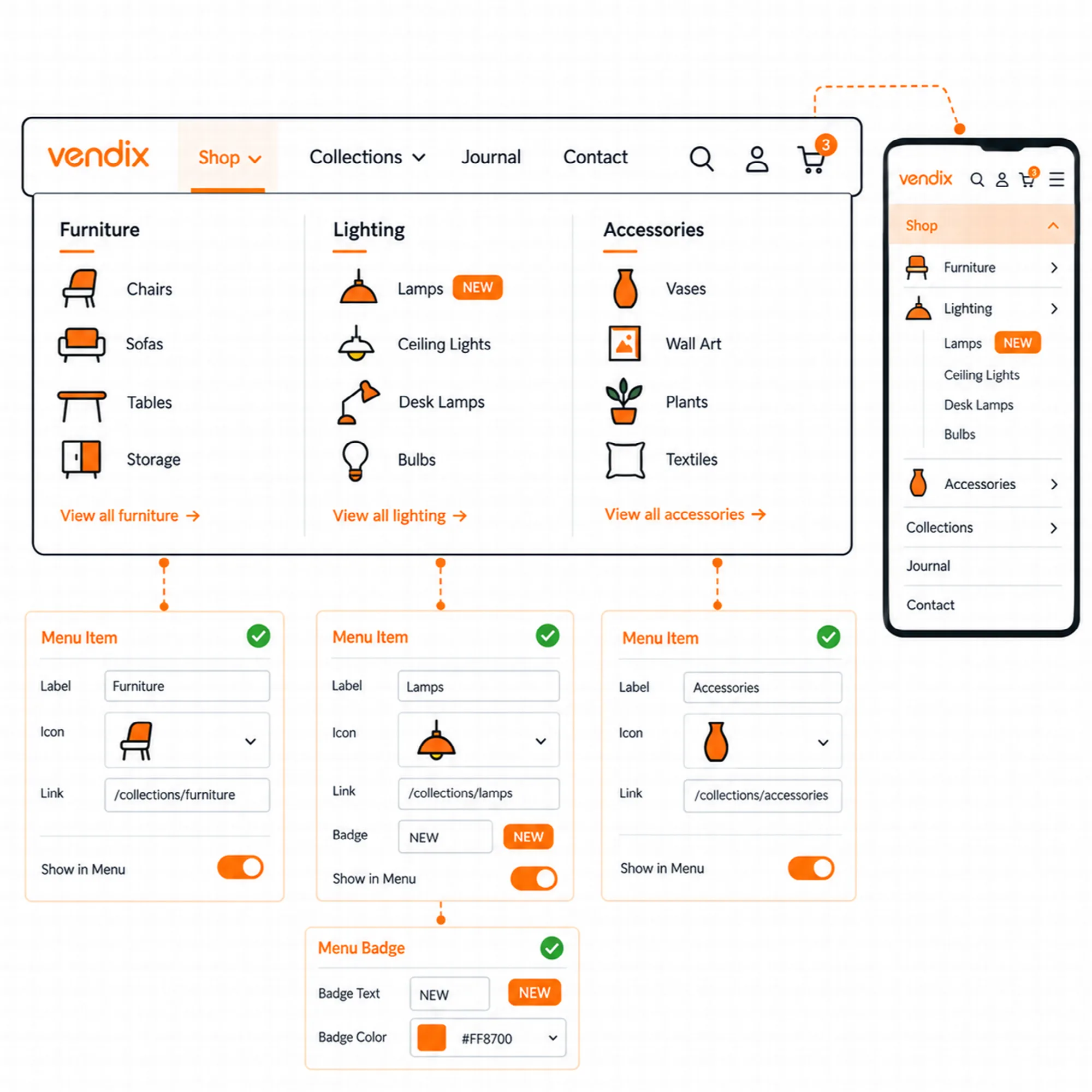
Mark a top-level menu item as a mega menu in its Vendix header settings under Appearance → Menus. Its sub-items then open as one to six columns of a wide panel in the header bar, and a published Elementor template can follow the columns.
Any menu item can carry a short badge, such as "New" or "Sale", in a design system color: primary, secondary, accent, success, warning, danger or info. Link lists add a badge with a label|link|badge line.
- Keyboard. A sub-menu opens when focus moves into its item; Escape closes it and returns focus to its link.
- Touch. The first tap on a parent item opens its sub-menu, and a tap elsewhere closes it.
- Right to left. Panels and sub-menu arrows follow the reading direction.
Badges hold up to 24 characters. Only users who can edit theme options can change these menu settings.
Responsive Header
Set the behavior for each screen and scroll state.
Configure row height for desktop, tablet and mobile, including the sticky state. Use the available transparent, sticky and hide-on-scroll settings where they suit the page.
The menu can become a button with a side panel below a selected screen width. In a header, newly added wide elements such as buttons, contact items, link lists and newsletter forms start hidden on phones, so the phone header keeps the logo, menu button and icons; Hide on changes this for any element and device.
The side panel and search layer open above the admin bar and other fixed page tools, close with Escape, the backdrop or the close button, and keep Tab inside while open. The panel's Left and Right options are screen sides on every site.
Preview the composition at narrow widths rather than assuming a desktop row will work unchanged on mobile.
Footer Layout
Keep recurring details organized at the end of the page.
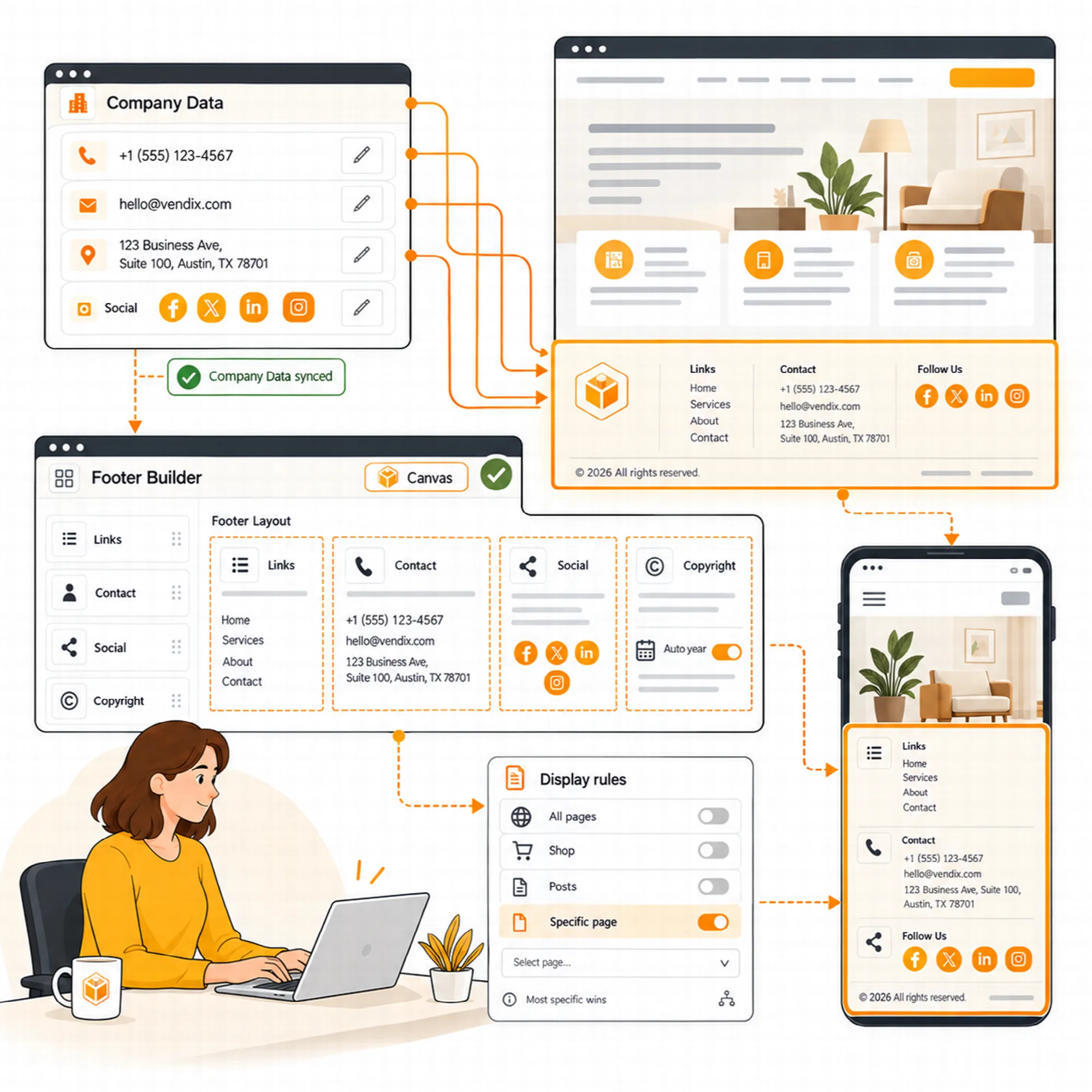
Build the footer from the same row, column and element system. Combine link columns, contact items, social profiles, a logo and a copyright line, and add a newsletter form, call to action band, app store badges, numbered large menu or event card where the site needs them.
Use a WordPress menu or a defined link list for the relevant navigation. Company-data connections supply supported contact values, while text placeholders such as {year} and {company} keep information current. A new footer links to the site's own About, Contact, Privacy Policy and Terms pages when they exist.
Columns stack on smaller screens, letting the footer remain readable without repeating a desktop arrangement at reduced scale.
Backgrounds & Reveal Footer
New
Give headers and footers movement without a page builder.
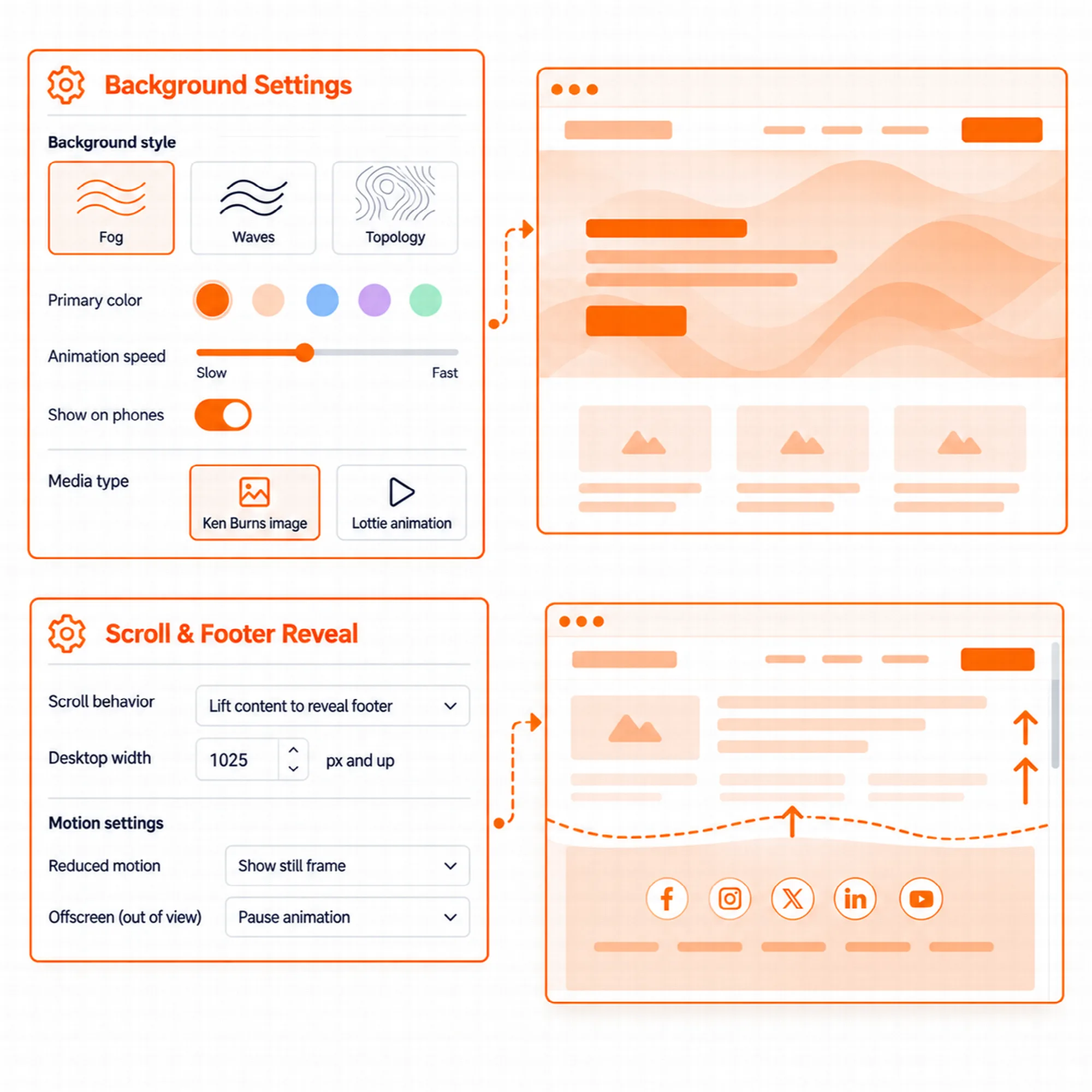
The layout, each row and each column can take an animated background, the same effects Elementor containers use in Vendix: Fog, Waves, Clouds, Clouds 2, Topology, Cells, Animated Gradient, Aurora Gradient and Flow Field. Colors, speed and the other effect settings can be changed, with a switch for phones.
Ken Burns and Lottie. A background can also be a slow Ken Burns zoom over images or a Lottie animation.
Reveal footer. "Reveal under the page" lets the page scroll away to uncover the footer underneath. Choose the width from which it works (1025 px by default, 0 for every width) and a page edge shadow: none, light or strong.
- The reveal is off by default, off in the Elementor editor and when printing, and turns itself off when the footer does not fit the window.
- Keyboard users who tab into the footer are taken to the end of the page.
- Animation scripts load only on pages that use them and pause while their area is out of view; visitors who prefer reduced motion see the animated background as a still picture.
Use one animated background per area and check the text contrast over it.
Display Rules
Show the layout where it belongs.
Choose sitewide output or more specific conditions for the front page, blog page, search results, 404 page, content types, archives, WooCommerce shop pages and selected pages, categories or tags. Exclusion rules take a layout out of matching pages.
When several layouts match, the most specific rule wins; on a tie, the layout edited last wins. Rule values are found by a search as you type, one rule row can hold several values, and a value that was deleted or moved to the Trash is marked. Administrators see one short "Vendix" item in the admin bar, with the header and footer layouts of the page in its menu and their full names and rules on hover.
On a plain checkout of Vendix Theme, a layout set by a broad rule gives way to the theme's plain header and footer; layouts set for WooCommerce Checkout or the checkout page show as they are. The cart count stays current on pages served from a page cache.
Supported blank templates, including Elementor Canvas, can also receive the builder output when that option is enabled. Published layouts and their rules are read from one small saved index, so page views do not query the layout list.
Check overlapping theme or builder output before publishing a replacement. The layout list warns when Elementor Pro Theme Builder or Elementor Header & Footer Builder is also active.
Connected Data
Maintain the details through their central record.
Phone, email, address, WhatsApp, working hours and social values can come from Company Data instead of being re-entered in each layout. Text and copyright elements accept placeholders such as {phone}, {email}, {address}, {company} and {year}.
This keeps the builder responsible for layout and Company Data responsible for the source values. An empty value shows nothing to visitors and a "Fill this in Vendix → Company Data" note to administrators. The company email is never taken from the WordPress admin email.
Layout Conversion & AI Drafts
New
Bring older headers forward and test new ideas as drafts.
Convert a former Vendix layout. Layouts made with the former Vendix builder stay in the list with a Convert action. It saves the old Elementor content as a published Elementor template and creates a new draft layout that shows it, carrying over the known sticky, transparent and scroll colors. The old record is kept, and the draft is set to the entire site until you choose where it shows.
Header from a screenshot (experimental). In the preset window, choose a header screenshot from the Media Library and ARN Smart AI saves a layout with the same structure as a new draft. Logos, texts and images are not copied: the draft uses the site logo, the site menu and Company Data, and leaves out HTML, image, template and banner elements.
This needs an image understanding model in the shared AI settings under Settings → ARN Center, and the screenshot is sent to that AI provider. Nothing is published automatically.

A Practical Builder Workflow
- Start with the information and navigation the site needs.
- Open a preset close to that structure, or build the desktop rows yourself.
- Set up mega menus and badges in Appearance → Menus where large menus need them.
- Review mobile and scroll behavior.
- Set display rules and inspect representative pages.
- Publish the reviewed layout and refresh relevant caches.
Questions About the Builder
Does the builder include ready-made header and footer designs?
Yes. Vendix Pro includes 24 header and 17 footer presets grouped as Business, Store and News & magazine. A preset opens as a new draft, so the layout you are editing stays as it is.
Can different pages use different layouts?
Supported display and exclusion rules allow different layouts in different page contexts. The most specific matching rule wins; on a tie, the layout edited last wins.
Does the builder require an Elementor header template?
No. The builder produces its own HTML and CSS, with Vendix Theme and with other WordPress themes. An Elementor template element is available when you want to place a saved template inside a row.
What happens to headers made with the former Vendix builder?
They stay in the layout list. A record with Elementor content can be converted into a new draft layout that shows that content, and the old record is kept.
Continue Building
Reviewed against Vendix Pro 2.0.0 · Last updated 1 November 2026