

A PROJECT ICON COLLECTION YOU CAN KEEP UNDER CONTROL
Icon Manager
Vendix Icon Manager controls which icons from the bundled font-free library are available to Vendix widgets and navigation elements on a WordPress site. Site teams enable icon categories or add individual icons to My Icons, and components then use those icons through their own icon controls.
Icon Library
Start with the relevant collection.
The bundled font-free library groups icons into categories. Start from the curated default selection, then expand the enabled categories as the project's content requires.
Icons support visual recognition in headings, menus, lists and buttons. Select symbols that clarify the label instead of relying on a graphic alone to explain an action.
This manager controls the available collection. It is not an illustration editor or a promise that arbitrary uploaded icon packs will be accepted.
Icon Selection
Build My Icons from the choices you use.
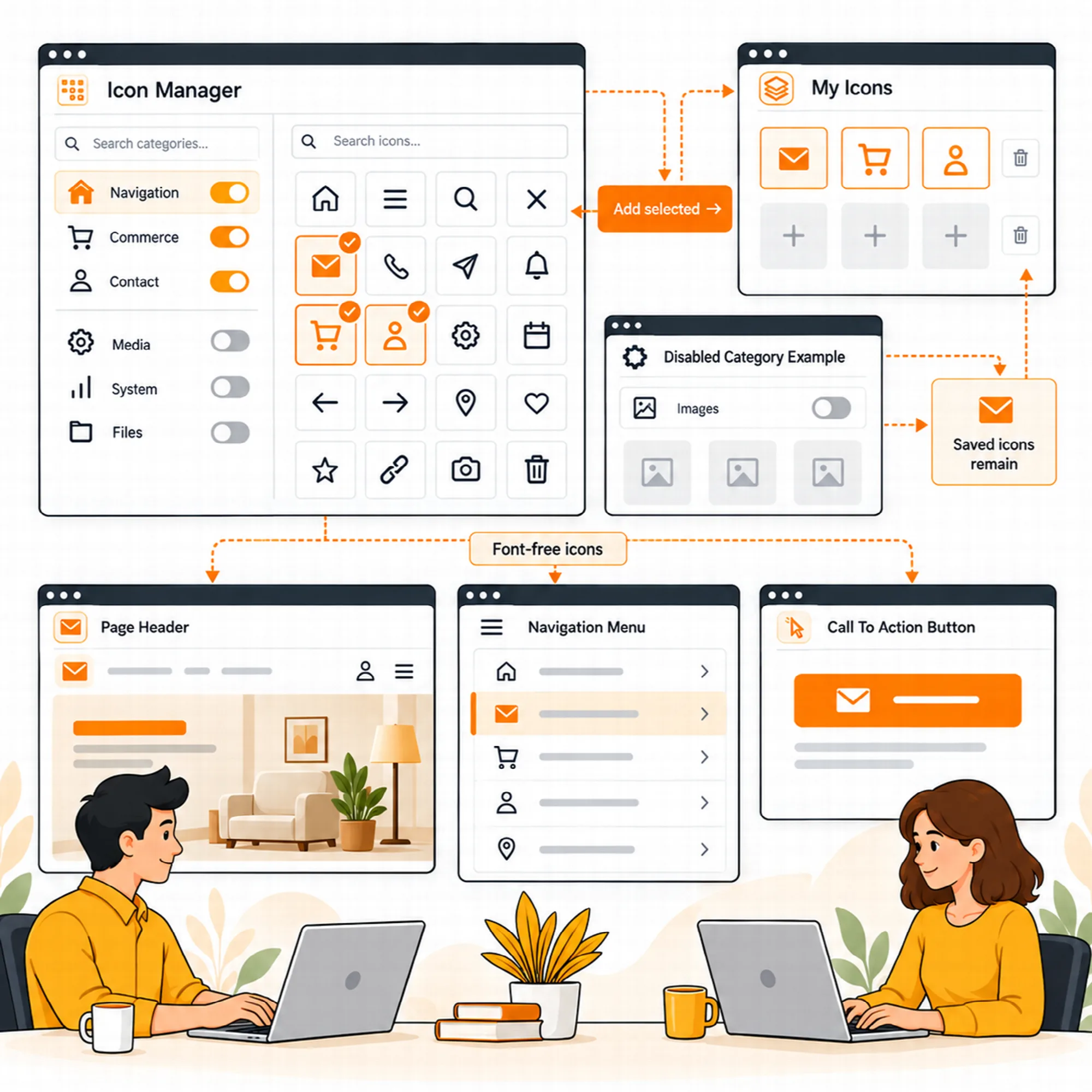
Search categories or icons, open a category and add selected entries to My Icons. Enable an entire category where useful, or keep a smaller hand-picked set for routine work.
The manager shows collection information and the selected category's grid, helping the team review what is available before choosing an icon in a component.
Disabling a category removes it from new selections; icons already saved in Elementor content continue to render. Collection management is separate from deleting existing page output.
Icon Output
Reuse a clear visual language across components.
Use supported icon controls in Vendix widgets and navigation elements. Combine the icon with its label and adjust the component's available color, spacing, alignment and interaction states.
An icon chosen for a button may also suit a heading or feature list, but the component controls its presentation. Review the result at the actual size where it appears.
Keep text labels available for actions, and use decorative icons as supporting content rather than the only source of meaning.
Lighter delivery. New The icon library ships as one file per category, about 145 files instead of about 8,750. Icons on pages carry their own drawing and need no extra request, and the Elementor editor and the Icons screen load no icon files. After updating from an older version, clear the page cache or CDN once, or icons on pages cached earlier may show as empty spaces.
A Practical Icon Setup
Choose a small relevant category set, add common selections to My Icons and test them in a heading, button and menu. Keep the collection aligned with the site's language and content.
Questions About Icons
Does disabling a category remove icons already on my pages?
No. The documented manager removes that category from new selections while preserving saved icon output.
Can an icon replace an action label?
Use the supported accessibility settings and an understandable label. A visual symbol alone may not communicate the intended action to every visitor.
Can I upload my own icon packs?
The manager controls the available bundled collection. It is not an illustration editor or a promise that arbitrary uploaded icon packs will be accepted.
Where are the selected icons used?
Supported icon controls in Vendix widgets and navigation elements use the collection. The component controls the icon's color, spacing, alignment and interaction states.
Continue Building
Reviewed against Vendix Pro 2.0.0 · Last updated 28 October 2026