

REVIEW WHAT THE PAGE PUBLISHES AND WHAT YOUR SEARCH DATA SHOWS
SEO & Visibility
Vendix SEO & Visibility covers SEO metadata, robots, schema and sitemaps, redirects, rendered-content analysis, SEO/GEO/AEO and E-E-A-T evaluation, sharing previews, content freshness, read-only Google Search Console and Bing connections and a Pro Site Report for WordPress pages built with Elementor, Gutenberg or the Classic Editor. It is intended for site owners and editors reviewing what a page publishes.
Metadata & Schema
Maintain the information attached to the published page.
Configure supported SEO titles, descriptions, robots settings, social metadata, JSON-LD and sitemap output. Review which installed product owns those outputs before enabling another metadata layer.
The engine is off until you turn it on under Vendix → SEO & Visibility. Each page and post then gets a Visibility Engine box for its own title, description, canonical URL, robots, social fields and schema type.
Robots. Vendix adds its directives to the one robots tag WordPress prints, so directives from WordPress and other plugins stay and a noindex from any source wins. Search results and 404 pages are never indexed. While "Discourage search engines from indexing this site" is checked in Settings → Reading, every page gets noindex, nofollow and the SEO & Visibility screen shows a warning.
Schema. One connected JSON-LD graph holds WebSite, the organization and the page type chosen in the box: WebPage, AboutPage, ContactPage, CollectionPage, Service, Product, SoftwareApplication, Article, BlogPosting or NewsArticle. BreadcrumbList follows the trail of the ARN Breadcrumbs widget, or Vendix Theme's trail where the page has no widget; shop and product category archives get one, a product search ends at the address of the search, and a page that shows no breadcrumbs gets none. The FAQ widgets of a page share one FAQPage. Organization details fall back to Company Data, including country-specific tax and registry numbers.
XML sitemap. Choose the content types, taxonomy archives and, if wanted, author archives deliberately, leave out noindex content and specific IDs, and set the URLs per sitemap part (100–2,000). Password-protected content and builder templates are always left out.
News articles. While the Newspaper module is on, posts without a chosen type use NewsArticle schema with the post author and category, and NewsArticle can also be picked in the box. An optional Google News sitemap lists the posts of the last two days. Both are explained under News Schema & Sitemap.
Output ownership. When Yoast SEO, Rank Math, SEOPress, All in One SEO or The SEO Framework is active, Vendix leaves metadata, schema, robots and sitemap output to that plugin and keeps its analysis available. On pages ARN Contix publishes, Contix owns the schema and Vendix prints the title, description and social tags Contix writes into the Vendix fields: one description, one schema graph.
A field can be valid without being useful. Keep descriptions specific to the page, ensure the chosen image exists and review the resulting output rather than relying only on a saved settings screen.
Metadata and schema provide structured information; they do not guarantee ranking or eligibility for a particular search presentation.
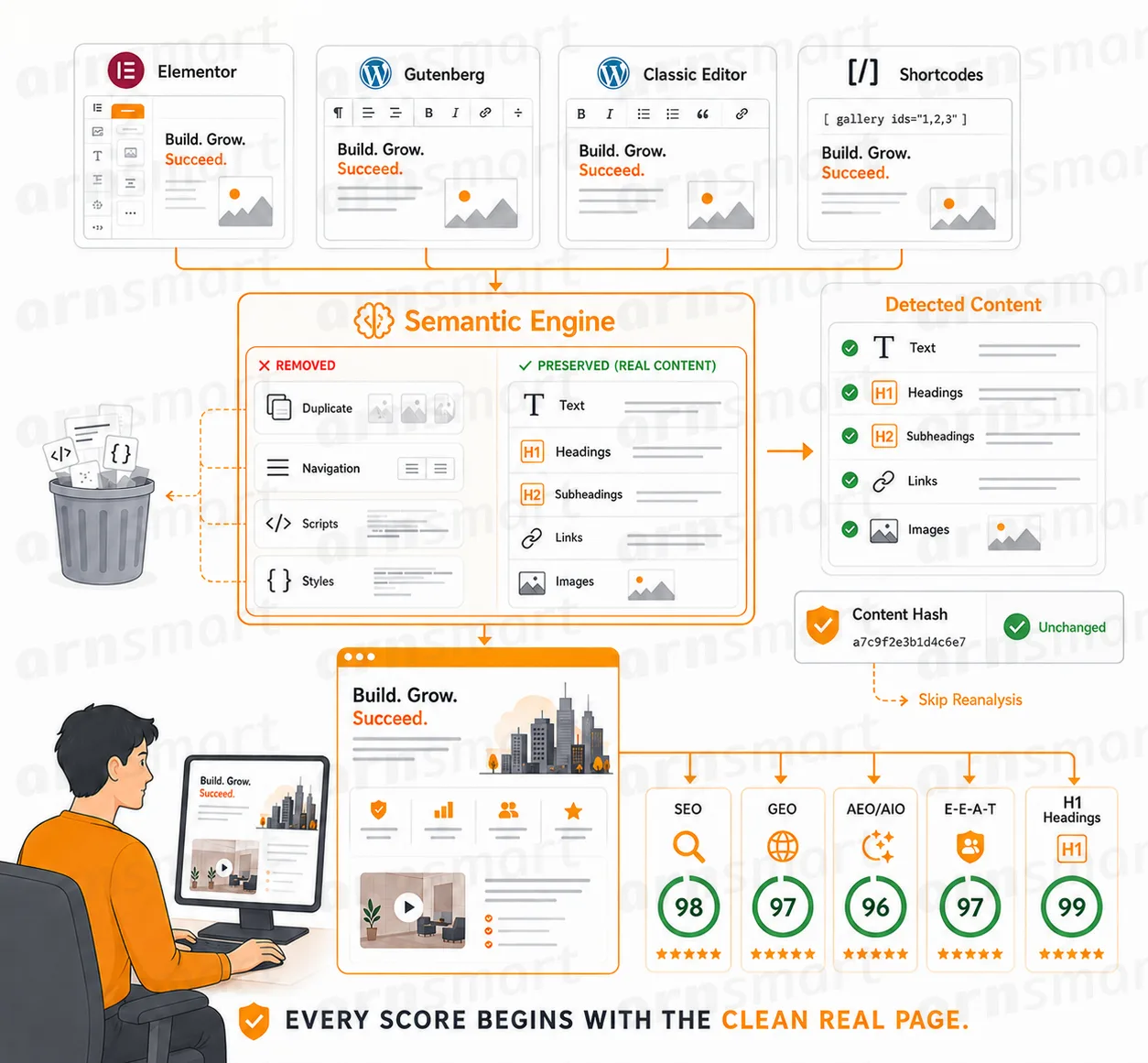
Semantic Analysis
Start from the content visitors actually receive.
Vendix analyzes supported rendered page output from Elementor, Gutenberg, the Classic Editor and documented adapters. Headings, links, media and semantic structure are reviewed within that content context.
Inspect detected-content diagnostics when the page contains shortcodes or builder-generated sections. This helps separate the meaningful content from duplicated layout data or interface elements.
A review is only as complete as the supported content and adapter scope. Keep custom rendering paths visible when judging a finding.
Visibility Evaluation
Use the scores as a review guide.
SEO, GEO, AEO and E-E-A-T-related evaluations organize supported content checks into a readable review. Heading hierarchy, descriptive fields, links and other signals can point to the next editorial action.
Multilingual checks handle documented language and keyword variants, including relevant Turkish and Arabic text differences. Review language-mismatch signals alongside the actual content.
Answer and entity data (Pro). Pages can carry a concise answer summary, primary entity, supporting topics and author and reviewer details that feed the JSON-LD output; speakable selectors are opt-in. A page can also list its authoritative source URLs and a first-hand experience note, and the [arn_sources] shortcode prints the source list where you place it. The readiness score is also in the Free edition.
A readiness or content score is not a promise of search traffic, authority or AI-system inclusion. Use it to investigate the page, not as a substitute for the page itself.

Sharing Preview
Review a link card before the page is shared.
Inspect the supported preview while editing. Choose the sharing image and review the title and description, with documented fallbacks to available metadata and featured content.
A preview makes missing or unsuitable information easier to notice before publication. The final presentation still depends on the receiving platform and its cache.
Keep metadata ownership consistent when another ARN content tool supplies the supported tags.

Content Freshness
Find content that needs another look.
List entries that have not been updated within the selected period. Optional AI suggestions can provide a refreshed title/description and a checklist of facts such as dates, prices or versions to verify.
This Pro tool is off by default; set the age limit (30 to 1,460 days) and the content types in its tab. An entry can also be marked as reviewed.
Compare current and proposed values side by side. Apply approved changes through the supported workflow and retain the available undo path.
An older page is a review candidate, not automatically an inaccurate page. Verify the facts rather than changing its date simply to appear current.

Search Intelligence
Connect the page with available search evidence.
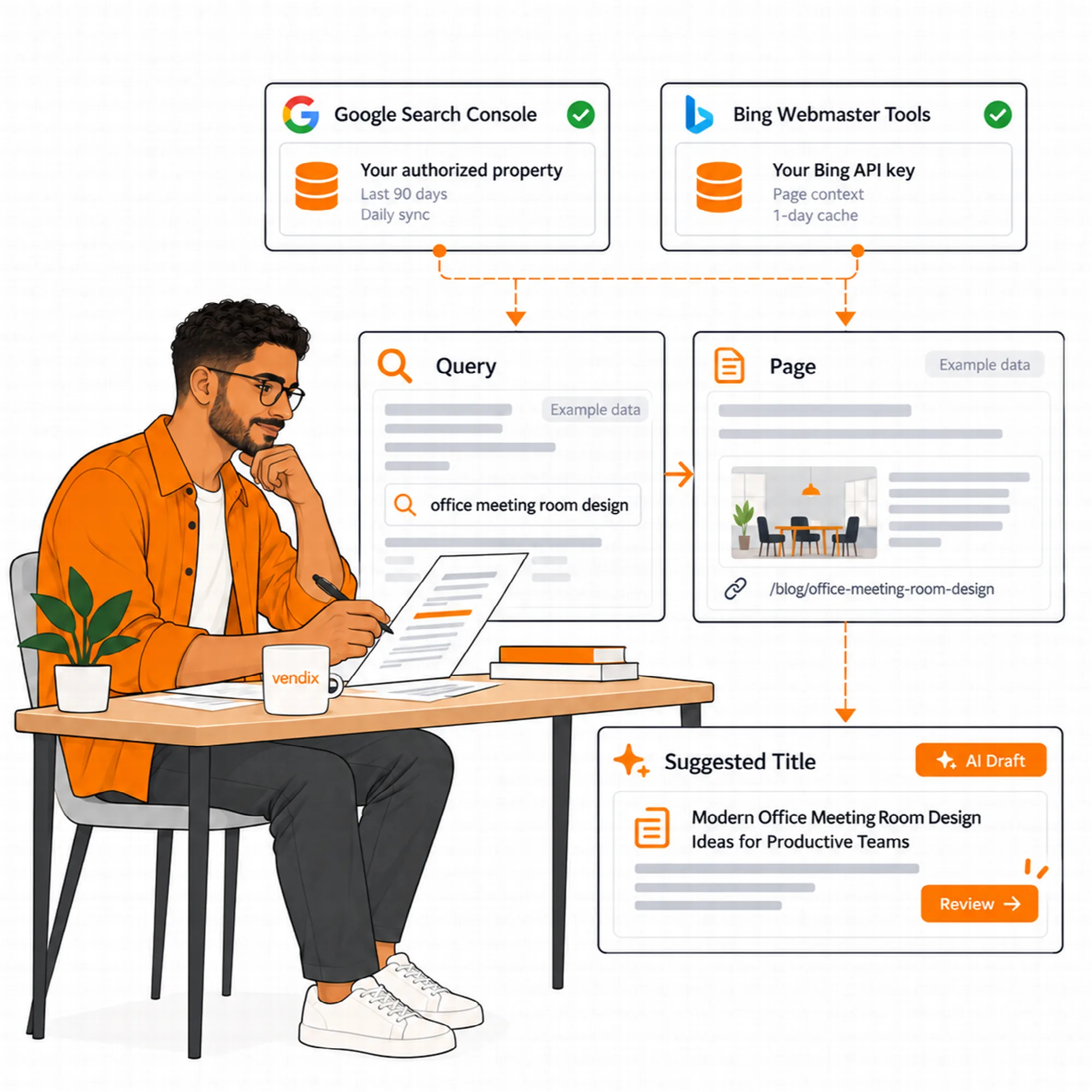
Use the read-only Google Search Console and Bing connections for supported query/page context. Review low-click pages and available queries before requesting optional title, description or search ideas.
Search Intelligence is a Pro tab. Search Console data for the last 90 days syncs daily; Bing data is fetched per page and kept for a day. A coverage check compares real queries with the words on the page.
The Google workflow uses the site owner's own service account and authorized property access; Bing uses the owner's API key. Stored keys are encrypted and never shown again in the browser. Missing access or data is a connection state to resolve, not evidence of zero demand.
Google autocomplete ideas. New On a page's Search Ideas tab, "Check Google autocomplete for these ideas" sends up to six of the page's search ideas and the site language to Google's suggestion service, and the answers are kept for a week. Administrators can turn this off with the "Google autocomplete ideas" switch in the Search Intelligence settings; then the tab sends nothing to Google.
Keep AI suggestions distinct from the returned search data. Source dates, property and page context matter when interpreting a result.
Site Report
Review findings across the selected public content.
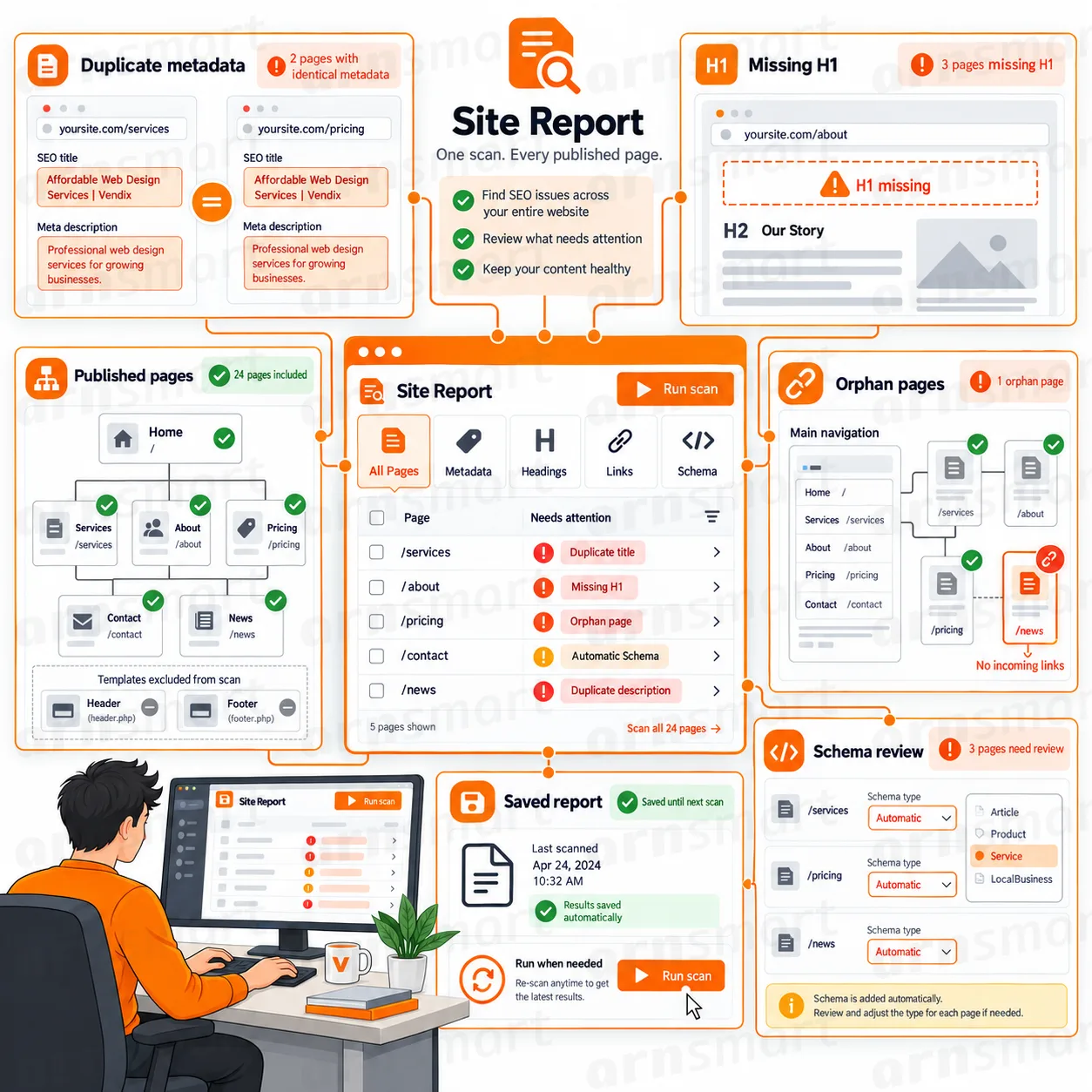
The Pro Site Report summarizes supported findings for the selected public content types. Use the report to identify pages needing attention, then return to the relevant page-level evidence.
The report compares pages with each other, which a single-page review cannot do:
- Pages that share the same title or meta description.
- Pages without an H1.
- Pages that no menu and no other page links to.
- Pages left on the automatic schema type instead of a deliberate one.
The scope is selected published content, not a guarantee that every URL and private record on the site has been assessed. The scan uses the content types selected for the sitemap.
Review report configuration and content ownership when comparing results from different runs.
Redirects
New
Send old addresses to the page that replaced them.
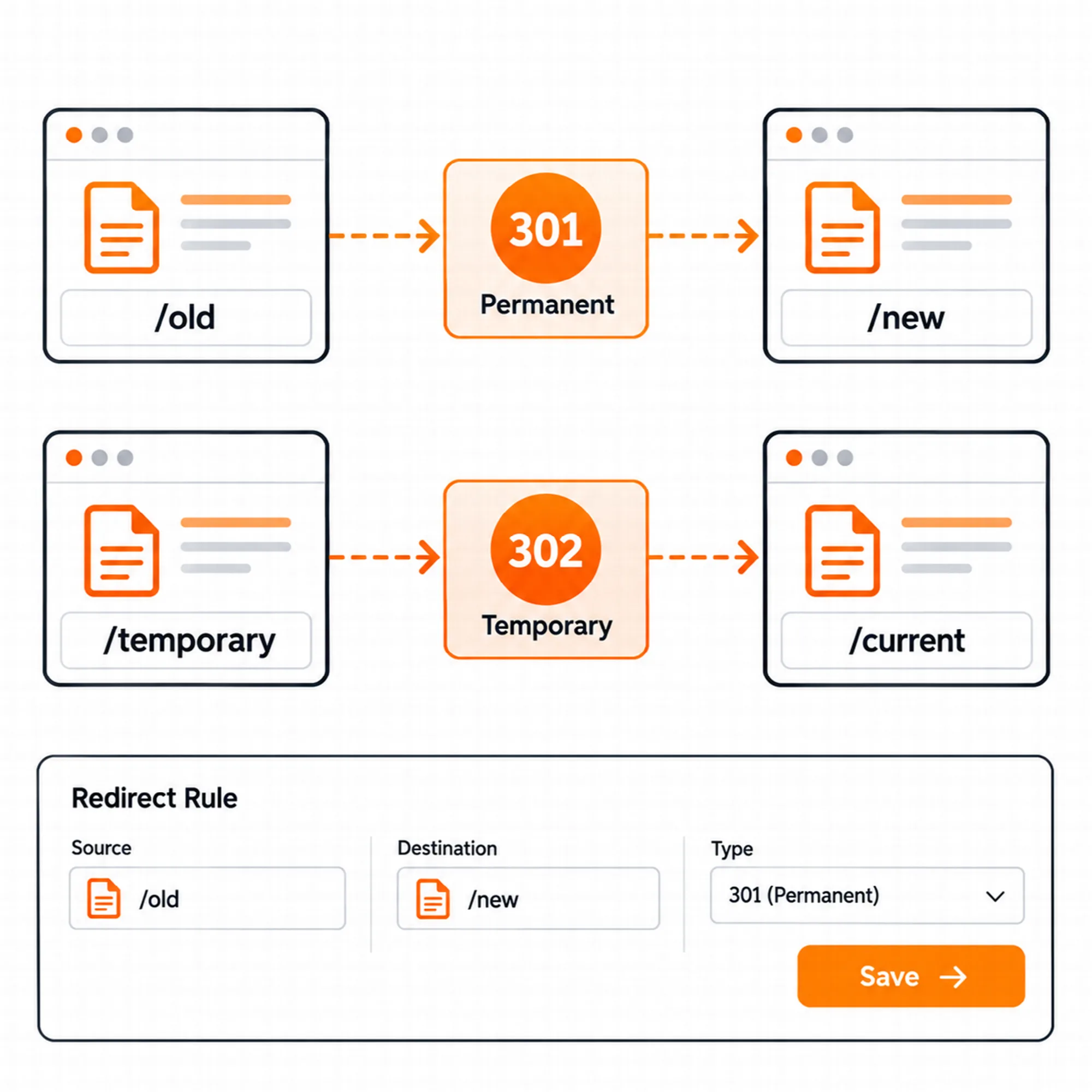
Redirects under SEO & Visibility → Redirects send visitors and search engines from an old address of the site to the new one: 301 for a permanent move, 302 for a temporary one.
- Manage the list. Add, edit, delete, bulk delete and search up to 1,000 redirects, each with an optional note; the list shows whether a redirect was added by hand or by ARN Contix.
- Tolerant matching. Letter case, leading and trailing slashes and the old address's query string do not matter.
- Loop and chain protection. A redirect that would send visitors in a circle or build a chain of more than three redirects is refused.
- Allowed external domains. A redirect can leave the site only for domains on this list.
Redirects are a Pro tool and work whether or not the SEO & Visibility engine is enabled. The home page and the WordPress admin, login and REST addresses cannot be redirected. ARN Contix writes the redirects of merged and removed content here, marked with their post, and removes them when it undoes the change.
A Practical Visibility Review
Inspect one page's rendered content and metadata, review its sharing card and available search evidence, then record a specific improvement. Recheck the published output after applying a change, and add a redirect when a page address changes.
Questions About Visibility
Does a high score guarantee better rankings?
No. Scores organize supported review signals. Search results depend on many factors outside the evaluation.
Which visibility tools need Pro?
The Free edition includes metadata, robots, schema, the XML sitemap, the sharing preview and readiness analysis. Redirects, Search Intelligence, Content Freshness, the Site Report, the answer and E-E-A-T fields and news schema with the Google News sitemap are Pro.
Does the Search Console connection change my site?
No. The Google Search Console and Bing connections are read-only and use the site owner's own Google service account or Bing API key and authorized property access.
Which editors does the content analysis support?
Vendix analyzes supported rendered page output from Elementor, Gutenberg, the Classic Editor and documented adapters. Keep custom rendering paths visible when judging a finding.
Continue Building
Reviewed against Vendix Pro 2.0.0 · Last updated 28 October 2026