

INVOICES, CREDIT NOTES AND CHECKOUT CONTRACTS FOR WOOCOMMERCE
PDF Documents & Contracts
New
Vendix creates PDF invoices, credit notes, packing slips and proforma invoices for WooCommerce orders in English, Turkish, Arabic and added languages, and adds checkout contracts that customers accept with one required box. These are store documents, not electronic invoices sent to a tax authority.
PDF Documents
Give every order the paperwork it needs.
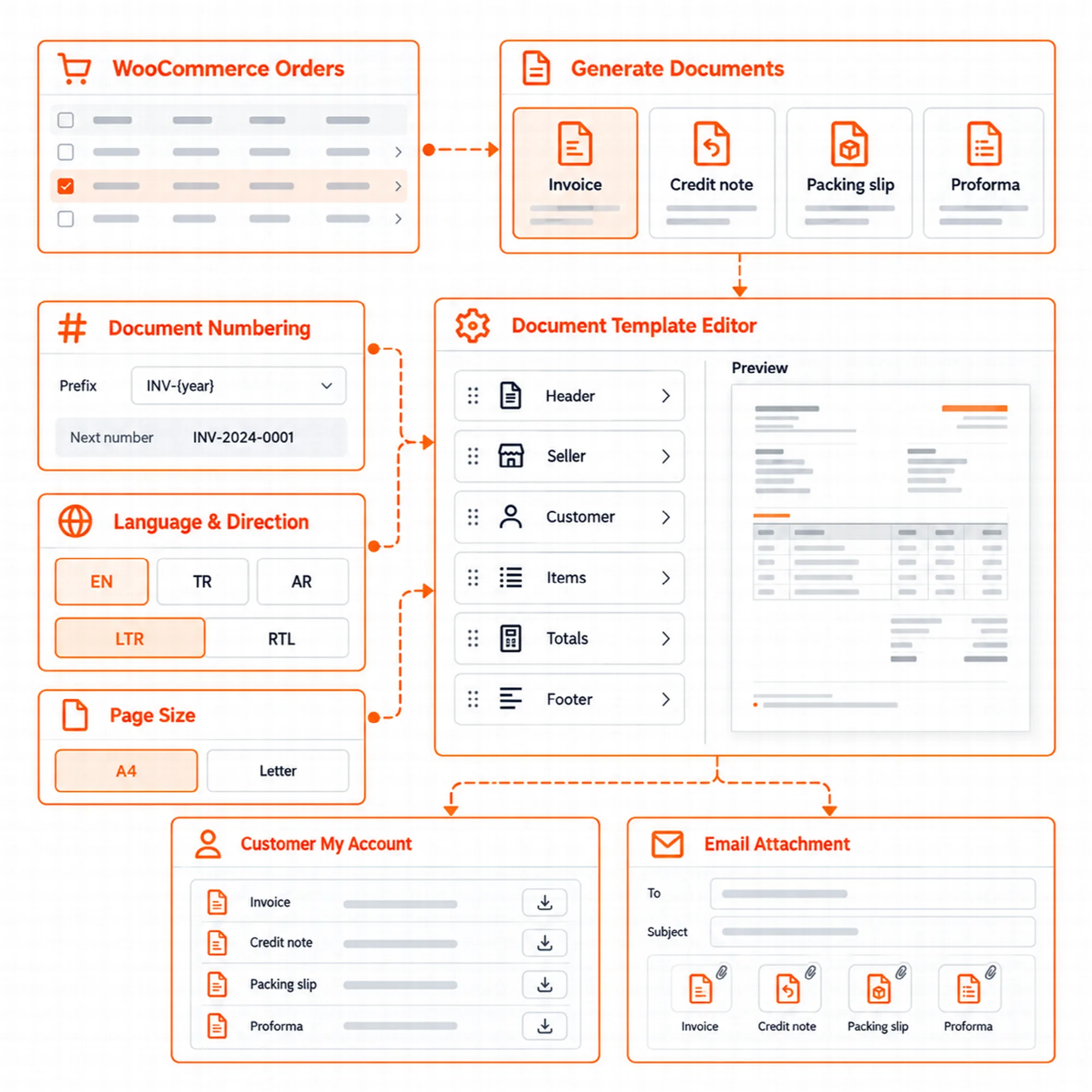
Four document types are available in ARN Vendix → WooCommerce → Documents. Each one is off until you turn it on.
| Document | When it is created | Number |
|---|---|---|
| Invoice | When the order is paid, when it is completed, or only by hand | Its own gapless number |
| Credit note | When an invoiced order is fully refunded, or by hand for a cancelled or partly refunded order | Its own gapless number |
| Packing slip | From the order's Documents box or the "Print packing slips" bulk action | The order number |
| Proforma invoice | For unpaid orders, also in My account | The order number |
Invoices list prices without tax, then the taxes and the total, whatever WooCommerce's tax display setting is. Credit notes show positive amounts.
Not electronic invoices. Vendix documents are not e-Fatura or e-Arşiv documents in Türkiye, not ZATCA e-invoices in Saudi Arabia, and they are not sent to any tax authority. Check what your country requires.
Numbering & Languages
Keep invoice numbers in order and documents in the customer's language.
Invoice and credit note numbers have no gaps and never repeat. A number can have a prefix and a suffix with {year} or {yy}, a set number of digits, a start number and "Start again every year". Number settings that would give a number a second time are not saved.
Documents come in the language of the order, by billing country or always in the store language. English, Turkish and Arabic are ready-made. Add language copies the texts of a language so they can be translated, with its own reading direction, font and billing countries. Arabic and other right-to-left languages are drawn right to left.
PDF documents need the mbstring extension of PHP; "Total in words" also needs the intl extension.
Document Designs
Design each document in the same editor as the emails.
Vendix Templates → Documents designs each PDF document from Header, Seller, Customer, Items, Totals, Note and Footer sections. Choose the paper size (A4 or Letter), margins and Design System colors, keep one design per document type, and check it with a sample PDF.
The seller's name, address and numbers come from Company Data, as set for the company's country. PDF documents are drawn without network access: remote images, styles and fonts are refused.
Documents for Customers
Send, download and print documents where the order lives.
- Order screen: a Documents box on each order creates, downloads and sends its documents.
- Bulk actions: "Create invoices", "Download PDFs (ZIP)" and "Print packing slips" in the orders list.
- Emails: documents can be attached to the processing, completed, refunded and new order emails.
- My account: customers download their documents under My account → Orders, with a proforma invoice for unpaid orders. Guests find their documents on the thank-you page and on the order tracking page.
- Export: every invoice and credit note issued in a date range can be exported as one ZIP of PDF files, made in the background, for example for an accountant. A sample invoice can be downloaded from the Documents tab.
Documents open only for the customer of the order and shop managers. A guest's download link works for one hour, and an export ZIP can be downloaded once within 24 hours and is then removed from the server.
Checkout Contracts
Ask for one clear acceptance at checkout.
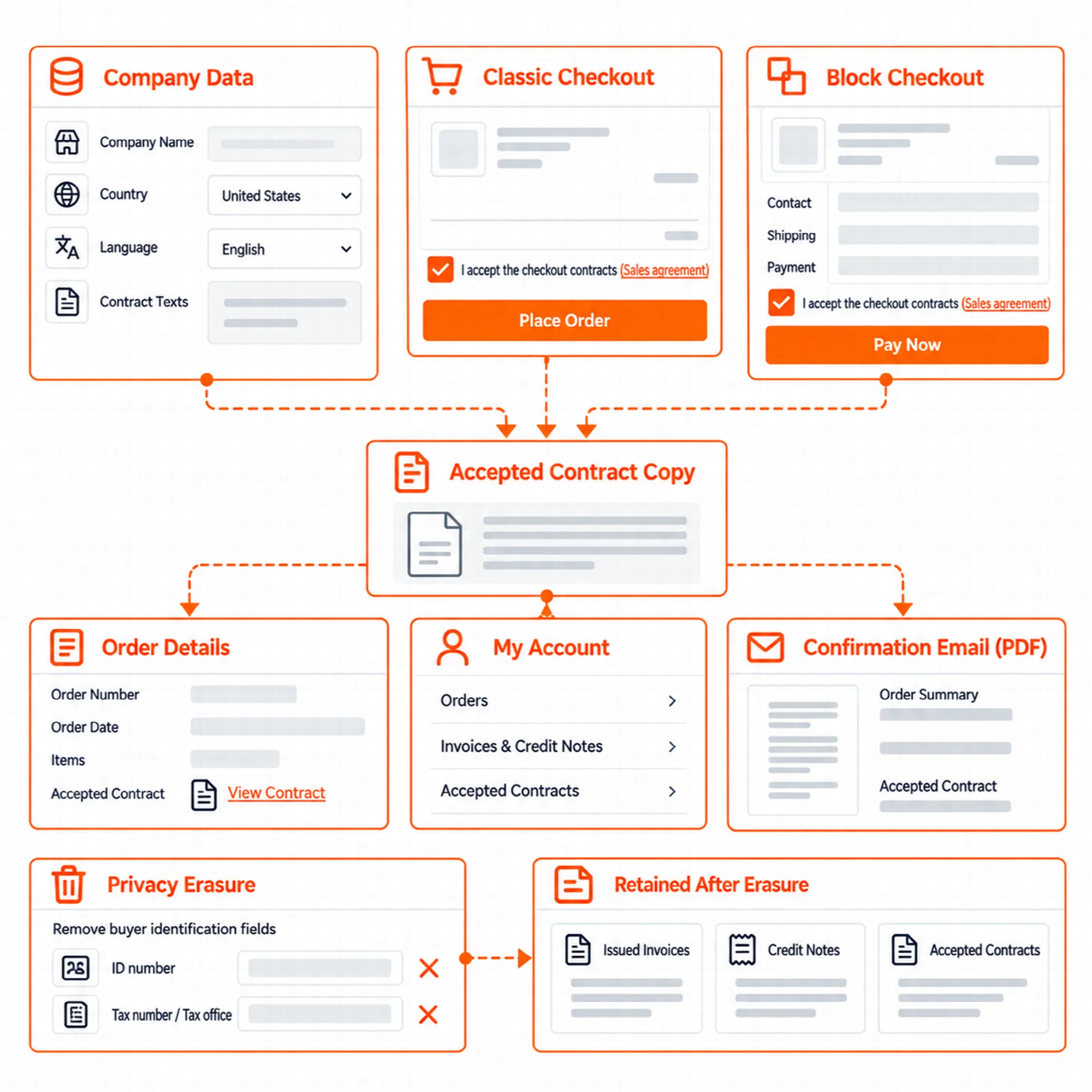
Checkout contracts are set in ARN Vendix → WooCommerce → Contracts. The customer accepts them with one required box, in the Checkout block and in the classic checkout.
- Contract texts: Distance Sales Agreement, Pre-information Form, Right of Withdrawal or your own text. Sample texts in English, Turkish and Arabic are included.
- Where they apply: per billing country and language, for all countries, some countries or all countries except some. A contract can also be shown as a link only.
- Store details: contracts take the store's details from Company Data. A tax office, tax number, trade registry or MERSIS number left empty prints as 0000000000, and the Contracts tab lists the empty ones your contracts use and warns about an empty store phone.
- Accepted copy: Vendix keeps the accepted copy of each contract with the order, lists it in the Documents box and in My account, and can attach it as a PDF to the order confirmation email.
Checkout fields. Optional ID number, tax number and tax office fields can be added at checkout for the billing countries you choose. Their values go to the invoice and the contracts.
The sample texts are not legal advice and may not fit your country or business, so have them checked by a lawyer.
Privacy & Records
Keep sales records while respecting personal data requests.
The WordPress privacy tools list a customer's documents in the personal data export. On erasure, issued invoices, credit notes and accepted contracts are kept as the store's sales records, and the buyer's ID number, tax number and tax office are erased. Vendix adds suggested texts to the privacy policy guide.
Invoices, credit notes and accepted contracts also stay when an order is deleted. They are removed on uninstall only when their own box is ticked.
Vendix stores no PDF files: each document is drawn from the copy kept in the database when it is opened. On Nginx, the Documents tab shows a rule that closes the documents folder, and the ARNMRTVNDX_DOCUMENTS_DIR constant in wp-config.php moves it out of the web folder.
A Practical Documents Setup
- Fill in the legal fields in Company Data.
- Turn on invoices and set the numbering in ARN Vendix → WooCommerce → Documents.
- Design the invoice in Vendix Templates → Documents and download a sample PDF.
- Turn on the contracts your country needs and have the texts checked.
- Place a test order and check the email attachment and My account.
Questions About PDF Documents & Contracts
Are Vendix invoices electronic invoices?
No. They are PDF store documents. They are not e-Fatura, e-Arşiv or ZATCA e-invoices and are not sent to any tax authority.
Can invoice numbers skip or repeat?
No. Invoice and credit note numbers have no gaps and never repeat, and number settings that would repeat a number are not saved.
Are the contract texts ready to use as they are?
No. The sample texts are a starting point in English, Turkish and Arabic. They are not legal advice, so have them checked for your country and business.
What happens to invoices when a customer asks for erasure?
Issued invoices, credit notes and accepted contracts are kept as sales records. The buyer's ID number, tax number and tax office are erased.
Reviewed against Vendix Pro 2.0.0 · Last updated 28 October 2026