

PRACTICAL TOOLS FOR THE TASKS A WEBSITE ACCUMULATES
Smart Features
Vendix Smart Features are independent modules for WordPress sites: a shared design system with colors, fonts and element typography, post features such as share buttons and review boxes, an intro video, a site-wide floating contact button, heading widow protection, comment control, admin shortcuts and notes, guarded search and replace, draft preview links and a reader question box. Each module is enabled separately.
Design System
Establish a visual baseline the project can reuse.
Manage shared typography and a brand color palette, including separate LTR/RTL font choices and supported uploaded or stylesheet-based font sources. Review the live typography preview before adopting a new baseline. The text editor's font list starts with "Default / Inherit", which removes a hard-coded font from the selected text so it follows the design system again.
Palette. Fifteen colors: primary, secondary, accent, heading, text, link, link hover, muted, border, light background and dark background, plus four status colors for info, success, warning and error. Widget styles take their text, border, background and accent colors from the palette. Link and Link Hover start empty and then follow the primary color; theme, Elementor Kit and widget link colors still win where they are set.
Google Fonts. New Pick a Google font for the body or the headings. The site's server downloads it once (Latin, Latin Extended and Arabic, in the weights the Design System uses) and serves it from your own site, so visitors' browsers never connect to Google. A font with one weight is used for headings too.
Element Typography. New Set the font, size per device, weight, line height, letter spacing and text transform of Body, H1–H6 and the Menu. Body sizes can be in px or rem, and the Menu row leaves the size and weight set in the Header & Footer Builder alone. The values are written as --vendix-type-* CSS variables, which Vendix Theme also reads.
Apply to Elementor Kit. New One button copies the colors, fonts and Theme Style typography to the Elementor Kit, and it can be undone.
Status and theme palette. New The dashboard card shows whether the Design System is on, and while it is off the panel warns that colors and typography are saved but not used. The Design System colors also appear in Vendix Theme's block editor palette (Vendix Theme 1.3.2 or later). With Vendix Theme and the Design System off, the accent colors of Vendix widgets, store features, banners and Header & Footer follow the theme's accent color.
Defaults that follow the palette. New Vendix widgets no longer save fixed brand colors. Until you pick a color, buttons, headings, gradients, Header & Footer color fallbacks and the Floating Contact button use the palette, so a palette change reaches them; a color you pick yourself stays as set.
Choose the documented application scope: Vendix widgets/layouts or broader site output. Elementor element-level typography remains the higher-priority setting where present, allowing deliberate exceptions.
Shared tokens help new components start from the same design decisions without making every component identical.

Post Features
New
Add sharing, reviews and sponsored labels to posts on any site type.
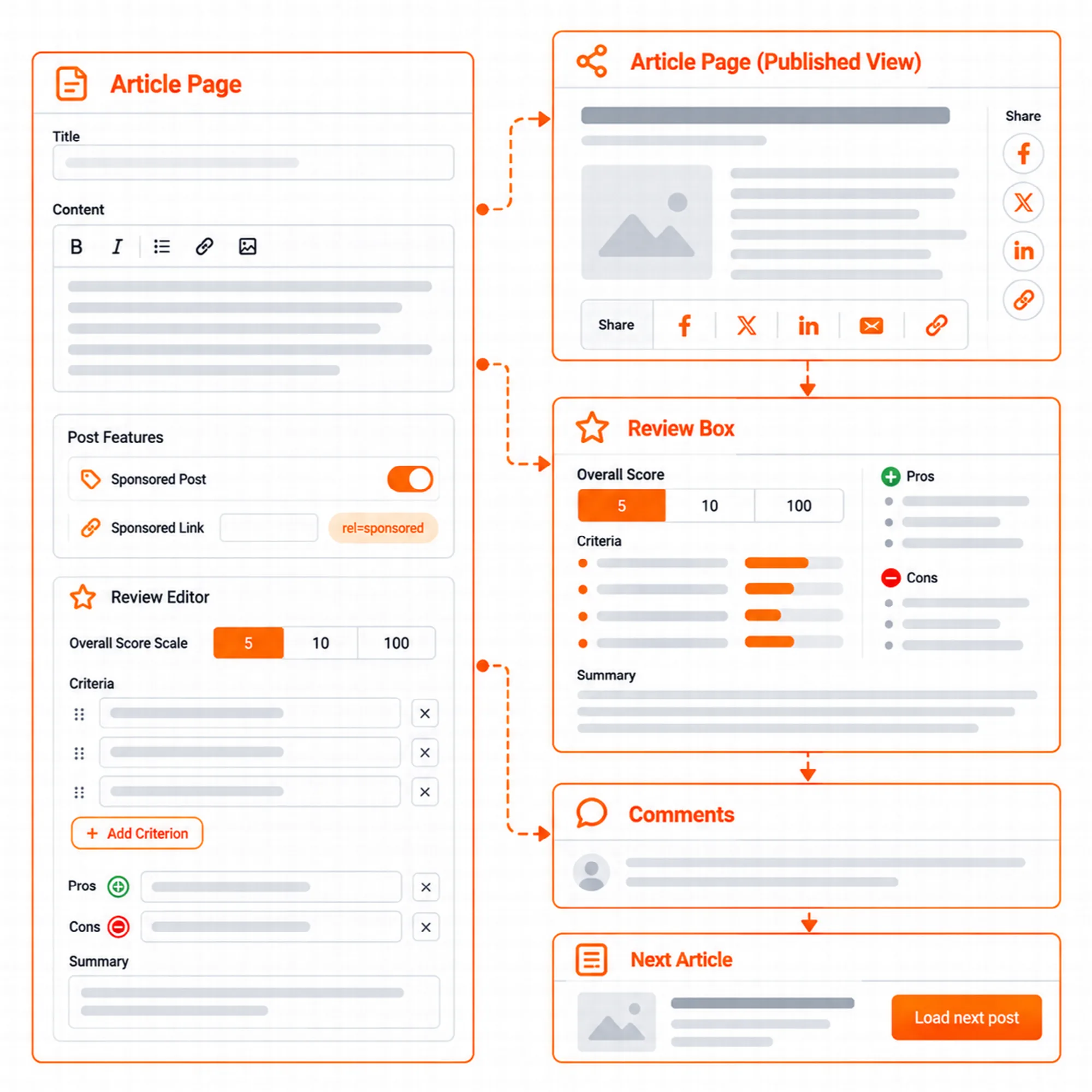
Post Features sits in Smart Features → Post Features and adds parts around the text of posts in the places Vendix Theme opens. With other themes, ARN Post Content and ARN Post Meta open the same places in Vendix post templates. The Newspaper module does not have to be on.
| Part | What it does |
|---|---|
| Share buttons | Above, below, above and below or beside the post text, with a bottom bar on phones; plain share links with no counts |
| Review box | The reviewed item, an overall score on a scale of 5, 10 or 100, criteria, pros and cons and a summary, under or over the text or placed with the ARN Review Box widget |
| Sponsored posts | A sponsored label on the post and on its cards, and rel="sponsored" on the post's links to other sites |
| Next post | The next post from the same category, or the latest one, loaded below the comments; up to five posts, then a "Load the next post" button |
The review box adds a Review node to the Vendix structured data of the page that shows it; there is none while another SEO plugin or ARN Contix owns the schema of the post. The sponsored label and the review box are set in each post's own box, and the posts list can filter sponsored posts.
In Vendix Theme, share buttons need version 1.3.0 or later. On the News & Magazine site type, the share settings of the Newspaper module moved here.
Intro Video
Introduce the site through a controlled opening sequence.
Configure a full-screen intro video with separate desktop/mobile sources and a poster image. Choose whether global output is limited to the front page and how often the introduction appears.
The supported controls include skip text, manual-play text and an optional sound control. Browsers may require user interaction for playback or sound, so the poster and manual route are part of the experience.
Use an introduction where it adds context. Review its effect on navigation and repeated visits before enabling it broadly.

Floating Contact
New
Give visitors one contact button on the pages you choose.
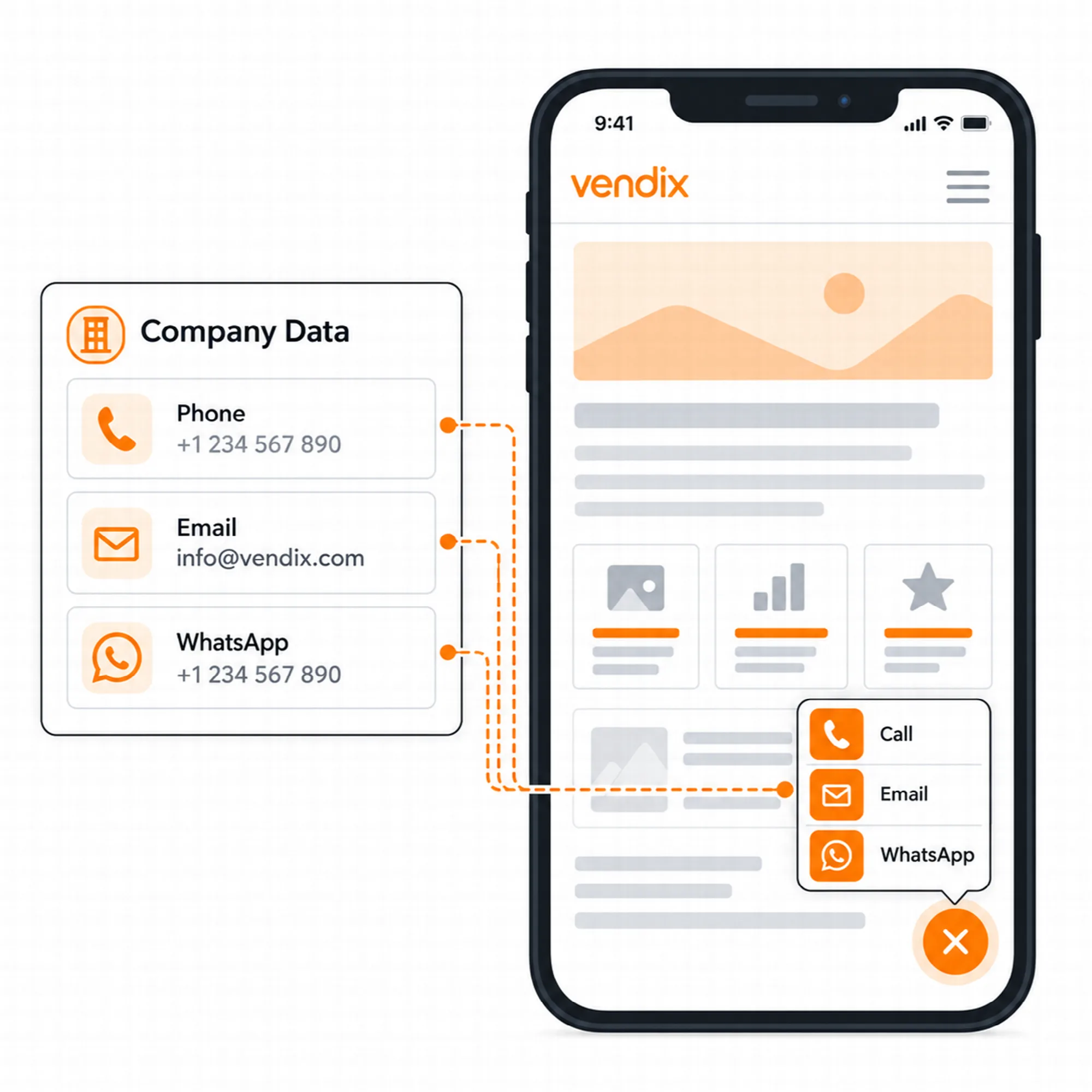
Floating Contact adds a site-wide WhatsApp, phone, email, map and custom-link button. Turn it on in Smart Features → Floating Contact; it is a Pro module and off by default.
Filled from Company Data. WhatsApp, phone, email and map come from Vendix → Company Data. A value entered in the panel is used by this button only, and a channel without a value is left out. WhatsApp can open with a ready message already typed.
Menu or visible buttons. Show an expandable menu or visible buttons in the Pill Menu, Icon Stack or Compact Fan layout, on the end or start side of the screen, with separate offsets for desktop and phones. Colors follow the Design System until you pick your own.
Where and when. The Header & Footer Builder display rules decide the pages, and a matching "Hide on" rule wins. The button can be limited to desktop, tablet or phone and to working days and hours in the site time zone.
The ARN Floating Contact Elementor widget keeps working on single pages and replaces the site-wide button where it is placed.
While the Visioix contact widget is on, Floating Contact stays hidden, and the ARN Floating Contact widget is hidden on the live site too, so a page never shows two contact buttons. On pages served from a full-page cache, working hours follow the moment the page was cached.
Heading Widow Guard
Keep the last words of a heading together.
A heading can finish with one isolated word on a narrow screen. Heading Widow Guard keeps the final two or three words together in supported post titles, content headings and Elementor headings.
The behavior affects visible wrapping while leaving browser titles and SEO metadata plain. Short headings remain unchanged.
Review representative headings in the languages and layouts used by the project rather than using this as a substitute for readable typography.

Disable Comments
Control new discussion without deleting existing comments.
Disable comments and pingbacks sitewide, or use the supported Pro content-type selection. Optional interface cleanup can hide comment menus and dashboard elements that are no longer relevant.
Existing comments are retained. Turning the module off restores the supported previous behavior instead of treating the setting as a bulk deletion tool.
Choose the scope before enabling it on a site that still uses discussion, product reviews or other comment-based interactions.

Quick Menu
Open the lists your team uses most.
Create grouped admin shortcuts to filtered content and product lists. A shortcut can lead to a relevant post type, status, taxonomy, stock state or supported product filter.
Set labels, icons, placement and permission requirements so the shortcuts fit the people using the site. Destinations follow the current WordPress administration address.
Quick Menu reduces repeated navigation; it does not create an alternative permission system or give users access they do not already hold.

Admin Notes
Keep team reminders where administrators already work.
Add colored dashboard notes for the administration team or a selected administrator. Use the completion state to distinguish a finished task from an active reminder.
Notes remain in the administrative workflow and are not shown to visitors. Keep them short and specific so the dashboard remains useful.
This is a coordination tool for site administrators, rather than a replacement for a full project-management system.

Search & Replace
Review an address change before writing it.
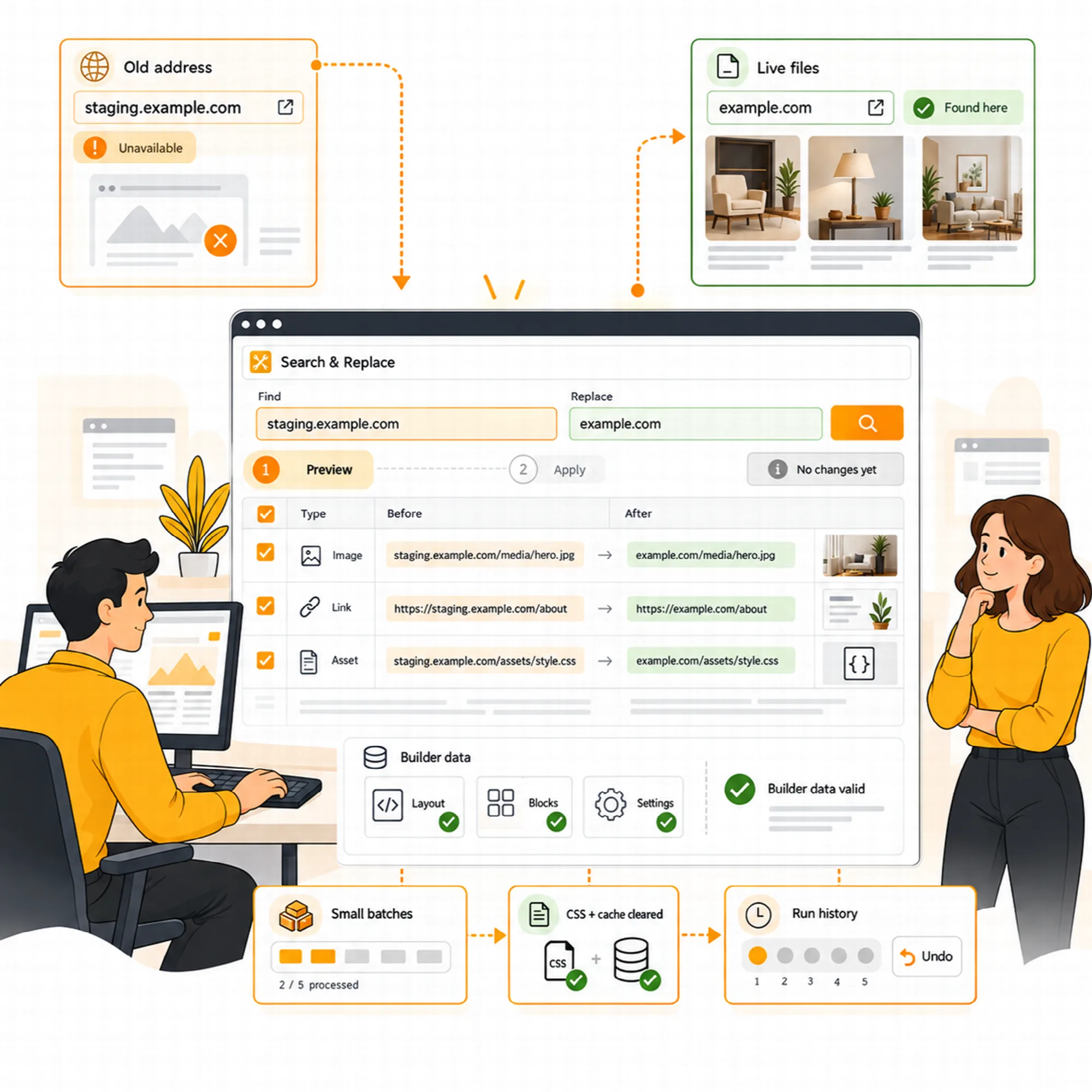
Change an address or a text across the database. Scan for supported old or staging addresses, inspect proposed replacements and preview the fields that would change. The guarded workflow keeps Elementor, Divi, WPBakery, Beaver Builder, BeTheme, Bricks, Oxygen, Breakdance and block editor data valid while processing larger operations in small steps.
One run can change up to five search-and-replace pairs, with the same settings for preview and execution. After a run, Vendix purges the caches of supported cache plugins, such as LiteSpeed Cache, WP Rocket, W3 Total Cache and SiteGround Speed Optimizer, and lists the builder CSS and host or CDN caches to clear by hand.
The last five runs have supported undo; fields changed again afterward are left alone and reported. Search & Replace is shown to administrators only, and to super admins on a multisite network. Take a current database backup and test representative pages when moving a website.
Draft Preview
Let someone review unpublished work without a login.
Create a secret preview link for draft, pending or scheduled content. Choose the supported expiry period and revoke the link when review is complete.
The draft stays unpublished, with noindex and cache controls and a visible preview badge. Treat the link as access material: share it only with the intended reviewer.
A draft preview is a review workflow, not an authorization to publish the content.

Reader Question Box
Invite a short answer while someone is reading.
Show a contextual question after a reader has progressed into eligible content. Configure the question for a page or content type, with optional AI assistance where enabled.
Answers use the ordinary WordPress comment workflow, preserving existing moderation and spam-tool handling. The box is shown only where comments are open, and dismissal prevents the supported repeat prompt.
Keep the question relevant to the page and make the requested answer easy to give.

Related Modules on Other Pages
Three larger Pro modules have their own page, and the redirect manager is described with SEO & Visibility.
Banners
Image banners, announcement cards with a countdown, ad code and Elementor templates in zones: in the content, as a pop-up, slide-in or sticky bar, with rotation, schedules and daily view and click counts. Turn it on in Smart Features → Banners; it is off by default.
Newspaper Widgets
Ten Elementor widgets for news and magazine sites, a view counter for most-read lists, NewsArticle schema, a Google News sitemap and news parts for Vendix Theme. Turn it on in Smart Features → Newspaper Widgets; it is off by default.
Section Library
Ready-made Elementor container sections for company, agency and service sites, imported to Elementor's My Templates in one click or inserted from the "Vendix Sections" button in the editor. Open it under Vendix Templates → Section Library.
Redirects
301 and 302 redirects from old addresses of the site to new ones in SEO & Visibility → Redirects, with loop and chain protection and a list of allowed external domains. Redirects work whether or not the SEO & Visibility engine is enabled.

A Practical Site-Tool Setup
Choose the module for the task, configure its scope and test the affected administrative or public page. Keep modules independent so enabling a reader prompt does not imply enabling comments globally or changing unrelated site behavior.
Questions About Smart Features
Does Search & Replace change files on other websites?
The workflow targets supported data on the current site. External live-site assets are reported separately rather than becoming automatic replacement targets.
Can draft preview links be revoked?
Yes. Use the supported expiry and revocation controls, and create a fresh link when another review window is needed.
Does Disable Comments delete existing comments?
No. Existing comments are retained. Turning the module off restores the supported previous behavior instead of treating the setting as a bulk deletion tool.
Can Floating Contact run next to the Visioix contact widget?
No. While the Visioix contact widget is on, Floating Contact stays hidden and Visioix keeps the contact button and its click tracking. Turn the contact widget off in Visioix to use the Vendix button.
Which Smart Features are in Vendix Free?
Vendix Free includes site-wide Disable Comments, Quick Menu, Admin Notes, Draft Preview Links, Search & Replace, a Site Banner placed with a shortcode, three news widgets and a Design System with brand colors and body and heading fonts. The other modules on this page, including Element Typography, Post Features, Floating Contact, Redirects, Banners and the full Newspaper module, are part of Vendix Pro.
What happens to my data if I deactivate or uninstall Vendix?
Deactivating Vendix or disconnecting its license never deletes settings, templates or content. Vendix data is removed only on a permanent uninstall, and only when "Delete all Vendix data when the plugin is permanently uninstalled" is turned on in Vendix → Settings. Two exceptions: deleting the plugin always removes the back-in-stock waiting list, which can be exported first in Products → Stock Alerts, and invoices, credit notes and accepted contracts are removed only when their own box is ticked.
Reviewed against Vendix Pro 2.0.0 · Last updated 1 November 2026