

TELL CUSTOMERS WHERE THEIR ORDER IS
Shipment Tracking & Emails
New
Vendix adds tracking numbers to WooCommerce orders, with carriers for Türkiye, the Gulf and worldwide plus your own, an "Order shipped" email and an order tracking page. Vendix Templates → Emails designs WooCommerce emails from sections with dynamic tags, a live preview and test emails.
Shipment Tracking
Add tracking numbers where the order is handled.
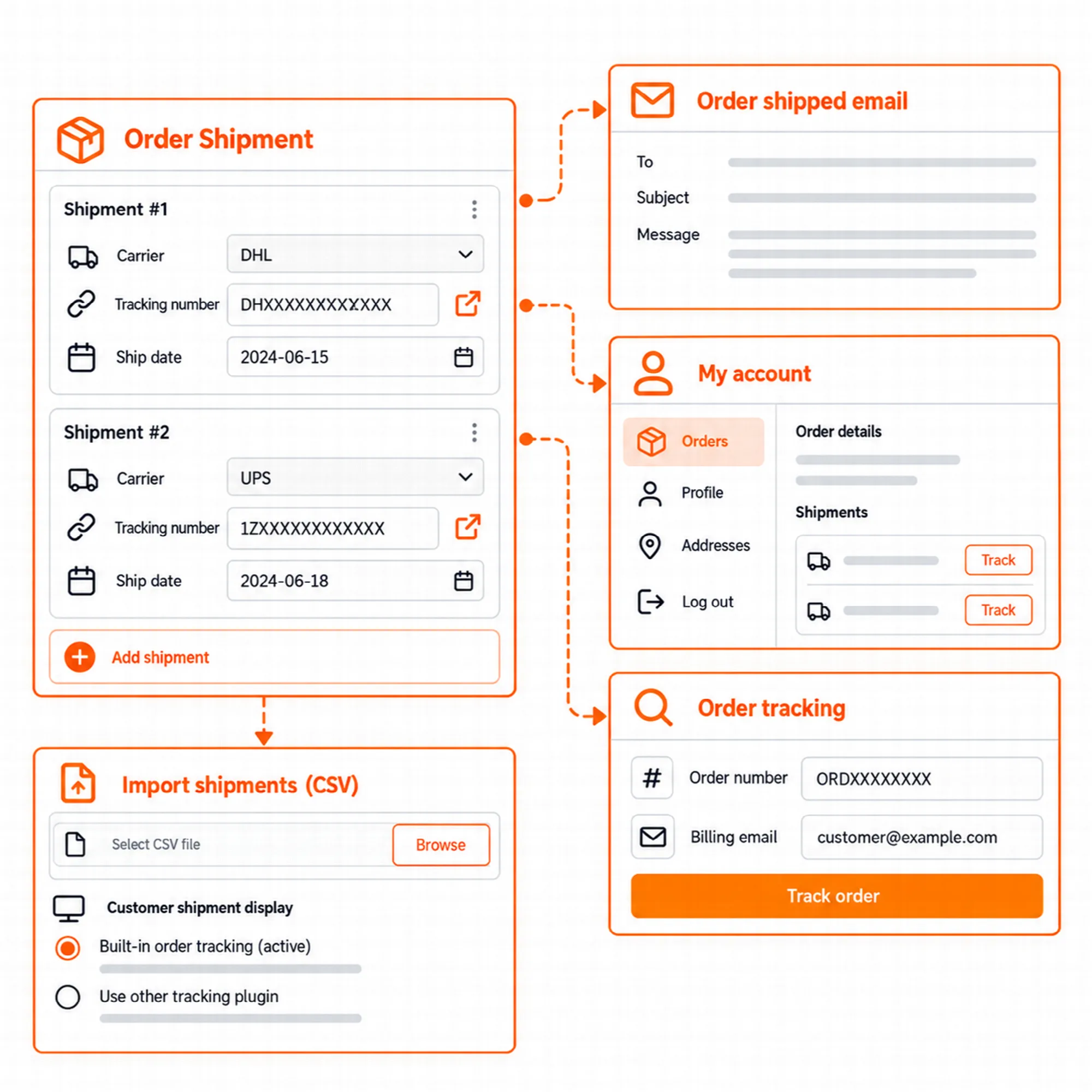
Shipment Tracking is a store module in ARN Vendix → WooCommerce → Shipment Tracking and is off until you turn it on. An order can hold several shipments, each with its carrier, tracking number and shipping date, on the classic order screen and on the WooCommerce order tables (HPOS).
| Region | Carriers in the list |
|---|---|
| Türkiye | Yurtiçi Kargo, Aras Kargo, MNG Kargo, PTT Kargo, Sürat Kargo, HepsiJet, Kolay Gelsin, UPS Türkiye |
| Gulf | SMSA Express, Aramex, Naqel Express, SPL (Saudi Post), J&T Express (Saudi Arabia), Emirates Post, Qatar Post |
| Worldwide | DHL Express, DHL eCommerce, DHL Paket (Germany), UPS, FedEx, USPS, Royal Mail, Parcelforce, Evri, DPD, DPD UK, GLS, TNT, PostNL, La Poste Colissimo, PostNord, Canada Post, Australia Post |
A carrier that is not in the list can be added with its own name and tracking address. Vendix does not connect to carrier systems: the tracking link opens the carrier's own tracking page.
Tracking for Customers
Show the parcel wherever the customer looks for it.
- "Order shipped" email. A WooCommerce email with the carrier, the tracking number and a tracking link, plus a link to the order tracking page.
- Completed order email. The tracking details also appear in WooCommerce's "Completed order" email.
- My account. Customers see the shipments of each order on their account pages.
- Order tracking page. The ARN Order Tracking widget or the
[arn_order_tracking]shortcode shows a form for the order number and billing email, then the order's shipments. The page chosen as "Order tracking page" also takes the order tracking template of Vendix Templates.
Guests also find their PDF documents on the order tracking page when PDF Documents are on.
Import & Other Tracking Plugins
Bring existing tracking numbers in and avoid showing a shipment twice.
CSV upload. Tracking numbers can be uploaded for many orders at once from a CSV file. Shop managers can use the import too.
One-click import. Numbers kept by WooCommerce Shipment Tracking or Advanced Shipment Tracking can be copied into Vendix in one step.
Other tracking plugins. While WooCommerce Shipment Tracking or Advanced Shipment Tracking is active, that plugin keeps showing tracking to customers and Vendix sends no "Order shipped" email, so a shipment is never shown twice.
WooCommerce Order Fulfillments. When WooCommerce's own fulfillments feature is on, the store owner chooses which system customers see. With Vendix chosen, WooCommerce's fulfillment emails are not sent; with WooCommerce chosen, Vendix shows nothing to customers.
Shipments are included in the WordPress personal data export and erase tools, and a full cleanup on uninstall keeps order shipments.
Email Designs
Give store emails the look of the site.
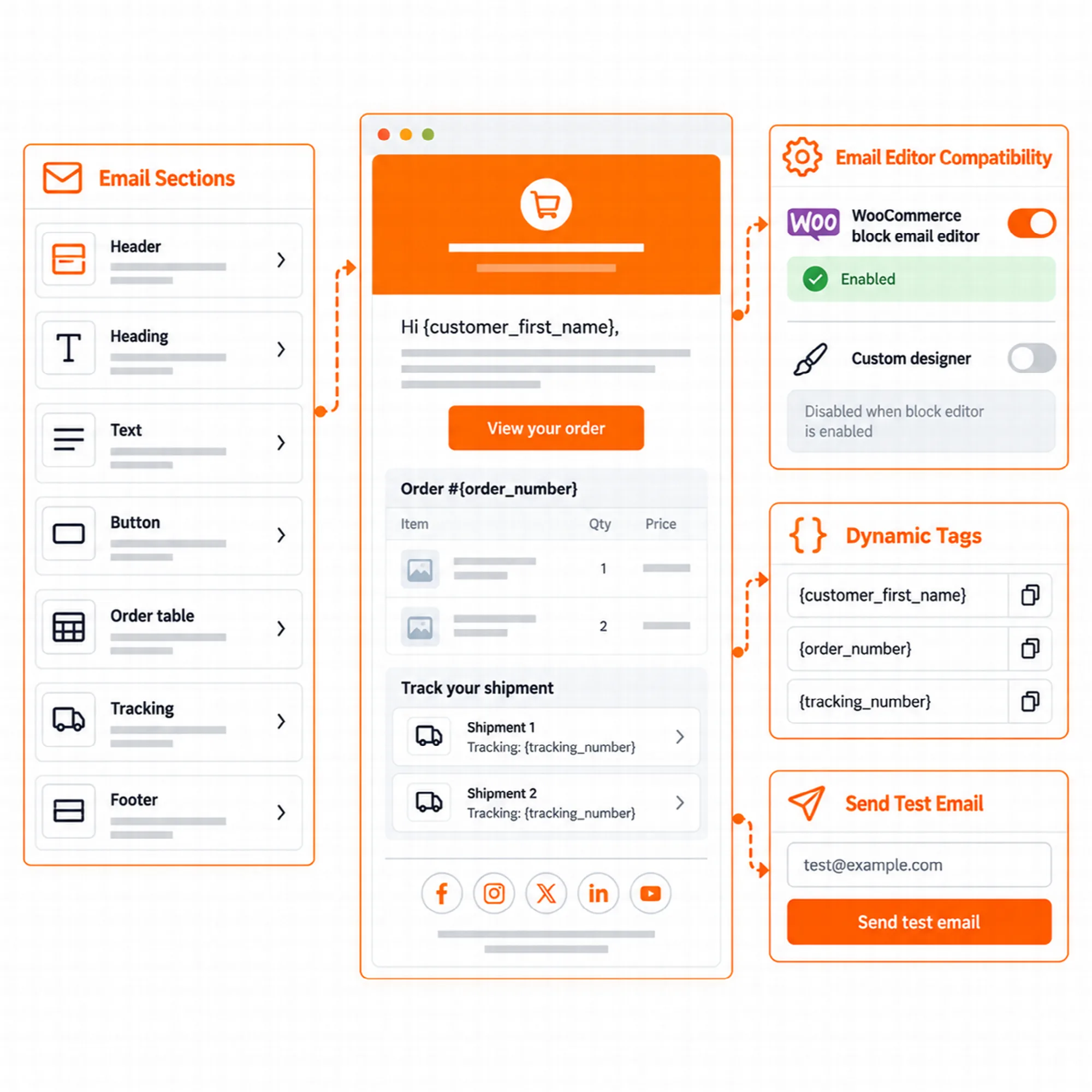
Vendix Templates → Emails designs WooCommerce emails from sections: logo, heading, text, button, order table, shipment tracking and footer. Texts can use dynamic tags such as {customer_first_name}, {order_number}, {tracking_number} and {tracking_page_url}.
- Live preview. The editor shows the design with a sample order, including two shipments, or with a real order chosen by its number.
- Test emails. A test email shows the design in a real mailbox before customers receive it.
- Which emails. A design can be used for the WooCommerce emails that have an HTML template, both customer and admin emails.
Designs are not used while WooCommerce's own block email editor draws the emails. Subjects and the email on/off switches stay in WooCommerce → Settings → Emails.
A Practical Shipping Setup
- Turn on Shipment Tracking and choose the carriers you use.
- Create a page for order tracking and set it as "Order tracking page".
- Import earlier tracking numbers if another tracking plugin kept them.
- Design the "Order shipped" email in Vendix Templates → Emails and send a test email.
- Add a tracking number to a test order and check the email, My account and the tracking page.
Questions About Shipment Tracking & Emails
Does Vendix fetch delivery status from the carriers?
No. Vendix stores the tracking number and links to the carrier's own tracking page; it does not connect to carrier systems.
Can I keep using another tracking plugin?
Yes. While WooCommerce Shipment Tracking or Advanced Shipment Tracking is active, that plugin shows tracking to customers and Vendix stays silent. Their numbers can also be imported into Vendix in one step.
Do email designs change WooCommerce's email settings?
No. Designs change how the emails look. Subjects, recipients and the switches of each email stay in WooCommerce → Settings → Emails.
Reviewed against Vendix Pro 2.0.0 · Last updated 28 October 2026